SPAU024 April 2025 AM2612
- 1
- Description
- Get Started
- Features
- 5
- 1Evaluation Module Overview
- 2Hardware
- 3Software
- 4Hardware Design Files
- 5Additional Information
- 6References
2.1.2 Configuration 2: AM26x controlCARD Backward Compatibility Configuration
The backward compatibility configuration is used for cases which require the controlSOM to interface to a AM26x controlCARD compatible baseboard or docking station. An HSEC adapter board (HSEC180ADAPEVM-AM2) is required for this configuration. Power is provided to the controlSOM through the HSEC Dock (TMDSHSECDOCK-AM263 or TMDSHSECDOCK). An emulation debug-probe such as the XDS110ISO-EVM is required to provide debug connectivity to the MCU. The HSEC adapter board, XDS110 debug probe, and HSEC dock are sold separately.
TMDSHSECDOCK-AM263 and TMDSHSECDOCK are baseboards that enable rapid prototyping and enhances the development capability of the AM261x controlSOM. The TMDSHSECDOCK-AM263 contains hardware to enable AM26x MCU-specific features that allow various peripherals not enabled onboard the controlSOM to be interfaced with. The TMDSHSECDOCK only enables access to the IOs pinned out to the SOM HD connectors. Table 2-2 compares the features of each docking station.
| Feature | TMDSHSECDOCK | TMDSHSECDOCK-AM263 |
|---|---|---|
| USB Type-C power input | ✓ | ✓ |
| GPIO breakout headers | ✓ | ✓ |
| Breadboard area for customizable routing and prototyping | ✓ | |
| 2-channel MCAN Transceiver | ✓ | |
| 2-channel LIN Transceiver | ✓ | |
| MIPI-60 debug header | ✓ | |
| 14-pin JTAG header | ✓ | ✓ |
| ADC input signal conditioning | ✓ |
In this configuration, Code Composer Studio connects to the controlSOM by JTAG and enables software development. The XDS110 debug-probe also enumerates a virtual COM port (VCP) for communication with the MCU by UART.
Follow these steps to enable this configuration:
- The following equipment is required:
- AM261x controlSOM (AM261-SOM-EVM)
- AM261x HSEC180 adapter board (HSEC180ADAPEVM-AM2)
- AM26x controlCARD compatible baseboard/HSEC180 docking station (TMDSHSECDOCK-AM263 or TMDSHSECDOCK)
- XDS110 isolated debug probe (XDS110ISO-EVM)
- Two USB Type-C cables
- (Optional) DC 5V power supply if using TMDSHSECDOCK
- Verify the switch settings are correct on
each EVM.
- AM261-SOM-EVM:
- Use SW1 to select the desired boot mode (Section 2.7).
- Use S1, S2, S4 to select the desired ADC voltage reference mode (if applicable for the application) (Section 2.9.7).
- XDS110ISO-EVM:
- S1 selects JTAG mode – set to JTAG mode.
- S2 enables UART, SPI connection – set to ON mode.
- AM261-SOM-EVM:
- Attach the controlSOM to the HSEC180 adapter board.
- Make sure the controlSOM is correctly oriented. The J1 header on the controlSOM connects with the J1 header on the HSEC180 adapter board.
- Insert the HSEC180 adapter board into the HSEC docking station.
- Connect the XDS110ISO-EVM into the connector J4 of the HSEC-180 adapter board (Figure 2-2) or J7 (Figure 2-3) of the controlSOM.
- Connect the USB cable into connector J5 on the XDS110 isolated debug probe. The XDS110 isolated probe is powered on.
- Connect a USB cable into the connector on the HSEC docking station.
- HSEC Dock Power.
- If using TMDSHSECDOCK-AM263, then flip SW3 to the ON position.
- If using TMDSHSECDOCK, then flip S1 to the USB-ON position.
- Verify the power status LEDs (D5, D6, D7) on the controlSOM are turned on.
- The controlSOM is ready for use. Follow the steps in Section 3 to get started on developing software.
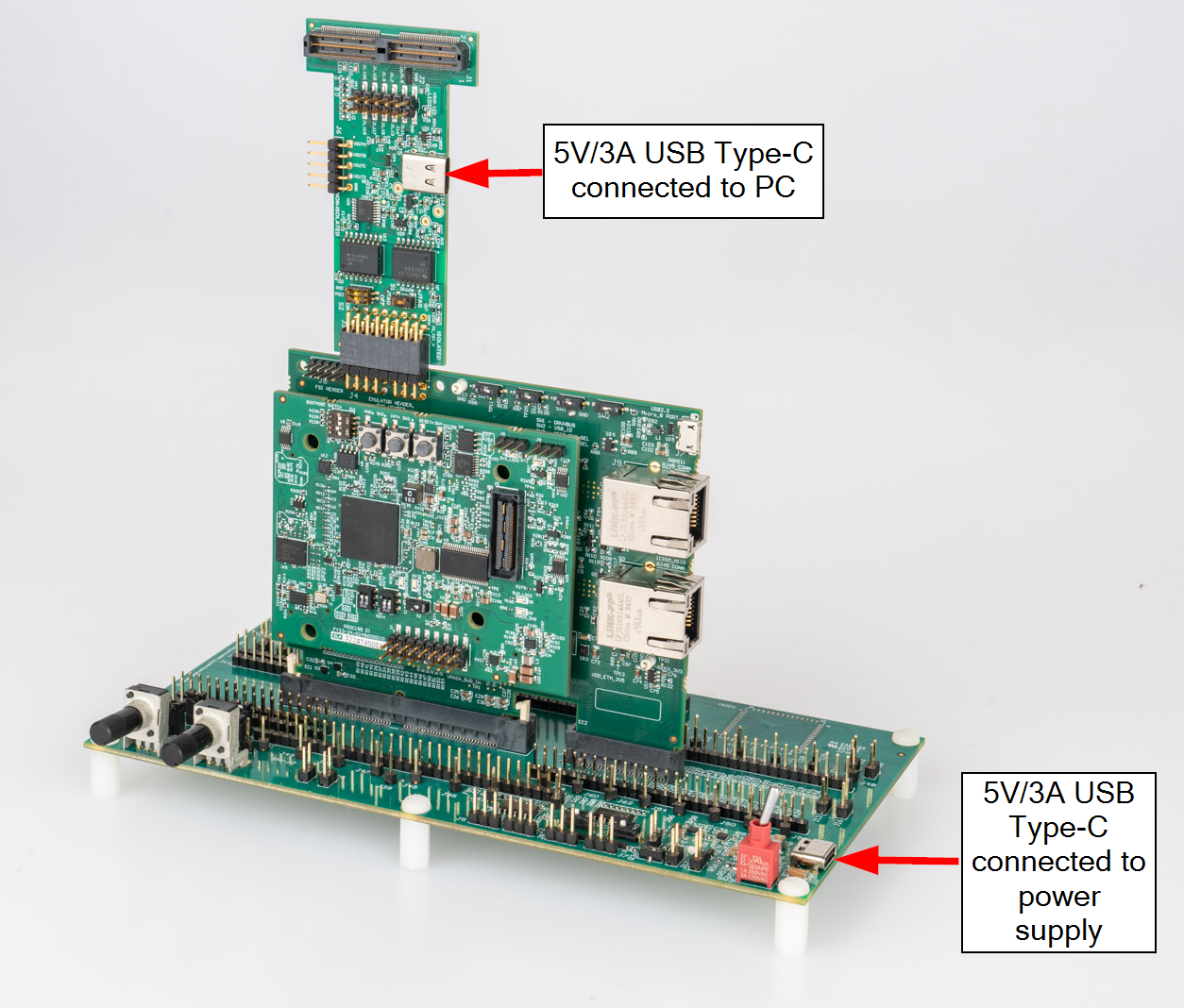 Figure 2-2 AM26x controlCARD Backward
Compatibility Configuration - XDS110ISO Connected to HSEC180ADAPEVM-AM2 J4
Figure 2-2 AM26x controlCARD Backward
Compatibility Configuration - XDS110ISO Connected to HSEC180ADAPEVM-AM2 J4 Figure 2-3 AM26x controlCARD Backward
Compatibility Configuration - XDS110ISO connected to controlSOM J7
Figure 2-3 AM26x controlCARD Backward
Compatibility Configuration - XDS110ISO connected to controlSOM J7