SBASAO8 June 2025 DAC39RF20
ADVANCE INFORMATION
- 1
- 1 Features
- 2 Applications
- 3 Description
- 4 Device Comparison
- 5 Pin Configuration and Functions
-
6 Specifications
- 6.1 Absolute Maximum Ratings
- 6.2 ESD Ratings
- 6.3 Recommended Operating Conditions
- 6.4 Thermal Information
- 6.5 Electrical Characteristics - DC Specifications
- 6.6 Electrical Characteristics - AC Specifications
- 6.7 Electrical Characteristics - Power Consumption
- 6.8 Timing Requirements
- 6.9 Switching Characteristics
- 6.10 SPI Interface Timing Diagrams
-
7 Detailed Description
- 7.1 Overview
- 7.2 Functional Block Diagram
- 7.3
Feature Description
- 7.3.1 DAC Output Modes
- 7.3.2 DAC Core
- 7.3.3 DEM and Dither
- 7.3.4 Offset Adjustment
- 7.3.5 Clocking Subsystem
- 7.3.6
Digital Signal Processing Blocks
- 7.3.6.1 Bypass Mode
- 7.3.6.2 DUC Mode
- 7.3.6.3 DDS SPI Mode
- 7.3.6.4
DDS Vector Mode
- 7.3.6.4.1 Second Order Amplitude Support
- 7.3.6.4.2 Vector Order and Symmetric Vector Mode
- 7.3.6.4.3 Initial Startup
- 7.3.6.4.4 Trigger Queuing
- 7.3.6.4.5 Trigger Burst
- 7.3.6.4.6 Hold Mode
- 7.3.6.4.7 Indexing Mode
- 7.3.6.4.8 Queued or Burst Triggers in Indexing-Mode
- 7.3.6.4.9 Writing Vectors While DDS is Enabled
- 7.3.6.5 DDS Streaming Mode
- 7.3.6.6 DSP Triggering
- 7.3.6.7 NCO Square Wave Mode
- 7.3.6.8 DSP Mute Function
- 7.3.6.9 DSP Output Gain
- 7.3.6.10 Complex Output Support
- 7.3.6.11 Channel Bonder
- 7.3.6.12 Programmable FIR Filter
- 7.3.6.13 DES Interpolator
- 7.3.7 Serdes Physical Layer
- 7.3.8
JESD204C Interface
- 7.3.8.1 Deviation from JESD204C Standard
- 7.3.8.2 Link Layer
- 7.3.8.3 SYSREF Alignment Required in Subclass 1 Mode
- 7.3.8.4 Transport Layer
- 7.3.8.5 JESD204C Debug Capture (JCAP)
- 7.3.8.6 JESD204C Interface Modes
- 7.3.9 Data Path Latency
- 7.3.10 Multi-Device Synchronization and Deterministic Latency
- 7.3.11 Link Reset
- 7.3.12 Alarm Generation
- 7.3.13 Mute Function
- 7.4 Device Functional Modes
-
8 Programming
- 8.1 Using the Standard SPI Interface
- 8.2 Using the Fast Reconfiguration Interface
- 8.3
Register Maps
- 8.3.1 Standard_SPI-3.1 Registers
- 8.3.2 System Registers
- 8.3.3 Trigger Registers
- 8.3.4 CPLL_AND_CLOCK Registers
- 8.3.5 SYSREF Registers
- 8.3.6 JESD204C Registers
- 8.3.7 JESD204C_Advanced Registers
- 8.3.8 SerDes_Equalizer Registers
- 8.3.9 SerDes_Eye-Scan Registers
- 8.3.10 SerDes_Lane_Status Registers
- 8.3.11 SerDes_PLL Registers
- 8.3.12 DAC_and_Analog_Configuration Registers
- 8.3.13 Datapath Registers
- 8.3.14 NCO_and_Mixer Registers
- 8.3.15 Alarm Registers
- 8.3.16 Fuse_Control Registers
- 8.3.17 Fuse_Backed Registers
- 8.3.18 DDS_Vector_Mode Registers
- 8.3.19 Programmable_FIR Registers
- 9 Application and Implementation
- 10Device and Documentation Support
- 11Revision History
- 12Mechanical, Packaging, and Orderable Information
7.3.6.4 DDS Vector Mode
Any DSP channel can operate in DDS Vector mode (see DSP_MODEn). In this mode, the interpolation filters are disabled and the NCO/Mixer logic is repurposed to generate user-defined waveforms (defined by DDS_VEC). The DSP does not require any input samples from the JESD interface.
| Term | Definition |
|---|---|
| Vector Field | Each DDS Vector is made up of several fields that define signal attributes to produce a waveform segment. Example fields are PHASE_START and FREQ_START. |
| Vector | A vector is one entry in the vector table and contains fields which define a waveform segment (see DDS_VEC) |
| Vector Table | A table of vectors that are used by the DDS (see DDS_VEC). |
| Vector Block | A portion of the vector table assigned to a DDS channel (a subset of DDS_VEC) |
| Waveform Segment | A signal that the DDS produces based on a single vector in the vector table. |
| Waveform | A signal that is produced by playing a sequence of waveform segments |
| Stalled | The vector processor is stalled when waiting for a trigger event. This always occurs at startup. Stalling also occurs if a vector is loaded that has the vector's VTRIG_MODE field set and no trigger is active or already queued in the trigger queue. In general, the DDS output is muted while the vector processor is stalled; however, Hold mode defines an exception to this. |
The DDS Vector mode synthesizer is shown in Figure 7-41. Key features are:
- Generates waveforms by playing a sequence of waveform segments.
- Each waveform segment is defined by a vector in the vector table (DDS_VEC).
- Four DDS channels can each produce independent waveforms.
- DDS channels can be disabled to allow more vectors to be used by the remaining channels.
- Each vector contains fields to define the initial amplitude, frequency, and phase of the waveform segment. Amplitude and frequency can also be ramped up or down, and the duration of the waveform segment can be defined (see DDS_VEC).
- Second order amplitude ramping is possible (DDS_AMP2).
- Up to 256 vectors are available.
- Upon startup, playback does not begin until a trigger event occurs.
- Playback can be stalled at the start of specific vectors and the DDS waits for a trigger to continue (output is muted during the waiting period, unless Hold Mode is active) (see VTRIG_MODE)
- A single trigger input event can play a waveform multiple times (DDS_BURST).
- A ‘Symmetric Mode’ can instruct the DDS to play vectors in ascending order and then again in descending order (for symmetric Frank codes) (DDS_SYM)
- The Indexing Mode allows the TRIG[4:1] inputs to instruct the DDS to jump to specific sections of vector memory. When Indexing Mode is enabled, only one DSP channel is used for DDS Vector mode.
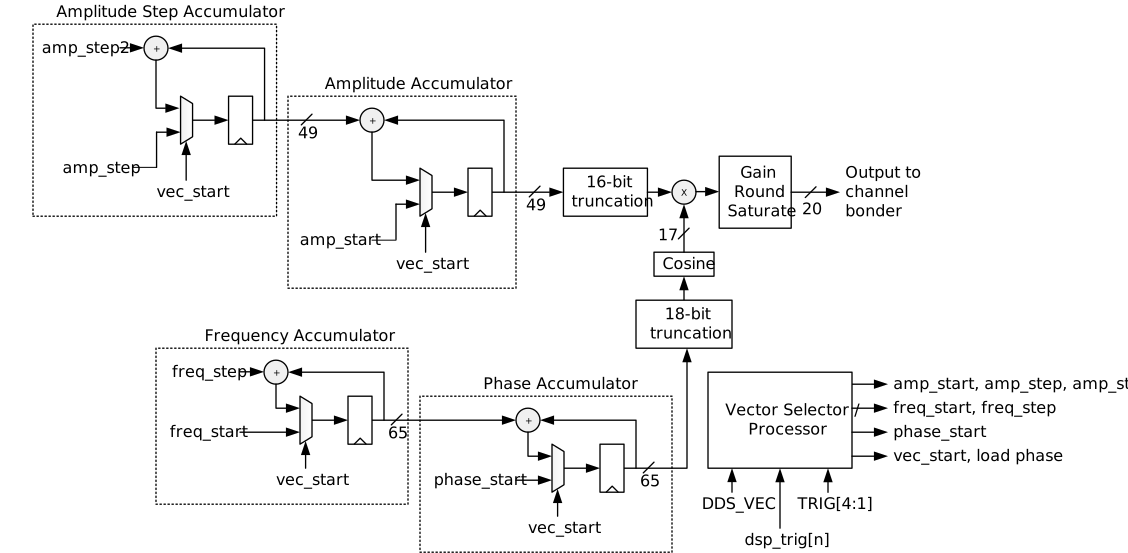 Figure 7-41 DDS Vector Waveform Generator
The vector table (defined by DDS_VEC) is divided into blocks and assigned to the DSP channels. The DSP channels are grouped into channel sets (channel 0 and 2 are grouped and channel 1 and 3 are grouped). When both DSP channels in a group are in DDS-Vector mode, the memory is shared between the two channels. This is depicted in Table 7-10. Each DDS channel executes the vectors in the channel's assigned vector block in ascending order, starting with the lowest index. When a DDS channel finishes playing a vector, the channel inspects the LAST_VEC field of that vector. If LAST_VEC=1, the channel starts over at the beginning of the channels assigned vector block.
| Vector Range | If channel 2 is NOT in DDS-Vector Mode | If channel 0 is NOT in DDS-Vector Mode | If channel 0 and 2 are both in DDS-Vector Mode |
|---|---|---|---|
| DDS_VEC[0:63] | Channel 0 | Channel 2 | Channel 0 |
| DDS_VEC[64:127] | Channel 2 |
| Vector Range | If channel 3 is NOT in DDS-Vector Mode | If channel 1 is NOT in DDS-Vector Mode | If channel 1 and 3 are both in DDS-Vector Mode |
|---|---|---|---|
| DDS_VEC[128:191] | Channel 1 | Channel 3 | Channel 1 |
| DDS_VEC[192:255] | |||
| DDS_VEC[256:319] | Channel 3 | ||
| DDS_VEC[320:383] |
The mapping in the above tables allows channel 0 and 2 to share resources. Similarly, channel 1 and 3 share resources.
More memory is allocated to channels 1 and 3. This maximizes the available memory when combining DDS-Vector mode with DUC or DDS-Stream modes. In those mixed configurations, the DDS-Vector mode applies to channels 1, 2, and/or 3, but not channel 0.
The Vector Processor is responsible for reading each vector, formatting and scaling the parameters, and applying them to the DDS accumulators for the proper duration of time.
Table 7-12 defines how the parameters produced by the Vector Processor. All references to DDS vector fields refer to the field of the specific vector being played.
| Signal | Format | Description |
|---|---|---|
| step_exp | Integer |
Step exponent. Ranges from -4 to -32. The purpose of this value is to apply a scaling factor to the amplitude and frequency step that is appropriate for the duration of the vector. Longer vectors use a smaller scaling factor (larger STEP_EXP value). step_exp = -STEP_EXP - 1 The recommended value for the STEP_EXP field of each vector is: STEP_EXP = floor(log2(NUM_SAMP_M32+32)) - 1 |
| amp_start | 49-bit signed |
Initial value for amplitude accumulator. Applied when a vector begins. amp_start = AMP_START * 233 amp_start can be set to zero to mute the DDS output while waiting for a trigger. |
| amp_step | 49-bit signed |
Initial value for amplitude step accumulator. amp_step =AMP_STEP * 233 * 2step_exp + amp_step/2 Note: The “amp_step2/2” term makes sure that the sequence of amplitude values follows a simpler quadradic equation. |
| amp_step2 | 49-bit signed |
Step for amplitude step accumulator (2nd order term). Applied during the entire vector. This term only applies when 2nd-order amplitude is enabled (see DDS_AMP2) amp_step2 = AMP_STEP2 * 233 * 4step_exp |
| freq_start | 65-bit |
Initial value for frequency accumulator. Applied when a vector begins. freq_start =FREQ_START * 217 + freq_step/2 Note: The “freq_step/2” term makes sure that the sequence of phase values follows a simpler quadradic equation. Note: When 2nd-order amplitude is enabled (see DDS_AMP2), the lower 16-bits of FREQ_START are used for amplitude control, and the formula above for freq_start assumes those 16-bits are zero. |
| freq_step | 65-bit |
Step value for frequency accumulator. Applied during the entire vector. freq_step = FREQ_STEP * 233 * 2step_exp |
| phase_start | 65-bit |
Initial value for phase accumulator. Applied when a vector begins. phase_start = PHASE_START * 249 |
| vec_start | 1-bit |
Control signal indicating the start of a vector. Causes the accumulators to initialize. Asserted for one sample period. If the Vector Processor encounters a vector that requires a trigger (and no trigger is in the queue), the vec_start signal is asserted, but amp_start and amp_step are set to zero to mute the DDS output. Once the trigger occurs, vec_start is asserted again but this time with amp_start and amp_step configured normally to start the vector. If Hold Mode is active, no mute is generated. The amp_start and amp_step signals are not set to zero and vec_start is not pulsed a second time in response to the trigger event (because the vector is already playing). |
| load_phase | 1-bit | When Hold Mode is disabled, the load_phase signal matches the vec_start signal (the phase accumulator loads phase_start). When Hold Mode is enabled, load_phase remains low to achieve phase-continuous operation. |