SBOU285A April   2023  – July 2025 INA700 , INA701


  1.   1
  2.   Description
  3.   Get Started
  4.   Features
  5.   5
  6. 1Evaluation Module Overview
    1. 1.1 Introduction
    2. 1.2 Kit Contents
    3. 1.3 Specification
    4. 1.4 Device Information
  7. 2Hardware
    1. 2.1 Quick Start Setup
    2. 2.2 EVM Operation
      1. 2.2.1 Current Sensing Operation
        1. 2.2.1.1 Detailed Setup
    3. 2.3 Circuitry
      1. 2.3.1 Current Sensing IC
      2. 2.3.2 Input Signal Path
      3. 2.3.3 Digital Circuitry
    4. 2.4 PAMB Compatibility
  8. 3Software
    1. 3.1 Setup
      1. 3.1.1 Driver Installation
      2. 3.1.2 Firmware
        1. 3.1.2.1 Firmware Debug
      3. 3.1.3 GUI Setup and Connection
        1. 3.1.3.1 Initial Setup
        2. 3.1.3.2 GUI to EVM Connection
    2. 3.2 GUI Operation
      1. 3.2.1 Homepage Tab
      2. 3.2.2 Registers Tab
      3. 3.2.3 Results Data Tab
    3. 3.3 Direct EVM USB Communication
      1. 3.3.1 Standard USB Read and Write Operations
      2. 3.3.2 Collect Data Through the USB BULK Channel
  9. 4Hardware Design Files
    1. 4.1 Schematics
    2. 4.2 PCB Layout
    3. 4.3 Bill of Materials
  10. 5Additional Information
    1. 5.1 Trademarks
  11. 6Related Documentation
  12. 7Revision History

PCB Layout

Note:

Board layouts are not to scale. These figures are intended to show how the board is laid out. The figures are not intended to be used for manufacturing EVM PCBs.

Figure 4-3 through Figure 4-6 illustrate the PCB layers of the EVM.
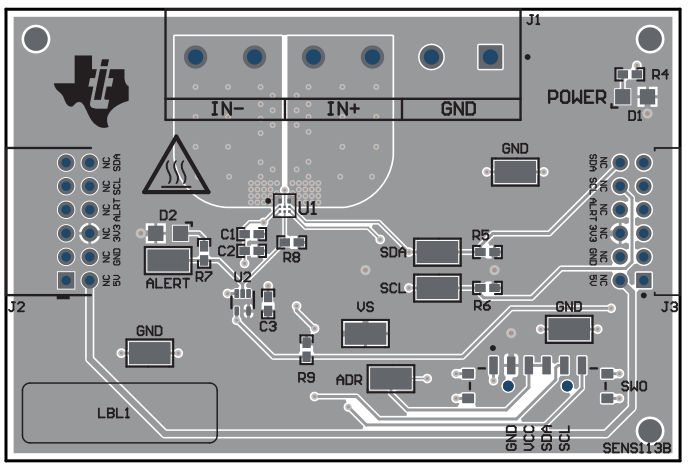
INA700-701EVM SENS113 Top ViewFigure 4-3 SENS113 Top View
INA700-701EVM SENS113 Bottom ViewFigure 4-5 SENS113 Bottom View
INA700-701EVM SENS113 Top LayerFigure 4-4 SENS113 Top Layer
INA700-701EVM SENS113 Bottom LayerFigure 4-6 SENS113 Bottom Layer