SLAA638A august 2014 – may 2023 MSP430I2040 , MSP430I2041
- 1
- Single Phase and DC Embedded Metering (Power Monitor) Using MSP430I2040
- Trademarks
- 1 Introduction
- 2 Design Details
- 3 Calibration Techniques
- 4 Hardware Setup
- 5 Calibrator Software
- 6 Operating the PC Software Tool
-
7 Serial Communication Commands
- 7.1 Introduction
- 7.2 Communication Protocol
- 7.3
Commands
- 7.3.1 HOST_CMD_GET_METER_NAME
- 7.3.2 HOST_CMD_GET_METER_VER
- 7.3.3 HOST_CMD_GET_METER_CONFIGURATION
- 7.3.4 HOST_CMD_GET_RTC
- 7.3.5 HOST_CMD_ALIGN_WITH_CALIBRATION_FACTORS
- 7.3.6 HOST_CMD_SET_PASSWORD
- 7.3.7 HOST_CMD_GET_READINGS_PHASE_N
- 7.3.8 HOST_CMD_GET_EXTRA_READINGS_PHASE_N
- 7.3.9 HOST_CMD_SUMCHECK_MEMORY
- 7.3.10 HOST_CMD_CLEAR_CALIBRATION_DATA
- 7.3.11 HOST_CMD_SET_CALIBRATION_PHASE_N
- 7.3.12 HOST_CMD_GET_CALIBRATION_PHASE_N
- 7.3.13 HOST_CMD_SET_CALIBRATION_EXTRAS
- 7.3.14 HOST_CMD_GET_CALIBRATION_EXTRAS
-
8 Firmware and Embedded Metering Library API
- 8.1 Introduction
- 8.2
Embedded Metering LIbrary API
- 8.2.1
Embedded Metering Library Function Calls
- 8.2.1.1
Functions for Metrology Engine Control
- 8.2.1.1.1 Functions for Metrology Engine Control
- int metrology_init (void)
- int metrology_init_from_nv_data (void)
- void align_metrology_with_calibration_data (void)
- void metrology_switch_to_normal_mode (void)
- void metrology_init_analog_front_end_normal_mode (void)
- void metrology_disable_analog_front_end (void)
- 8.2.1.2 Procedure for Metrology Engine Initialization
- 8.2.1.3
Functions for Calculate and Reading the Readings
- 8.2.1.3.1 Functions for Calculate and Reading the Readings
- power_t calculate_phase_readings (void
- power_t active_power (int ph)
- power_t reactive_power (int ph)
- power_t apparent_power (int ph)
- power_t fundamental_active_power(int ph)
- power_t fundamental_reactive_power(int ph)
- power_factor_t power_factor (int ph)
- rms_voltage_t rms_voltage (int ph)
- rms_voltage_t fundamental_rms_voltage(int ph)
- thd_t voltage_thd(int ph)
- rms_current_t rms_current (int ph)
- rms_current_t fundamental_rms_current(int ph)
- thd_t current_thd(int ph)
- int16_t mains_frequency (int ph)
- uint16_t phase_status (int ph)
- 8.2.1.1
Functions for Metrology Engine Control
- 8.2.2 Embedded Metering LIbrary Callbacks
- 8.2.3
Application Level Calibration Functions
- 8.2.3.1
Functions for Reading and Writing Calibration Parameters
- 8.2.3.1.1 Functions for Reading and Writing Calibration Parameters
- int get_calibration_status (void)
- void set_calibration_status (int value)
- int clear_calibration_data (void)
- int16_t get_temperature_intercept (void)
- int16_t get_temperature_slope (void)
- void set_temperature_parameters (int16_t temperature_at_calibration, int16_t temperature_sensor_intercept, int16_t temperature_sensor_slope)
- calibration_scaling_factor_t get_P_scaling (int phx)
- void set_P_scaling (int phx, calibration_scaling_factor_t value)
- calibration_scaling_factor_t get_V_rms_scaling (int phx)
- void set_V_rms_scaling (int phx, calibration_scaling_factor_t value)
- int16_t get_v_dc_estimate (int phx)
- int16_t get_initial_v_dc_estimate (int phx)
- void set_v_dc_estimate (int phx, int16_t value)
- int32_t get_v_ac_offset (int phx)
- void set_v_ac_offset (int phx, int32_t value)
- calibration_scaling_factor_t get_I_rms_scaling(int phx);
- void set_I_rms_scaling(int phx, calibration_scaling_factor_t value);
- int32_t get_i_dc_estimate(int phx);
- int32_t get_initial_i_dc_estimate(int phx)
- void set_i_dc_estimate(int phx, int32_t value);
- int32_t get_i_ac_estimate(int phx);
- void set_i_ac_offset (int phx, int32_t value)
- uint16_t get_compensate_capacitor_value (int phx)
- void set_compensate_capacitor_value (int phx, uint16_t value)
- uint16_t get_compensate_resistance (int phx)
- void set_compensate_resistance (int phx, uint16_t value)
- int16_t get_phase_corr (int phx)
- void set_phase_corr (int phx, int16_t value)
- 8.2.3.1
Functions for Reading and Writing Calibration Parameters
- 8.2.4 Setting Default Calibration Parameters
- 8.2.1
Embedded Metering Library Function Calls
- 9 Example Application Code
- 10Hardware Design Files
- 11EVM Specification and Performance
- 12Running on MSP430i2040 and MSP430i2041
- 13Revision History
9.2 Preparing the Application Code to Run
- Launch the IAR5.5 Embedded Workbench IDE, then click on File → Open → Workspace.
- Select “emeters.eww” when prompted for Workspace to be opened.
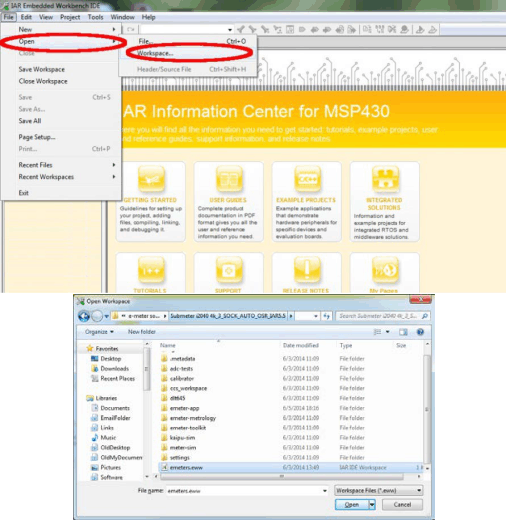 Figure 9-1 Opening Workspace
 - Select the emeter-app-i2041 project tab at the bottom of the Workspace window.
- Check the project options by right clicking on the project name and selecting Options… from the pop-up menu as shown in Figure 9-2.
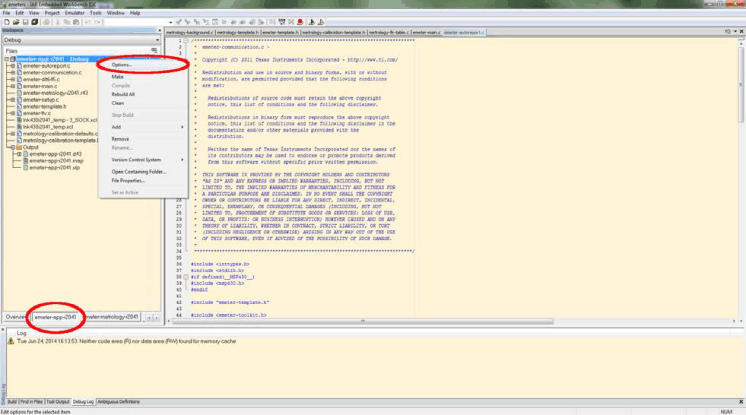 Figure 9-2 Project Tab
 - When the options appears, select C/C++ compiler on the left hand column and then select the Optimizations tab on the right hand side and check that the optimization setting is as shown in Figure 9-3).
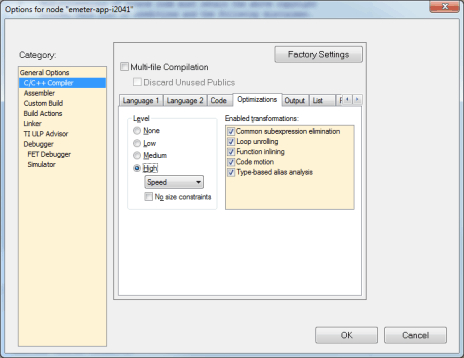 Figure 9-3 Optimization Options
 - Select FET Debugger on the left hand column of the select Setup tab. The EVM uses Spy-Bi-Wire for its code downloading and debugging. Check to make sure the options are as shown in Figure 9-4.
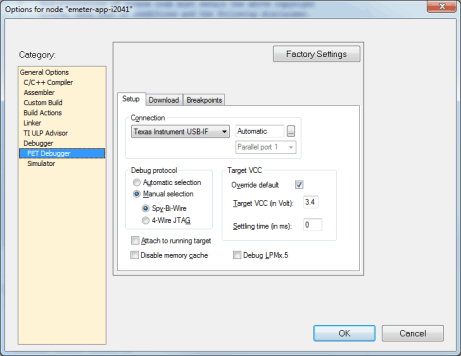 Figure 9-4 Debugger Options
 - Select the Download tab. Under Flash erase, do not choose Erase main memory and Information memory; this option erases both sets of data and cannot be recovered. Instead, choose Erase main memory as the download option to preserve these factory parameters: system clock calibration, ADC calibration, and internal reference calibration (Figure 9-5). However, metrology calibration stored in the main memory, such as VGAIN, IGAIN, PGAIN, and so on, are always erased after downloading. Select Erase main memory as the option for download to preserve the factory parameters.
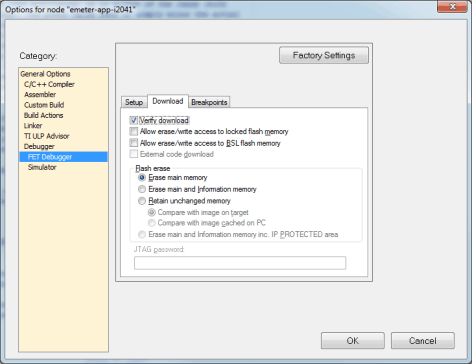 Figure 9-5 Download Options
 - Click OK after all of the changes are made.
- Rebuild the project by right clicking on the project and selecting Rebuild All from the pop-up menu (see Figure 9-6). Three warnings are reported during rebuilding (see Figure 9-6), it is safe to ignore the three warnings. To open the project workspace, modify the code, compile, and download the code;
IAR Embedded Workbench® 5.5 must be installed with a valid license. If a valid license is not available, the object code can still be downloaded. For downloading procedures, see Section 9.3.
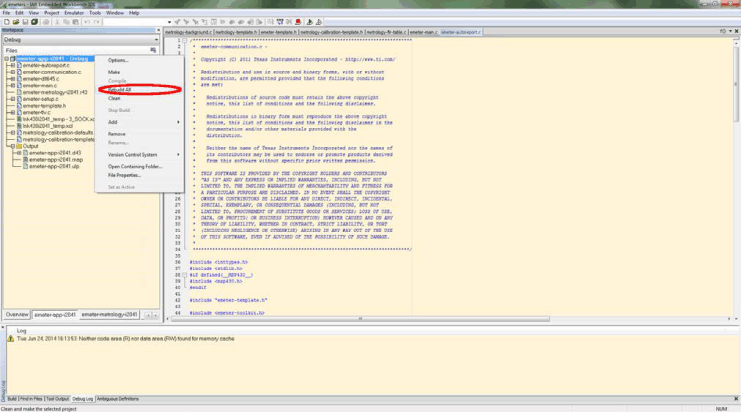 Figure 9-6 Compiling the Application
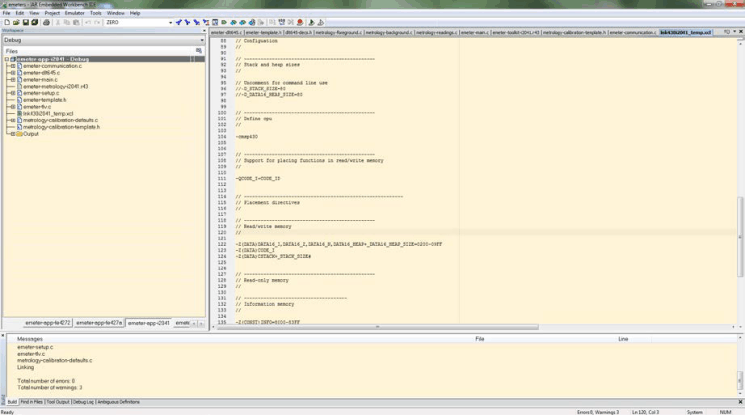 Figure 9-7 Warnings
 - Make sure the jumper on J8 is short properly. Connect the 14 pin connector P1 to MSP-FET430UIF by a flat cable as shown in Figure 9-8.
WARNING:
The debugging interface is NOT ISOLATED; make sure proper isolation is in place between the EVM and the PC using for debugging with AC or DC high voltage connected.
Connection to debugging interface is optional for the operation of the EVM. The EVM can operate standalone without debugger connected.
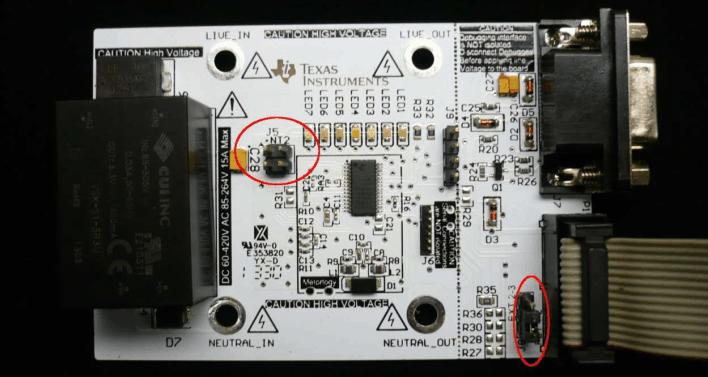 Figure 9-8 Connecting EVM and FET
 - Click the Download and Debug button to begin download and debugging as shown in Figure 9-9.
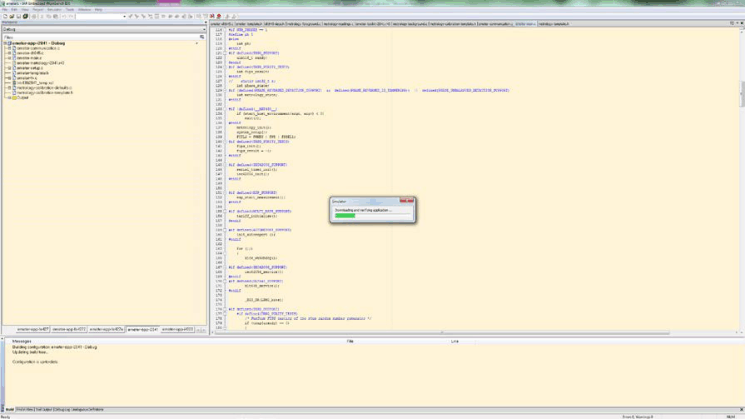 Figure 9-9 Code Downloading
 - After downloading is completed and successful, a screen like that shown in Figure 9-10 will appear. Click Go to start application running.
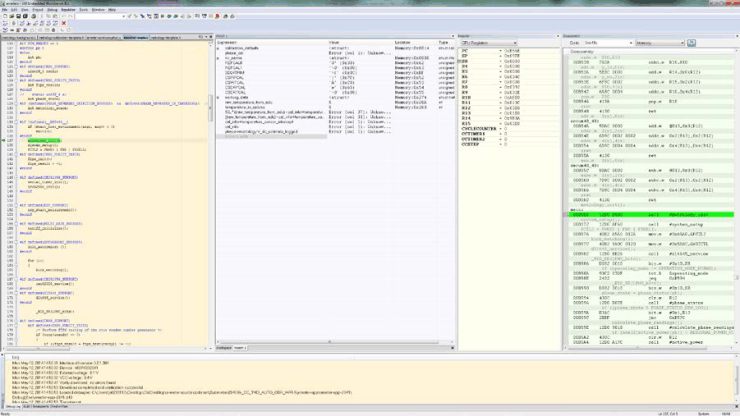 Figure 9-10 Debugger Screen
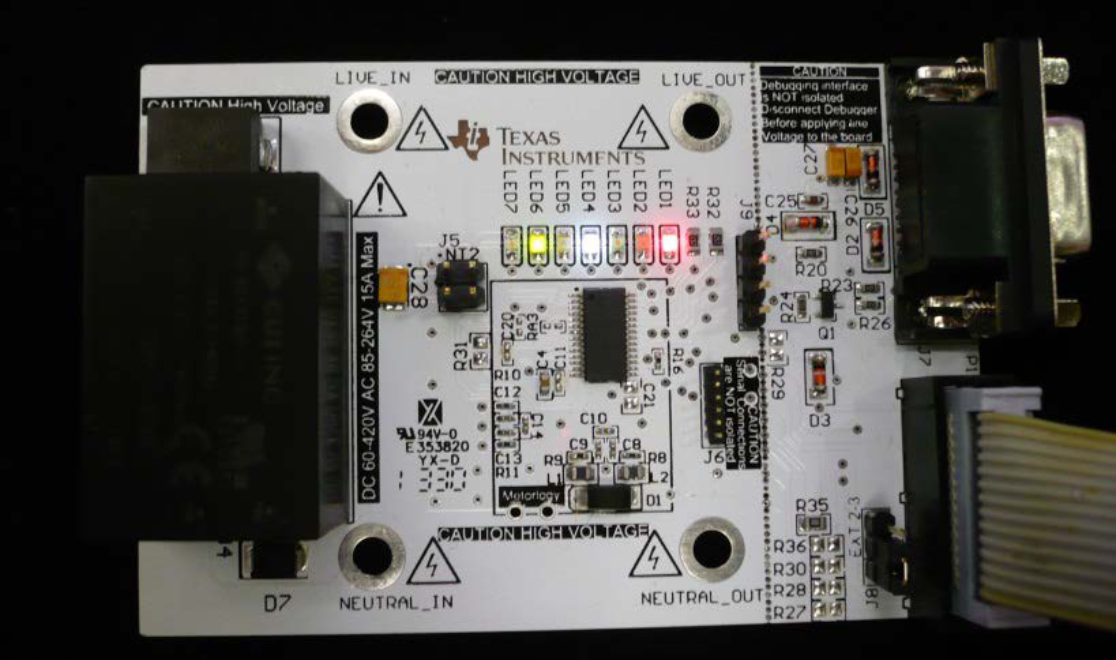 Figure 9-11 EVM running