SLAAEN4 March 2025 MSPM0G1106 , MSPM0G1107 , MSPM0G1506 , MSPM0G1507 , MSPM0G1518 , MSPM0G1519 , MSPM0G3106 , MSPM0G3106-Q1 , MSPM0G3107 , MSPM0G3107-Q1 , MSPM0G3506 , MSPM0G3506-Q1 , MSPM0G3507 , MSPM0G3507-Q1 , MSPM0G3518 , MSPM0G3518-Q1 , MSPM0G3519 , MSPM0G3519-Q1
5.3 CAN Bus Multi-Node Communication Example
CAN communication is a bus communication. Users can use the CAN-UART bridge design to test the multi-node communication of the CAN bus. Figure 5-1 shows the basic structure. When the user sends a message to the CAN bus through any CAN-UART bridge, the message is read back from other nodes immediately.
At least three LaunchPads must be used. Each CAN communication on the LaunchPad requires a transceiver. The connection between the LaunchPad and transceiver is shown in Figure 4-2.
The CAN module of MSPM0 supports hardware filtering to select messages with specific IDs. Note that hardware filtering is not performed by default in this sample code. The user can configure hardware filtering. For specific configuration, see related documentation.
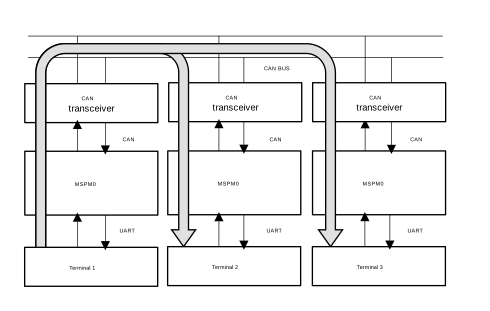 Figure 5-1 Basic Structure of Multi-Node
Communication
Figure 5-1 Basic Structure of Multi-Node
Communication