SLLU393 October 2024
- 1
- Description
- Get Started
- Features
- Applications
- 6
- 1 Evaluation Module Overview
- 2 Hardware
- 3 Hardware Connections Overview
- 4 Connection Details
- 5 MSP430FR2355 Microcontroller & User Interface
- 6 LED Lights
- 7 User-Configurable Settings
- 8 Software
- 9 Hardware Design Files
- 10Additional Information
- 11Revision History
2.1 Quick Start Guide
The MCF8316DEVM requires a power supply source with a recommended operating range from 4.5V to 35V. To set up and power the EVM, follow the sequence below:
- Connect motor phases to A, B, and C on connector J8.
- Do not turn on the power supply yet. Connect the motor supply to VBAT/VM and PGND on connector J7.
- Connect to VBAT to enable reverse polarity protection and Pi filter. Note that when connecting to VBAT, VM will be VM—0.7V less due to a diode drop in the reverse-polarity protection circuit.
- To disable reverse-polarity protection and the Pi filter, connect to VM.
- Select J3 to 5V_USB and J5 to 3V3COM to power MSP430 from USB power supply.
- Connect the micro-USB cable into the computer.
- Turn the potentiometer fully clockwise to set the motor to zero speed upon powerup.
- Flip the switch S1 to the right to configure BRAKE = RUN, switch S2 to the left to configure DIR = ABC, and switch S3 to the right to configure DRVOFF = ON
- Turn on the motor power supply.
- Use the potentiometer R4 to control the speed of the motor and the switches to disable the motor driver, change the direction, or apply a brake to the motor. Optionally, use the Motor Studio GUI to monitor real-time speed of the motor, put the MCF8316D into a low-power sleep mode, and read status of the LED as shown in Section 8.
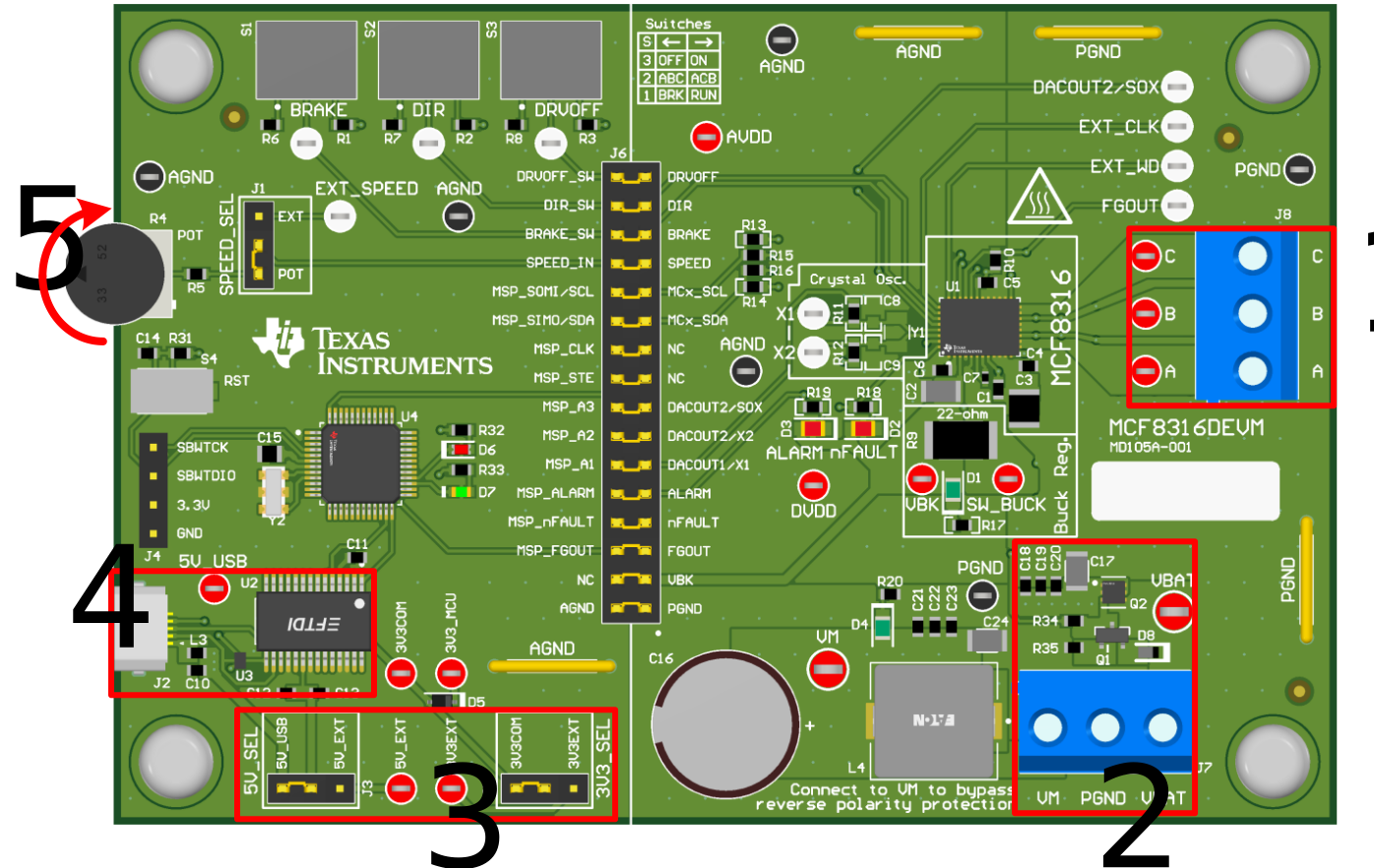 Figure 2-1 Reference for Quick Start Guide