SLVUCP8A September 2024 – June 2025 TPS26750
- 1
- Description
- Get Started
- Features
- Applications
- 6
- 1Evaluation Module Overview
- 2Hardware
-
3Software
- 3.1 Software Description
- 3.2 Software Installation
- 3.3 Software Development
- 3.4 Using the Application Customization Tool
- 4Application Specific Use Cases
- 5Hardware Design Files
- 6Additional Information
- 7Revision History
2.2.2 Stand Alone Testing
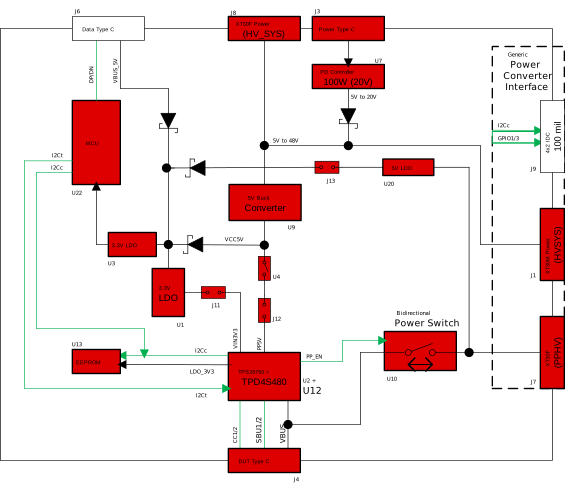 Figure 2-2 Stand Alone Testing Block Diagram
Supported functionality as a stand alone device:
- 5V sourcing (DFP)
- 5 - 48V sinking, both SPR and EPR capable (UFP)
- 5V sourcing, 5V to 48V sinking (DRP)
To test the TPS26750EVM as a stand-alone device, users need to connect a power source to the Power Type C connector (J3) or one of the XT30 Power connectors (J1 or J8).
If users want to support 5V sourcing, then the power supply needs to provide at least 18W of power, due to the following board requirements:
- 5V/3A for PP5V Power Path
- 5V/120mA for VCONN
- 5V/100mA for Board MCU (U22)
If users only want to support a powered sinking setup, then 5W is all that is required to be provided to the Power Type C port (J3). When sinking, the output of the sinking power path can be accessed from the XT30F (PPHV) connector (J7). The portions of the EVM are powered, highlighted in red, when testing the device in Stand Alone mode and are shown in Figure 2-2.
The example setup in Figure 2-3 shows a 140W 3 Port PD3.1 Supported Wall Adapter, whose USB-C2 port is capable of providing 100W (20V at 5A) of power, connected to a USB-C to USB-C 100W capable cable, which is in turn connected to the Power Type C port (J3) of the TPS26750EVM. This example setup is capable of sourcing 5V of power to the DUT Type C port (J4) and sinking from 5V to 48V of power (both SPR and EPR capable) to the DUT Type C port (J4).

Figure 2-3 Stand Alone Testing Example Hardware Setup
This figure depicts a previous version of the TPS26750 EVM (RevA2), but the information remains accurate and applicable to the current version.