SLVUD25 April 2025
2.2 Setup
The TPS26742EQ1EVM requires the connection of additional EVMs (Daughter Cards) in order to operate normally. This connection option allows many different DC2DC converters to be connected to the EVM for evaluation.
Daughter cards for the BQ25758Q1/BQ25758BQ1, LM55288, LM55289, LM72650Q1, and LM72680Q1 are under development.
System Implemented with LM251772EVM-PD
- Prepare the TPS26742EQ1 EVM
- Verify that a shunt is installed between pins 1 and 2 of J12 to select the 6V to 32V input voltage range
- Verify that a shunt is installed on J14 to connect the VCC5V pin of the TPS26742EQ2 IC to the 5V PCB buck to support VCONN for Type C PD power greater than 60W
- Prepare LM251772EVM-PD daughter cards
- Verify that a shunt is installed between pins 2 and 3 of JP5
- Verify that a shunt is installed on JP9 if daughter card connected to port A and not installed for port B
- Verify that a shunt is installed between pins 1 and 2 of JP1
- Verify that all other jumpers are open
- Connect the 3 boards together as shown below
-
Figure 2-2 Setup With LM251772-Q1 EVM
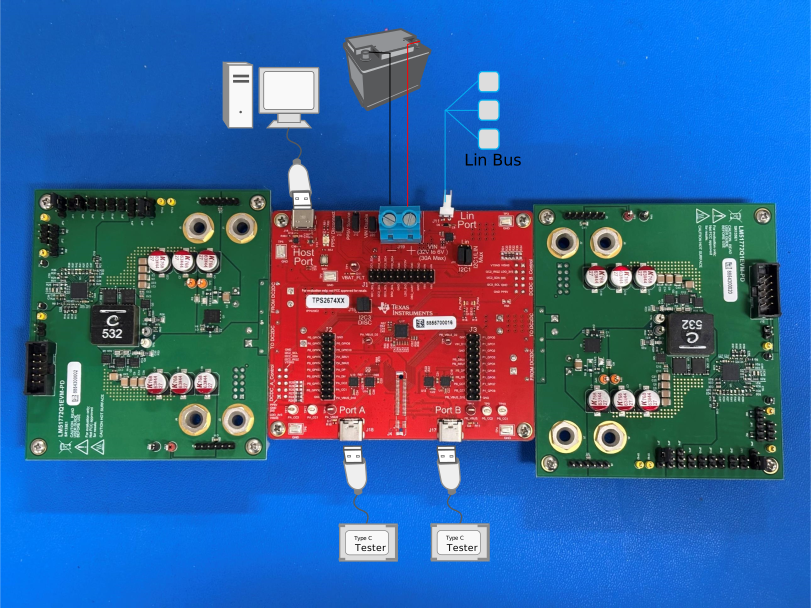
- Connect a 5.5V-32V DC power supply to J20, the blue 2 pin screw terminal connector. This power supply must meet the input power requirements of the combined type C output ports and TPS26742EQ1EVM
- Connect Host MCU to a laptop of PC using the host type C port if planning to update the firmware using the GUI.
- Attach a Lin bus controller to the Lin Bus connector if planning to use :om
- Connect Port A and/or Port B Type-C connectors a type-C sink devices or test equipment.