SLVUD44A March 2025 – October 2025 TPS1689
4.6 Telemetry
The Telemetry page as shown in Figure 4-10 guides the user through the device parametric data, status information, data read from the high speed sample buffer, and real time graphical plots of a few key device parameters.
 Figure 4-10 TPS1689EVM-GUI: Device
Telemetry
Figure 4-10 TPS1689EVM-GUI: Device
TelemetryThis portion of the GUI is divided into five tabs, Telemetry Configuration, Device Parametric Information, Device Status Information, Read High Speed Sample Buffer, and Parametric Plot.
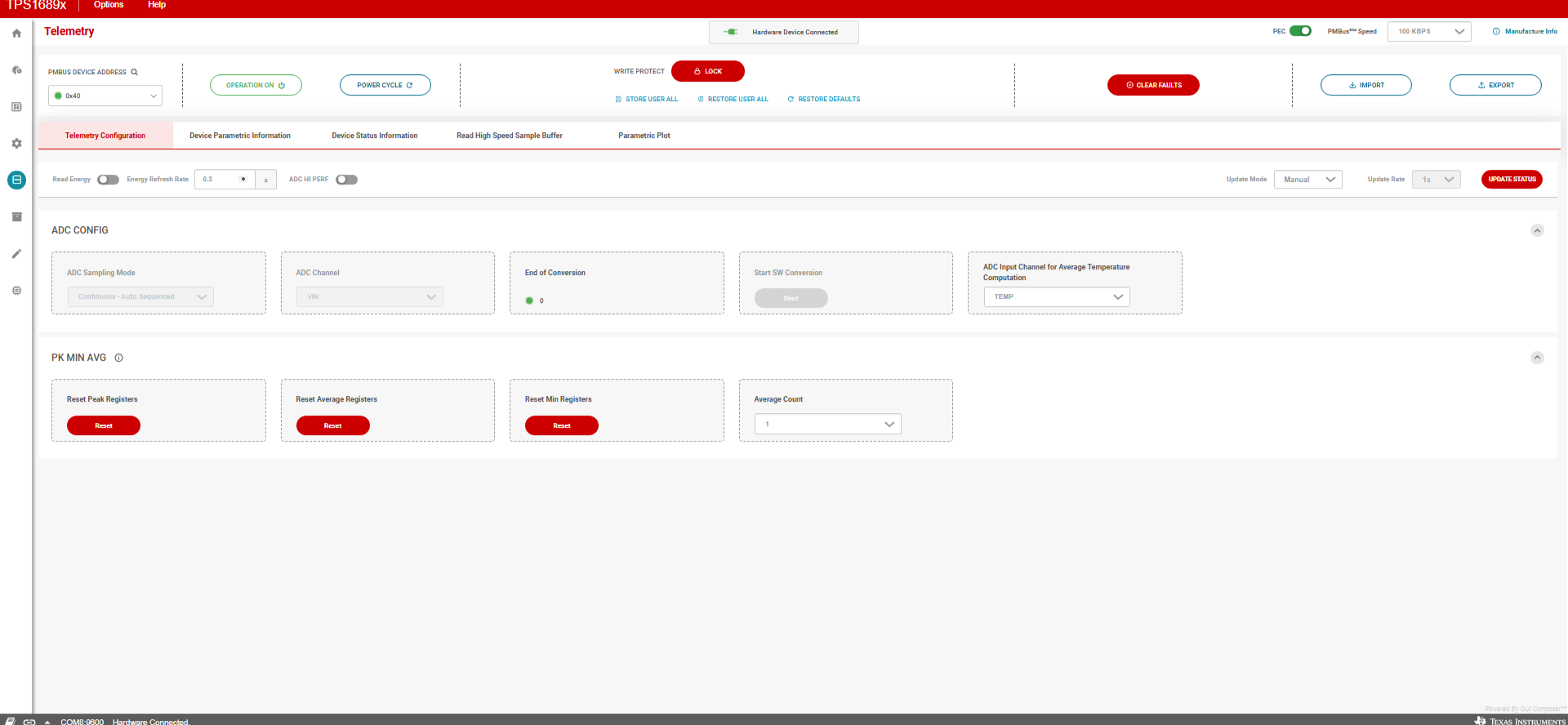 Figure 4-11 Telemetry
Configuration
Figure 4-11 Telemetry
ConfigurationAccessibility of the ADC_CONFIG_1 (E8h) register is disabled in the GUI. Changing the configuration of this register is not recommended under normal operation. This is because changing the configuration of this register prevents the ADC from sampling all the necessary signals needed for protection.
 Figure 4-12 Device Parametric Information: General
Parameters
Figure 4-12 Device Parametric Information: General
ParametersThe GUI implements the algorithm described in the PMBus Specifications for computing the real-world value of accumulated energy and average power consumption by the system using READ_EIN (86h) register data as presented in Figure 4-13. To get the values of accumulated energy and average power consumption, the READ_EIN (86h) register must be read periodically with a periodicity specified in the Energy Refresh Rate field and by enabling the Read Energy toggle switch as indicated by the RED circle in Figure 4-13. ADC HI PERF toggle switch (Bit[3] of DEVICE_CONFIG (E4h) register) specifies the ADC internal operating modes, high speed or high performance. The effective ADC sampling period is 11µs in high speed mode and 18 µs in high performance mode and comes with high speed mode by default. If changing the ADC internal modes is necessary, then changing the ADC internal modes must be done before the load is applied and after establishing communication with the GUI for the first time. Changing the ADC internal modes must not be changed under normal operation. This results in the wrong real world value for energy accumulation.
 Figure 4-13 Device Parametric Information: Energy
Parameters
Figure 4-13 Device Parametric Information: Energy
Parameters Figure 4-14 Device Status Information
Device parametric and status information can be updated manually or automatically as selected in the Update Mode drop-down menu shown in Figure 4-15. In manual update mode, users need to click on the UPDATE STATUS icon to get the latest information. Upon clicking the START icon in automatic update mode, the GUI reads all telemetry registers except READ_EIN (86h) in a time interval specified in the Update Rate field, as shown by the RED circle in Figure 4-15. The GUI continues to read the registers as long as the user is in any one of the three tabs, Telemetry Configuration, Device Parametric Information, and Device Status Information under the Telemetry page. The GUI stops updating as the user navigates to other tabs.
 Figure 4-15 Device Telemetry Update
Read High Speed Sample Buffer tab implements the READ_SAMPLE_BUF (D8h, Block Read) register. The ADC channel to sample for buffering and the decimation rate/sample skip count are configured through Bit[5:3] and Bit[2:0] respectively in the ADC_CONFIG_2 register. Parameter selection and decimation rate can be picked using the drop-down menus as shown by the RED circle in Figure 4-15. By selecting different decimation rates, users can choose between fine time resolution & short aperture and coarse time resolution & wide aperture. Click on the READ icon to plot the 64 samples retrieved from the READ_SAMPLE_BUF block read command.
Figure 4-16 represents the plots of input voltage using the data retrieved by sending the READ_SAMPLE_BUF (D8h) block read command.
 Figure 4-16 Read High Speed Sample Buffer,
Input Voltage
Figure 4-16 Read High Speed Sample Buffer,
Input VoltageParametric Plot tab allows users to visualize some key device parameters, including input voltage, output voltage, input current, input power, average input power, device die temperature, auxiliary input voltage, and energy accumulation as shown in Figure 4-17. Users must select the update rate from the drop-down menu called Update Rate as presented in Figure 4-17. Then, users need to choose the parameters to plot. To begin plotting, two parameters must always be selected. Click on the START icon to initiate plotting. Plotting can be stopped by clicking on the STOP icon. Plotting stops as the user navigates to other tabs.
 Figure 4-17 Parametric Plot