SNAU265D June 2021 – February 2025 HDC3020 , HDC3020-Q1 , HDC3021 , HDC3021-Q1 , HDC3022 , HDC3022-Q1 , HDC3120 , HDC3120-Q1
3.6 Condensation Removal
Certain environments can force the temperature to drop below the dew point. During such an event, condensation can occur on the device. The sensor opening is blocked, which can impact accurate sensor readings. In such situations, the integrated heater on the HDC3020 can be beneficial to remove any condensation and can continue reading error free measurements.
The HDC3 comes with a configurable heater to allow customers to use the heater based on their application and the amount of power needed to evaporate the condensation. The highest power (lowest resistance) offered on this device is 35.92 Ω and the lowest power (highest resistance) is 1996 Ω. This setting can be configured as needed but the recommended resistances are outlined in Table 3-2.
The recommended operating condition for the heater can be set between 1.62V to 5.5V. The condensation removal is layout-dependent as some layouts would need more power or more time to evaporate the moisture. The recommended layout can be found in the Layout Example section of the device-specific data sheet. Users can configure a setting between 25% and 100% and characterize a setting based on the layout and application. Users must note that they need to calculate and write the CRC to the device based on the heater configuration.
Calculating the dew point (DP) from the temperature and humidity measurements can be important when it comes to this feature. If the temperature drops below the DP, the device can be placed in an environment where the temperature gets above the DP and the heater can be enabled. The user can also leverage the ALERT output, which is triggered when the part crosses preset temp and %RH levels. The timing of this process can take a couple of minutes, sometimes even five minutes until the device can read the temperature and humidity accurately. When the %RH reading goes to zero % (or near it), the heater can be subsequently turned off to allow the device to cool down. Cooling of the device can take several minutes, but the temperature measurement continues to run to make sure the device goes back to normal operating condition before restarting the device for normal service.
To configure and enable the heater, see the flowchart in Figure 3-3.
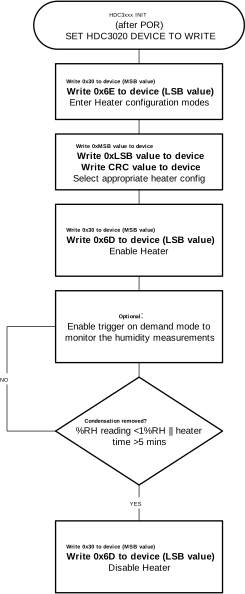 Figure 3-3 Flowchart for Condensation
Removal
Figure 3-3 Flowchart for Condensation
RemovalThe integrated heater evaporates moisture that forms on top of the humidity sensor, but does not remove any contaminants. Any contaminant residue, if present, can impact the accuracy of the humidity sensor and can cause drift. If the device experiences drift due to contamination or precipitation, see Offset Error Correction.