SNVU932A March 2025 – August 2025 LP5814 , LP5814I , LP5815
3.3.5.2 Turn On LED in Autonomous Mode
This section shows the steps to turn on the red LED (OUT2) and white LED (OUT3) LEDs in autonomous animation mode with the patterns as shown in Table 3-1 and .
| LED | PATTERNS |
|---|---|
| Red LED (OUT2) |
Animation Mode, Blinking with 5Hz Frequency |
| White LED (OUT3) | Animation Mode, Breathing with 1s Exponential Ramping Up and 1s Exponential Ramping Down |

Figure 3-13 Blinking Pattern

Figure 3-14 Breathing Pattern
-
Enable chip through clicking Chip Enabled button as shown in Figure 3-15.
-
Select the red LED (OUT2) and white LED (OUT3) to do the configuration through clicking the red LED and white LED with Shift keyboard button pushed.
-
Enable the selected red LED and white LED through selecting the Enable item from the Enable LED pulldown menu.
Set the selected red LED and white LED in autonomous animation mode through selecting the Auto item from the Select Mode pulldown menu.
Enable exponential PWM dimming for the selected red LED and white LED through selecting the Exponential item from the PWM Dimming Scale pulldown menu.

Figure 3-15 Chip Enable and Auto Mode Set - Click the Device Configuration button on the right side of the LED Control page to open the maximum current configure panel as shown in Figure 3-16. Set the MC (Maximum Current) for the selected red LED and white LED through selecting the 25.5mA or 51mA item from the Maximum Current pulldown menu.
- Click UPDATE button on the top right corner to make the configurations in above step 3 and step 4 take effect.
- Set DC (Dot Current) value for
the selected blue LED and green LED through entering the data in the Dot
Current control as shown in Figure 3-16.

Figure 3-16 Current Set and Update Command Send in Auto Mode -
Click the Auto Mode Configuration tab to open the patterns setting panel as shown in Figure 3-17.
Select engine 0 for selected red LED (OUT2) through selecting the Engine0 is selected item from the OUT2 Engine Channel pulldown menu.
Select engine 1 for selected white LED (OUT3) through selecting the Engine1 is selected item from the OUT3 Engine Channel pulldown menu
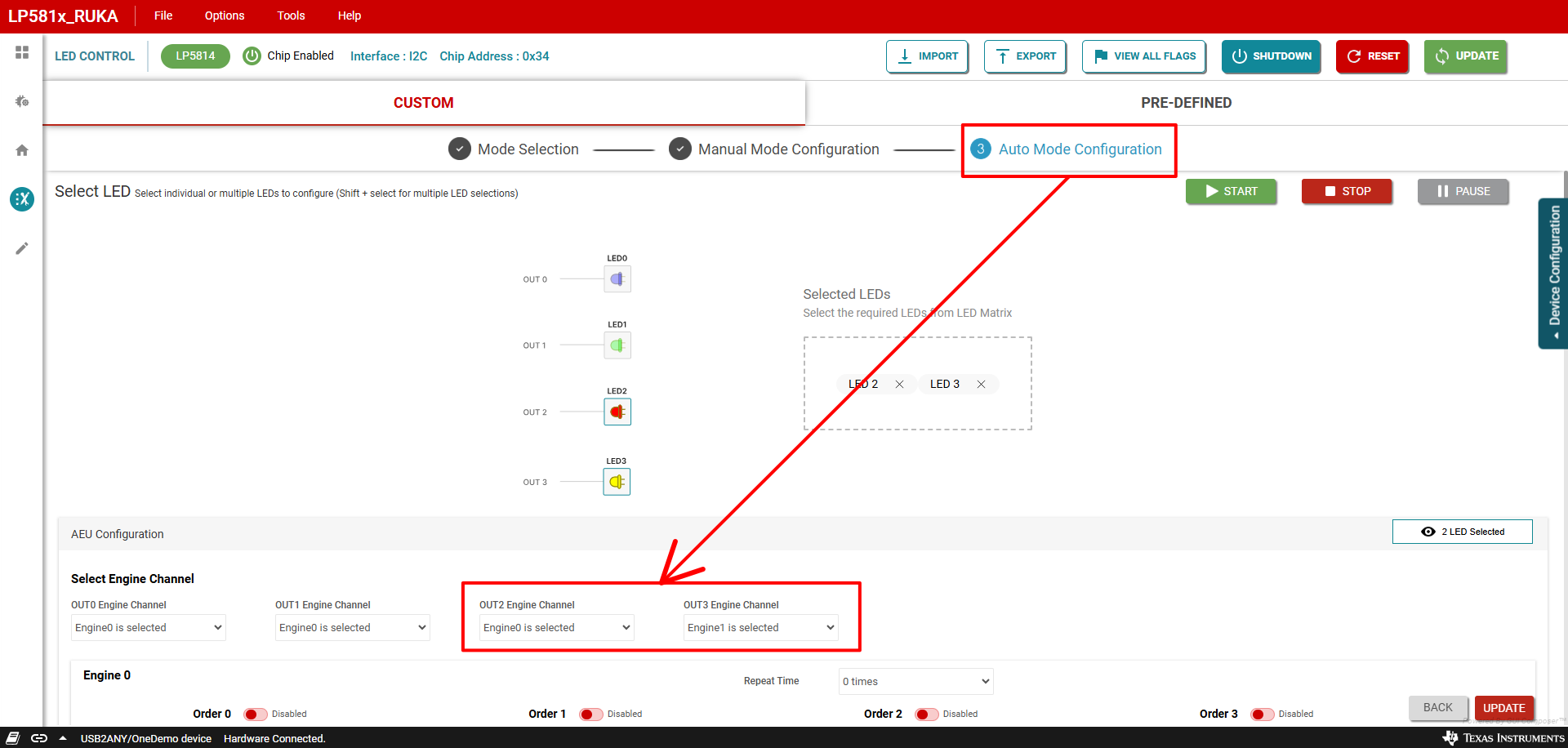
Figure 3-17 Engine Select -
Enable engine 0 order 0 through clicking the toggle button besides the Order 0 under Engine 0 control panel. Select pattern 0 for engine 0 order 0 through selecting the Pattern0 is selected item from the pulldown menu under the Order 0 as shown in Figure 3-18.
Enable engine 1 order 0 through clicking the toggle button besides the Order 0 under Engine 1 control panel. Select pattern 1 for engine 1 order 0 through selecting the Pattern1 is selected item from the pulldown menu under the Order 0 as shown in Figure 3-18.

Figure 3-18 Engine Order Enable -
Set the parameters of pattern 0 as the value shown in the Table 3-2 table.
Set the parameters of pattern 1 as the value shown in the Table 3-3 table.
Enter the values under the PATTERN 0 and PATTERN 1 control panels as shown in Figure 3-19.
Table 3-2 PATTERN0 5Hz Blinking ParametersAddress Register Set Value Description 1Ch PATTERN0_PAUSE_TIME 00h No pause time 1Dh PATTERN0_REPEAT_TIME 0Fh Infinite repeat times 1Eh PATTERN0_PWM0 FFh PATTERN0_PWM0 = FFh 1Fh PATTERN0_PWM1 FFh PATTERN0_PWM1 = FFh 20h PATTERN0_PWM2 00h PATTERN0_PWM2 = 0 21h PATTERN0_PWM3 00h PATTERN0_PWM3 = 0 22h PATTERN0_PWM4 00h PATTERN0_PWM4 = 0 23h PATTERN0_SLOPER_TIME1 02h PATTERN0_SLOPER_T1 = 0, PATTERN0_SLOPER_T0 = 0.1s 24h PATTERN0_SLOPER_TIME2 02h PATTERN0_SLOPER_T3 = 0, PATTERN0_SLOPER_T2 = 0.1s Table 3-3 PATTERN1 Breathing ParametersAddress Register Set Value Description 25h PATTERN1_PAUSE_TIME 00h No pause time 26h PATTERN1_REPEAT_TIME 0Fh Infinite repeat times 27h PATTERN1_PWM0 00h PATTERN1_PWM0 = 0 28h PATTERN1_PWM1 FFh PATTERN1_PWM1 = FFh 29h PATTERN1_PWM2 FFh PATTERN1_PWM2 = FFh 2Ah PATTERN1_PWM3 00h PATTERN1_PWM3 = 0 2Bh PATTERN1_PWM4 00h PATTERN1_PWM4 = 0 2Ch PATTERN1_SLOPER_TIME1 4Bh PATTERN1_SLOPER_T1 = 0.2s, PATTERN1_SLOPER_T0 = 1s 2Dh PATTERN1_SLOPER_TIME2 4Bh PATTERN1_SLOPER_T3 = 0.2s, PATTERN1_SLOPER_T2 = 1s 
Figure 3-19 Pattern Parameters Set - Finally, send start command to
start the configured patterns running on the red LED (OUT2) and white LED (OUT3)
through clicking the START button as shown in Figure 3-20.
The selected red LED starts blinking in 5Hz frequency and selected white LED starts breathing up and down after sending start command.

Figure 3-20 Start Command Send