SPRADP7A February 2025 – March 2025 AM62A3 , AM62A3-Q1 , AM62A7 , AM62A7-Q1 , AM67A , TDA4AEN-Q1
4.3 CSI-2 Rx Driver
The V4L2-compliant CSI-2 Rx driver, included in the Processor SDK, receives image data from the sensor and differentiates the RGB-dominant and IR-dominant streams based on the virtual channel numbers. The driver then stores each stream in DDR using dedicated DMA contexts. Two video device nodes are created in user space, allowing applications to retrieve the RGB-dominant and IR-dominant image data respectively. The data flow from the sensor to the video device nodes is modeled by the V4L2 framework as the media device topology. This topology can be displayed in text by the media-ctl --print command and visualized using the Linux dot utility.
Figure 4-2 shows the media device topology in text, based on SDK 10.1. This topology contains two streams from the sensor (ox05b 4-0036) to CSI-2 Rx (cdns_csi2rx.30101000.csi-bridge), then to the DMA wrapper (30102000.ticsi2rx). The DMA wrapper uses two DMA contexts to transfer the image data to DDR, with each context linked to a device node (/dev/video3 and /dev/video4). User-space applications can then access the raw image data from these two device nodes.
 Figure 4-2 Media Device Toplogy in
Text
Figure 4-2 Media Device Toplogy in
TextThe media device topology can also be visualized using the Linux dot utility. Run the following command on EVM to generate a dot file:
root@am62axx-evm:~# media-ctl --print-dot > media.dotThen run the following command on a Linux PC to generate a png image file, as shown below.
$ dot -Tpng media-top.dot -o media-top.png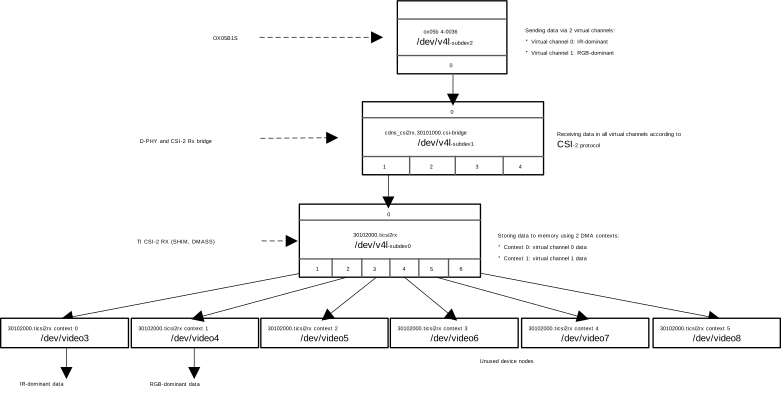 Figure 4-3 Media Device Topology
Visualization
Figure 4-3 Media Device Topology
VisualizationThe OX05B1S driver in the SDK configures the sensor to transmit IR-dominant data through virtual channel 0 and RGB-dominant data through virtual channel 1. DMA context 0 is used to store the data from virtual channel 0. As a result, the first video device node created by the CSI2 Rx driver (/dev/video3 in the example above) is used to receive IR-dominant data. Similarly, the second device node (/dev/video4 in the example above) is used to receive RGB-dominant data.