SPRUJ79 November 2024 F29H850TU , F29H859TU-Q1
- 1
- Read This First
- 1 ► C29x SYSTEM RESOURCES
- 2 F29x Processor
-
3 System Control and Interrupts
- 3.1 C29x System Control Introduction
- 3.2 System Control Functional Description
- 3.3 Resets
- 3.4 Safety Features
- 3.5 Clocking
- 3.6 Bus Architecture
- 3.7 32-Bit CPU Timers 0/1/2
- 3.8 Watchdog Timers
- 3.9 Low-Power Modes
- 3.10
Memory Subsystem (MEMSS)
- 3.10.1 Introduction
- 3.10.2 Features
- 3.10.3 Configuration Bits
- 3.10.4 RAM
- 3.10.5 ROM
- 3.10.6 Arbitration
- 3.10.7 Test Modes
- 3.10.8 Emulation Mode
- 3.11 System Control Register Configuration Restrictions
- 3.12
Software
- 3.12.1 SYSCTL Registers to Driverlib Functions
- 3.12.2 MEMSS Registers to Driverlib Functions
- 3.12.3 CPU Registers to Driverlib Functions
- 3.12.4 WD Registers to Driverlib Functions
- 3.12.5 CPUTIMER Registers to Driverlib Functions
- 3.12.6 XINT Registers to Driverlib Functions
- 3.12.7 LPOST Registers to Driverlib Functions
- 3.12.8 SYSCTL Examples
- 3.12.9 TIMER Examples
- 3.12.10 WATCHDOG Examples
- 3.12.11
LPM Examples
- 3.12.11.1 Low Power Modes: Device Idle Mode and Wakeup using GPIO - SINGLE_CORE
- 3.12.11.2 Low Power Modes: Device Idle Mode and Wakeup using Watchdog - SINGLE_CORE
- 3.12.11.3 Low Power Modes: Device Standby Mode and Wakeup using GPIO - SINGLE_CORE
- 3.12.11.4 Low Power Modes: Device Standby Mode and Wakeup using Watchdog - SINGLE_CORE
- 3.13
SYSCTRL Registers
- 3.13.1 SYSCTRL Base Address Table
- 3.13.2 DEV_CFG_REGS Registers
- 3.13.3 MEMSS_L_CONFIG_REGS Registers
- 3.13.4 MEMSS_C_CONFIG_REGS Registers
- 3.13.5 MEMSS_M_CONFIG_REGS Registers
- 3.13.6 MEMSS_MISCI_REGS Registers
- 3.13.7 CPU_SYS_REGS Registers
- 3.13.8 CPU_PER_CFG_REGS Registers
- 3.13.9 WD_REGS Registers
- 3.13.10 CPUTIMER_REGS Registers
- 3.13.11 XINT_REGS Registers
-
4 ROM Code and Peripheral Booting
- 4.1 Introduction
- 4.2 Device Boot Sequence
- 4.3 Device Boot Modes
- 4.4 Device Boot Configurations
- 4.5 Device Boot Flow Diagrams
- 4.6 Device Reset and Exception Handling
- 4.7 Boot ROM Description
- 4.8 Software
- 5 Lockstep Compare Module (LCM)
- 6 Peripheral Interrupt Priority and Expansion (PIPE)
-
7 Error Signaling
Module (ESM_C29)
- 7.1 Introduction
- 7.2 ESM Subsystem
- 7.3 ESM Functional Description
- 7.4 ESM Configuration Guide
- 7.5 Interrupt Condition Control and Handling
- 7.6 Software
- 7.7 ESM Registers
- 8 Error Aggregator
-
9 Flash Module
- 9.1 Introduction to Flash Memory
- 9.2 Flash Subsystem Overview
- 9.3 Flash Banks and Pumps
- 9.4 Flash Read Interfaces
- 9.5 Flash Erase and Program
- 9.6 Migrating an Application from RAM to Flash
- 9.7 Flash Registers
-
10Safety and Security Unit (SSU)
- 10.1 Introduction
- 10.2 Access Protection Ranges
- 10.3 LINKs
- 10.4 STACKs
- 10.5 ZONEs
- 10.6 SSU-CPU Interface
- 10.7 SSU Operation Modes
- 10.8 Security Configuration and Flash Management
- 10.9 Flash Write/Erase Access Control
- 10.10 RAMOPEN Feature
- 10.11 Debug Authorization
- 10.12 Hardcoded Protections
- 10.13 SSU Register Access Permissions
- 10.14 SSU Fault Signals
- 10.15 Software
- 10.16 SSU Registers
-
11Configurable Logic Block (CLB)
- 11.1 Introduction
- 11.2 Description
- 11.3 CLB Input/Output Connection
- 11.4 CLB Tile
- 11.5 CPU Interface
- 11.6 RTDMA Access
- 11.7 CLB Data Export Through SPI RX Buffer
- 11.8 CLB Pipeline Mode
- 11.9 Software
- 11.10 CLB Registers
- 12Dual-Clock Comparator (DCC)
- 13Real-Time Direct Memory Access (RTDMA)
-
14External Memory Interface (EMIF)
- 14.1 Introduction
- 14.2
EMIF Module Architecture
- 14.2.1 EMIF Clock Control
- 14.2.2 EMIF Requests
- 14.2.3 EMIF Signal Descriptions
- 14.2.4 EMIF Signal Multiplexing Control
- 14.2.5
SDRAM Controller and Interface
- 14.2.5.1 SDRAM Commands
- 14.2.5.2 Interfacing to SDRAM
- 14.2.5.3 SDRAM Configuration Registers
- 14.2.5.4 SDRAM Auto-Initialization Sequence
- 14.2.5.5 SDRAM Configuration Procedure
- 14.2.5.6 EMIF Refresh Controller
- 14.2.5.7 Self-Refresh Mode
- 14.2.5.8 Power-Down Mode
- 14.2.5.9 SDRAM Read Operation
- 14.2.5.10 SDRAM Write Operations
- 14.2.5.11 Mapping from Logical Address to EMIF Pins
- 14.2.6 Asynchronous Controller and Interface
- 14.2.7 Data Bus Parking
- 14.2.8 Reset and Initialization Considerations
- 14.2.9 Interrupt Support
- 14.2.10 RTDMA Event Support
- 14.2.11 EMIF Signal Multiplexing
- 14.2.12 Memory Map
- 14.2.13 Priority and Arbitration
- 14.2.14 System Considerations
- 14.2.15 Power Management
- 14.2.16 Emulation Considerations
- 14.3 EMIF Subsystem (EMIFSS)
- 14.4
Example Configuration
- 14.4.1 Hardware Interface
- 14.4.2
Software Configuration
- 14.4.2.1
Configuring the SDRAM Interface
- 14.4.2.1.1 PLL Programming for EMIF to K4S641632H-TC(L)70 Interface
- 14.4.2.1.2 SDRAM Timing Register (SDRAM_TR) Settings for EMIF to K4S641632H-TC(L)70 Interface
- 14.4.2.1.3 SDRAM Self Refresh Exit Timing Register (SDR_EXT_TMNG) Settings for EMIF to K4S641632H-TC(L)70 Interface
- 14.4.2.1.4 SDRAM Refresh Control Register (SDRAM_RCR) Settings for EMIF to K4S641632H-TC(L)70 Interface
- 14.4.2.1.5 SDRAM Configuration Register (SDRAM_CR) Settings for EMIF to K4S641632H-TC(L)70 Interface
- 14.4.2.2 Configuring the Flash Interface
- 14.4.2.1
Configuring the SDRAM Interface
- 14.5 Software
- 14.6 EMIF Registers
-
15General-Purpose Input/Output (GPIO)
- 15.1 Introduction
- 15.2 Configuration Overview
- 15.3 Digital Inputs on ADC Pins (AIOs)
- 15.4 Digital Inputs and Outputs on ADC Pins (AGPIOs)
- 15.5 Digital General-Purpose I/O Control
- 15.6 Input Qualification
- 15.7 PMBUS and I2C Signals
- 15.8 GPIO and Peripheral Muxing
- 15.9 Internal Pullup Configuration Requirements
- 15.10 Software
- 15.11 GPIO Registers
- 16Interprocessor Communication (IPC)
- 17Embedded Real-time Analysis and Diagnostic (ERAD)
- 18Data Logger and Trace (DLT)
-
19Waveform Analyzer Diagnostic
(WADI)
- 19.1 WADI Overview
- 19.2 Signal and Trigger Input Configuration
- 19.3 WADI Block
- 19.4 Safe State Sequencer (SSS)
- 19.5 Lock and Commit Registers
- 19.6 Interrupt and Error Handling
- 19.7 RTDMA Interfaces
- 19.8 Software
- 19.9 WADI Registers
-
20Crossbar (X-BAR)
- 20.1 X-BAR Related Collateral
- 20.2 Input X-BAR, ICL XBAR, MINDB XBAR,
- 20.3 ePWM , CLB, and GPIO Output X-BAR
- 20.4
Software
- 20.4.1 INPUT_XBAR Registers to Driverlib Functions
- 20.4.2 EPWM_XBAR Registers to Driverlib Functions
- 20.4.3 CLB_XBAR Registers to Driverlib Functions
- 20.4.4 OUTPUT_XBAR Registers to Driverlib Functions
- 20.4.5 MDL_XBAR Registers to Driverlib Functions
- 20.4.6 ICL_XBAR Registers to Driverlib Functions
- 20.4.7 XBAR Registers to Driverlib Functions
- 20.4.8 XBAR Examples
- 20.5 XBAR Registers
-
21Embedded Pattern
Generator (EPG)
- 21.1 Introduction
- 21.2 Clock Generator Modules
- 21.3 Signal Generator Module
- 21.4 EPG Peripheral Signal Mux Selection
- 21.5 Application Software Notes
- 21.6
EPG Example Use Cases
- 21.6.1 EPG Example: Synchronous Clocks with Offset
- 21.6.2 EPG Example: Serial Data Bit Stream (LSB first)
- 21.6.3 EPG Example: Serial Data Bit Stream (MSB first)
- 21.6.4 EPG Example: Clock and Data Pair
- 21.6.5 EPG Example: Clock and Skewed Data Pair
- 21.6.6 EPG Example: Capturing Serial Data with a Known Baud Rate
- 21.7 EPG Interrupt
- 21.8 Software
- 21.9 EPG Registers
- 22► ANALOG PERIPHERALS
- 23Analog Subsystem
-
24Analog-to-Digital Converter (ADC)
- 24.1 Introduction
- 24.2 ADC Configurability
- 24.3 SOC Principle of Operation
- 24.4 SOC Configuration Examples
- 24.5 ADC Conversion Priority
- 24.6 Burst Mode
- 24.7 EOC and Interrupt Operation
- 24.8 Post-Processing Blocks
- 24.9 Result Safety Checker
- 24.10 Opens/Shorts Detection Circuit (OSDETECT)
- 24.11 Power-Up Sequence
- 24.12 ADC Calibration
- 24.13 ADC Timings
- 24.14
Additional Information
- 24.14.1 Ensuring Synchronous Operation
- 24.14.2 Choosing an Acquisition Window Duration
- 24.14.3 Achieving Simultaneous Sampling
- 24.14.4 Result Register Mapping
- 24.14.5 Internal Temperature Sensor
- 24.14.6 Designing an External Reference Circuit
- 24.14.7 Internal Test Mode
- 24.14.8 ADC Gain and Offset Calibration
- 24.15
Software
- 24.15.1 ADC Registers to Driverlib Functions
- 24.15.2
ADC Examples
- 24.15.2.1 ADC Software Triggering - SINGLE_CORE
- 24.15.2.2 ADC ePWM Triggering - SINGLE_CORE
- 24.15.2.3 ADC Temperature Sensor Conversion - SINGLE_CORE
- 24.15.2.4 ADC Synchronous SOC Software Force (adc_soc_software_sync) - SINGLE_CORE
- 24.15.2.5 ADC Continuous Triggering (adc_soc_continuous) - SINGLE_CORE
- 24.15.2.6 ADC Continuous Conversions Read by DMA (adc_soc_continuous_dma) - SINGLE_CORE
- 24.15.2.7 ADC PPB Offset (adc_ppb_offset) - SINGLE_CORE
- 24.15.2.8 ADC PPB Limits (adc_ppb_limits) - SINGLE_CORE
- 24.15.2.9 ADC PPB Delay Capture (adc_ppb_delay) - SINGLE_CORE
- 24.15.2.10 ADC ePWM Triggering Multiple SOC - SINGLE_CORE
- 24.15.2.11 ADC Burst Mode - SINGLE_CORE
- 24.15.2.12 ADC Burst Mode Oversampling - SINGLE_CORE
- 24.15.2.13 ADC SOC Oversampling - SINGLE_CORE
- 24.15.2.14 ADC PPB PWM trip (adc_ppb_pwm_trip) - SINGLE_CORE
- 24.15.2.15 ADC Trigger Repeater Oversampling - SINGLE_CORE
- 24.15.2.16 ADC Trigger Repeater Undersampling - SINGLE_CORE
- 24.15.2.17 ADC Safety Checker - SINGLE_CORE
- 24.16 ADC Registers
- 25Buffered Digital-to-Analog Converter (DAC)
- 26Comparator Subsystem (CMPSS)
- 27► CONTROL PERIPHERALS
-
28Enhanced Capture (eCAP)
- 28.1 Introduction
- 28.2 Description
- 28.3 Configuring Device Pins for the eCAP
- 28.4 Capture and APWM Operating Mode
- 28.5
Capture Mode Description
- 28.5.1 Event Prescaler
- 28.5.2 Glitch Filter
- 28.5.3 Edge Polarity Select and Qualifier
- 28.5.4 Continuous/One-Shot Control
- 28.5.5 32-Bit Counter and Phase Control
- 28.5.6 CAP1-CAP4 Registers
- 28.5.7 eCAP Synchronization
- 28.5.8 Interrupt Control
- 28.5.9 RTDMA Interrupt
- 28.5.10 ADC SOC Event
- 28.5.11 Shadow Load and Lockout Control
- 28.5.12 APWM Mode Operation
- 28.5.13 Signal Monitoring Unit
- 28.6
Application of the eCAP Module
- 28.6.1 Example 1 - Absolute Time-Stamp Operation Rising-Edge Trigger
- 28.6.2 Example 2 - Absolute Time-Stamp Operation Rising- and Falling-Edge Trigger
- 28.6.3 Example 3 - Time Difference (Delta) Operation Rising-Edge Trigger
- 28.6.4 Example 4 - Time Difference (Delta) Operation Rising- and Falling-Edge Trigger
- 28.7 Application of the APWM Mode
- 28.8 Software
- 28.9 ECAP Registers
- 29High Resolution Capture (HRCAP)
-
30Enhanced Pulse Width Modulator (ePWM)
- 30.1 Introduction
- 30.2 Configuring Device Pins
- 30.3 ePWM Modules Overview
- 30.4
Time-Base (TB) Submodule
- 30.4.1 Purpose of the Time-Base Submodule
- 30.4.2 Controlling and Monitoring the Time-Base Submodule
- 30.4.3 Calculating PWM Period and Frequency
- 30.4.4 Phase Locking the Time-Base Clocks of Multiple ePWM Modules
- 30.4.5 Simultaneous Writes Between ePWM Register Instances
- 30.4.6 Time-Base Counter Modes and Timing Waveforms
- 30.4.7 Global Load
- 30.5 Counter-Compare (CC) Submodule
- 30.6 Action-Qualifier (AQ) Submodule
- 30.7 XCMP Complex Waveform Generator Mode
- 30.8 Dead-Band Generator (DB) Submodule
- 30.9 PWM Chopper (PC) Submodule
- 30.10 Trip-Zone (TZ) Submodule
- 30.11 Diode Emulation (DE) Submodule
- 30.12 Minimum Dead-Band (MINDB) + Illegal Combination Logic (ICL) Submodules
- 30.13 Event-Trigger (ET) Submodule
- 30.14 Digital Compare (DC) Submodule
- 30.15 ePWM Crossbar (X-BAR)
- 30.16
Applications to Power Topologies
- 30.16.1 Overview of Multiple Modules
- 30.16.2 Key Configuration Capabilities
- 30.16.3 Controlling Multiple Buck Converters With Independent Frequencies
- 30.16.4 Controlling Multiple Buck Converters With Same Frequencies
- 30.16.5 Controlling Multiple Half H-Bridge (HHB) Converters
- 30.16.6 Controlling Dual 3-Phase Inverters for Motors (ACI and PMSM)
- 30.16.7 Practical Applications Using Phase Control Between PWM Modules
- 30.16.8 Controlling a 3-Phase Interleaved DC/DC Converter
- 30.16.9 Controlling Zero Voltage Switched Full Bridge (ZVSFB) Converter
- 30.16.10 Controlling a Peak Current Mode Controlled Buck Module
- 30.16.11 Controlling H-Bridge LLC Resonant Converter
- 30.17 Register Lock Protection
- 30.18
High-Resolution Pulse Width Modulator (HRPWM)
- 30.18.1
Operational Description of HRPWM
- 30.18.1.1 Controlling the HRPWM Capabilities
- 30.18.1.2 HRPWM Source Clock
- 30.18.1.3 Configuring the HRPWM
- 30.18.1.4 Configuring High-Resolution in Deadband Rising-Edge and Falling-Edge Delay
- 30.18.1.5 Principle of Operation
- 30.18.1.6 Deadband High-Resolution Operation
- 30.18.1.7 Scale Factor Optimizing Software (SFO)
- 30.18.1.8 HRPWM Examples Using Optimized Assembly Code
- 30.18.2 SFO Library Software - SFO_TI_Build_V8.lib
- 30.18.1
Operational Description of HRPWM
- 30.19
Software
- 30.19.1 EPWM Registers to Driverlib Functions
- 30.19.2 HRPWMCAL Registers to Driverlib Functions
- 30.19.3
EPWM Examples
- 30.19.3.1 ePWM Trip Zone - SINGLE_CORE
- 30.19.3.2 ePWM Up Down Count Action Qualifier - SINGLE_CORE
- 30.19.3.3 ePWM Synchronization - SINGLE_CORE
- 30.19.3.4 ePWM Digital Compare - SINGLE_CORE
- 30.19.3.5 ePWM Digital Compare Event Filter Blanking Window - SINGLE_CORE
- 30.19.3.6 ePWM Valley Switching - SINGLE_CORE
- 30.19.3.7 ePWM Digital Compare Edge Filter - SINGLE_CORE
- 30.19.3.8 ePWM Deadband - SINGLE_CORE
- 30.19.3.9 ePWM DMA - SINGLE_CORE
- 30.19.3.10 ePWM Chopper - SINGLE_CORE
- 30.19.3.11 EPWM Configure Signal - SINGLE_CORE
- 30.19.3.12 Realization of Monoshot mode - SINGLE_CORE
- 30.19.3.13 EPWM Action Qualifier (epwm_up_aq) - SINGLE_CORE
- 30.19.3.14 ePWM XCMP Mode - SINGLE_CORE
- 30.19.3.15 ePWM Event Detection - SINGLE_CORE
- 30.20 EPWM Registers
-
31Enhanced Quadrature
Encoder Pulse (eQEP)
- 31.1 Introduction
- 31.2 Configuring Device Pins
- 31.3 Description
- 31.4 Quadrature Decoder Unit (QDU)
- 31.5 Position Counter and Control Unit (PCCU)
- 31.6 eQEP Edge Capture Unit
- 31.7 eQEP Watchdog
- 31.8 eQEP Unit Timer Base
- 31.9 QMA Module
- 31.10 eQEP Interrupt Structure
- 31.11 Software
- 31.12 EQEP Registers
-
32Sigma Delta Filter Module
(SDFM)
- 32.1 Introduction
- 32.2 Configuring Device Pins
- 32.3 Input Qualification
- 32.4 Input Control Unit
- 32.5 SDFM Clock Control
- 32.6 Sinc Filter
- 32.7 Data (Primary) Filter Unit
- 32.8 Comparator (Secondary) Filter Unit
- 32.9 Theoretical SDFM Filter Output
- 32.10 Interrupt Unit
- 32.11 Software
- 32.12 SDFM Registers
- 33► COMMUNICATION PERIPHERALS
-
34Modular Controller Area Network (MCAN)
- 34.1 MCAN Introduction
- 34.2 MCAN Environment
- 34.3 CAN Network Basics
- 34.4 MCAN Integration
- 34.5
MCAN Functional Description
- 34.5.1 Module Clocking Requirements
- 34.5.2 Interrupt Requests
- 34.5.3 Operating Modes
- 34.5.4 Transmitter Delay Compensation
- 34.5.5 Restricted Operation Mode
- 34.5.6 Bus Monitoring Mode
- 34.5.7 Disabled Automatic Retransmission (DAR) Mode
- 34.5.8 Clock Stop Mode
- 34.5.9 Test Modes
- 34.5.10 Timestamp Generation
- 34.5.11 Timeout Counter
- 34.5.12 Safety
- 34.5.13 Rx Handling
- 34.5.14 Tx Handling
- 34.5.15 FIFO Acknowledge Handling
- 34.5.16 Message RAM
- 34.6 Software
- 34.7 MCAN Registers
-
35EtherCAT®
SubordinateDevice Controller
(ESC)
- 35.1
Introduction
- 35.1.1 EtherCAT Related Collateral
- 35.1.2 ESC Features
- 35.1.3 ESC Subsystem Integrated Features
- 35.1.4 ESC versus Beckhoff ET1100
- 35.1.5 EtherCAT IP Block Diagram
- 35.1.6
ESC Functional Blocks
- 35.1.6.1 Interface to EtherCAT MainDevice
- 35.1.6.2 Process Data Interface
- 35.1.6.3 General-Purpose Inputs and Outputs
- 35.1.6.4 EtherCAT Processing Unit (EPU)
- 35.1.6.5 Fieldbus Memory Management Unit (FMMU)
- 35.1.6.6 Sync Manager
- 35.1.6.7 Monitoring
- 35.1.6.8 Reset Controller
- 35.1.6.9 PHY Management
- 35.1.6.10 Distributed Clock (DC)
- 35.1.6.11 EEPROM
- 35.1.6.12 Status / LEDs
- 35.1.7 EtherCAT Physical Layer
- 35.1.8 EtherCAT Protocol
- 35.1.9 EtherCAT State Machine (ESM)
- 35.1.10 More Information on EtherCAT
- 35.1.11 Beckhoff® Automation EtherCAT IP Errata
- 35.2
ESC and ESCSS Description
- 35.2.1 ESC RAM Parity and Memory Address Maps
- 35.2.2 Local Host Communication
- 35.2.3 Debug Emulation Mode Operation
- 35.2.4 ESC SubSystem
- 35.2.5 Interrupts and Interrupt Mapping
- 35.2.6 Power, Clocks, and Resets
- 35.2.7 LED Controls
- 35.2.8 SubordinateDevice Node Configuration and EEPROM
- 35.2.9 General-Purpose Inputs and Outputs
- 35.2.10 Distributed Clocks – Sync and Latch
- 35.3 Software Initialization Sequence and Allocating Ownership
- 35.4 ESC Configuration Constants
- 35.5 Software
- 35.6 ETHERCAT Registers
- 35.1
Introduction
-
36Fast Serial Interface
(FSI)
- 36.1 Introduction
- 36.2 System-level Integration
- 36.3
FSI Functional Description
- 36.3.1 Introduction to Operation
- 36.3.2 FSI Transmitter Module
- 36.3.3
FSI Receiver Module
- 36.3.3.1 Initialization
- 36.3.3.2 FSI_RX Clocking
- 36.3.3.3 Receiving Frames
- 36.3.3.4 Ping Frame Watchdog
- 36.3.3.5 Frame Watchdog
- 36.3.3.6 Delay Line Control
- 36.3.3.7 Buffer Management
- 36.3.3.8 CRC Submodule
- 36.3.3.9 Using the Zero Bits of the Receiver Tag Registers
- 36.3.3.10 Conditions in Which the Receiver Must Undergo a Soft Reset
- 36.3.3.11 FSI_RX Reset
- 36.3.4 Frame Format
- 36.3.5 Flush Sequence
- 36.3.6 Internal Loopback
- 36.3.7 CRC Generation
- 36.3.8 ECC Module
- 36.3.9 FSI-SPI Compatibility Mode
- 36.4 FSI Programing Guide
- 36.5 Software
- 36.6 FSI Registers
-
37Inter-Integrated Circuit Module (I2C)
- 37.1 Introduction
- 37.2 Configuring Device Pins
- 37.3
I2C Module Operational Details
- 37.3.1 Input and Output Voltage Levels
- 37.3.2 Selecting Pullup Resistors
- 37.3.3 Data Validity
- 37.3.4 Operating Modes
- 37.3.5 I2C Module START and STOP Conditions
- 37.3.6 Non-repeat Mode versus Repeat Mode
- 37.3.7 Serial Data Formats
- 37.3.8 Clock Synchronization
- 37.3.9 Clock Stretching
- 37.3.10 Arbitration
- 37.3.11 Digital Loopback Mode
- 37.3.12 NACK Bit Generation
- 37.4 Interrupt Requests Generated by the I2C Module
- 37.5 Resetting or Disabling the I2C Module
- 37.6
Software
- 37.6.1 I2C Registers to Driverlib Functions
- 37.6.2
I2C Examples
- 37.6.2.1 I2C Digital Loopback with FIFO Interrupts - SINGLE_CORE
- 37.6.2.2 I2C EEPROM - SINGLE_CORE
- 37.6.2.3 I2C Digital External Loopback with FIFO Interrupts - SINGLE_CORE
- 37.6.2.4 I2C Extended Clock Stretching Controller TX - SINGLE_CORE
- 37.6.2.5 I2C Extended Clock Stretching Target RX - SINGLE_CORE
- 37.7 I2C Registers
-
38Power Management Bus Module (PMBus)
- 38.1 Introduction
- 38.2 Configuring Device Pins
- 38.3
Target Mode
Operation
- 38.3.1 Configuration
- 38.3.2
Message Handling
- 38.3.2.1 Quick Command
- 38.3.2.2 Send Byte
- 38.3.2.3 Receive Byte
- 38.3.2.4 Write Byte and Write Word
- 38.3.2.5 Read Byte and Read Word
- 38.3.2.6 Process Call
- 38.3.2.7 Block Write
- 38.3.2.8 Block Read
- 38.3.2.9 Block Write-Block Read Process Call
- 38.3.2.10 Alert Response
- 38.3.2.11 Extended Command
- 38.3.2.12 Group Command
- 38.4
Controller Mode
Operation
- 38.4.1 Configuration
- 38.4.2
Message Handling
- 38.4.2.1 Quick Command
- 38.4.2.2 Send Byte
- 38.4.2.3 Receive Byte
- 38.4.2.4 Write Byte and Write Word
- 38.4.2.5 Read Byte and Read Word
- 38.4.2.6 Process Call
- 38.4.2.7 Block Write
- 38.4.2.8 Block Read
- 38.4.2.9 Block Write-Block Read Process Call
- 38.4.2.10 Alert Response
- 38.4.2.11 Extended Command
- 38.4.2.12 Group Command
- 38.5 Software
- 38.6 PMBUS Registers
-
39Universal Asynchronous Receiver/Transmitter (UART)
- 39.1 Introduction
- 39.2 Functional Description
- 39.3 Initialization and Configuration
- 39.4 Software
- 39.5 UART Registers
-
40Local Interconnect Network (LIN)
- 40.1 LIN Overview
- 40.2
Serial Communications Interface Module
- 40.2.1 SCI Communication Formats
- 40.2.2 SCI Interrupts
- 40.2.3 SCI RTDMA Interface
- 40.2.4 SCI Configurations
- 40.2.5 SCI Low-Power Mode
- 40.3
Local Interconnect Network Module
- 40.3.1
LIN Communication Formats
- 40.3.1.1 LIN Standards
- 40.3.1.2 Message Frame
- 40.3.1.3 Synchronizer
- 40.3.1.4 Baud Rate
- 40.3.1.5 Header Generation
- 40.3.1.6 Extended Frames Handling
- 40.3.1.7 Timeout Control
- 40.3.1.8 TXRX Error Detector (TED)
- 40.3.1.9 Message Filtering and Validation
- 40.3.1.10 Receive Buffers
- 40.3.1.11 Transmit Buffers
- 40.3.2 LIN Interrupts
- 40.3.3 Servicing LIN Interrupts
- 40.3.4 LIN RTDMA Interface
- 40.3.5 LIN Configurations
- 40.3.1
LIN Communication Formats
- 40.4 Low-Power Mode
- 40.5 Emulation Mode
- 40.6
Software
- 40.6.1 LIN Registers to Driverlib Functions
- 40.6.2
LIN Examples
- 40.6.2.1 LIN Internal Loopback with Interrupts - SINGLE_CORE
- 40.6.2.2 LIN SCI Mode Internal Loopback with Interrupts - SINGLE_CORE
- 40.6.2.3 LIN SCI MODE Internal Loopback with DMA - SINGLE_CORE
- 40.6.2.4 LIN Internal Loopback without interrupts (polled mode) - SINGLE_CORE
- 40.6.2.5 LIN SCI MODE (Single Buffer) Internal Loopback with DMA - SINGLE_CORE
- 40.7 LIN Registers
-
41Serial Peripheral Interface (SPI)
- 41.1 Introduction
- 41.2 System-Level Integration
- 41.3 SPI Operation
- 41.4 Programming Procedure
- 41.5
Software
- 41.5.1 SPI Registers to Driverlib Functions
- 41.5.2
SPI Examples
- 41.5.2.1 SPI Digital Loopback - SINGLE_CORE
- 41.5.2.2 SPI Digital Loopback with FIFO Interrupts - SINGLE_CORE
- 41.5.2.3 SPI Digital External Loopback without FIFO Interrupts - SINGLE_CORE
- 41.5.2.4 SPI Digital External Loopback with FIFO Interrupts - SINGLE_CORE
- 41.5.2.5 SPI Digital Loopback with DMA - SINGLE_CORE
- 41.6 SPI Registers
- 42Single Edge Nibble Transmission (SENT)
- 43► SECURITY PERIPHERALS
- 44Security Modules
- 45Revision History
19.4.1 SSS Configuration
The WADI's signal analysis block (see Figure 19-7) generates error events related to SIG1 and SIG2 that can be used to start the SSS block. The SSS block essentially provides a waveform pattern generation based off the WADI block signal analysis events. The SSS has custom configurations for how long to hold a signal low or high. The trigger or multiple trigger configuration block is how the SSS is enabled. The output event + output event trigger + duration + link configuration block are flexible settings that can be used to control the outputs, control which events triggers the outputs, control how long to hold the outputs in a high or low state, and allows cyclic signal generation. For example, if an error event occurs from the WADI block's signal analysis the SSS can output a pattern of high and low signals in a cyclic manner or perform the pattern of outputs once.
Each WADI's block signal analysis events can be used to start the SSS block. There are a total of eight configurable events (SSS_EVTnCFG[EVTn]) that can be used to compare against the trigger event (SSS_EVTTRIG) for SSS to start. Each configurable event holds the settings for all WADI blocks 1 to n. The trigger event triggers the start of the SSS if the trigger event matches one of the configured SSS events (SSS_EVTnCFG[EVTn]). Once the trigger event is met with the SSS event, the signal SIGn is overwritten with the configurations defined in the SSS output event configuration (SSS_BLKSOUTEVTnCFG[OUTEVTn]). The SSS output event can either set the output high or low. After defining the output event configurations, the SSS maps the output event to the WADI block's signal output.
 Figure 19-7 SSS High-Level Block
Diagram
Figure 19-7 SSS High-Level Block
DiagramSteps for output event configuration (see Figure 19-8) for WADI block 1 and 2 example:
- Configure what action to occur for output event 1-8 using SSS_BLKSOUTEVTnCFG[OUTEVTn]
- Configure which output events can control which block signals using SSS_BLK1_2OUTSEL[BLK1SIG1], SSS_BLK1_2OUTSEL[BLK1SIG2], SSS_BLK1_2OUTSEL[BLK2SIG1], SSS_BLK1_2OUTSEL[BLK2SIG2]
 Figure 19-8 Map Output Events to
BLKnSIGn
Figure 19-8 Map Output Events to
BLKnSIGnThere are four common ways to configure the SSS.
- Single trigger with single pattern output events: Used for single trigger based enabling of SSS
- Single trigger with cyclic pattern output events
- Multiple trigger with single pattern output events: Used for chaining event triggers before enabling SSS
- Multiple trigger with cyclic pattern output events
Figure 19-9 is a general diagram of configuring the SSS for single trigger with a single pattern of output events. Each output event can be configured to trigger on different events. For example, OUTEVT1 can be triggered on EVT1, EVT2, EVT3, and so on, using SSS_OUTEVTnTRIGCFG. To configure the duration of the output event, that is done through the SSS_OUTEVTnDUR.
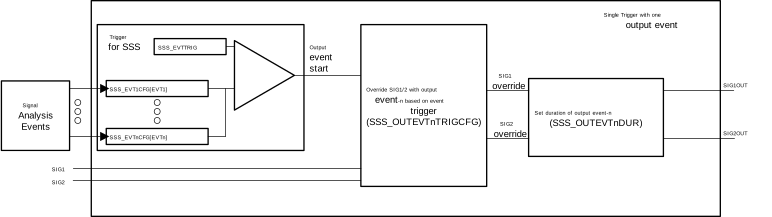 Figure 19-9 Single Trigger with Single
Pattern Output Event
Figure 19-9 Single Trigger with Single
Pattern Output EventEach output event has a fixed time of activation unless the output event is configured to be always high or low. This time is configured using the SSS_OUTEVTnDUR count that is configured by user and starts down-counting once trigger to activate the output event is met. Once the counter reaches 0, the output event is removed and delay word is reloaded for next activation. User can configure the count to 0xFF_FFFF, which is the maximum count and that is used to keep the output event continuously active. This is a special setting used for driving fixed value safe state output.
In case the subsequent sequence word is configured to be linked and shares the outputs, then make sure that before configuring the fixed overrides to 0xFF_FFFF (to delay count), the configuration either changes the output sharing or link condition of subsequent sequence word to avoid an unpredictable condition.
By hardware design, the delay condition overrides and the subsequent sequence word steps are ignored if delay count is configured to be 0xFF_FFFF.
If the second trigger to occur while sequence word is active then count is re-initialized to configured count and down-count is restarted again. Thus extending the sequence word application to related outputs.
Sequence delay setting is an independent word for each sequence word, SSS_SEQUENCE_DELAYx. The setting is a 24-bit setting that allows a delay of up to 40ms (400MHz input clock - without division) that is sufficient to drive the intermediate state of switch activations in present topologies.
Figure 19-10 shows multiple trigger with single pattern output events.
For configuring multiple triggers, in Figure 19-10, EVT1 must occur before moving onto the second event trigger. Once that event has occurred, then EVT2 must happen for the SSS to start.
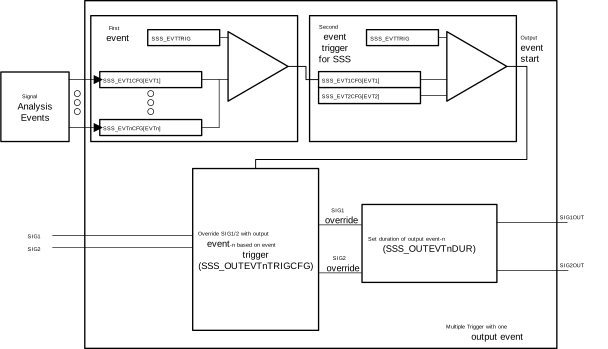 Figure 19-10 Multiple Trigger with Single
Pattern Output Events
Figure 19-10 Multiple Trigger with Single
Pattern Output EventsFigure 19-11 shows a multiple trigger configuration before the start of the SSS and linking output events to each other to generate a single pattern of output events. For example, if the desired output is four output events high, low, high, low, the SSS can do this with linking output events to one another. The linking can be done through the SSS_OUTPUTEVTnLINKCFG.
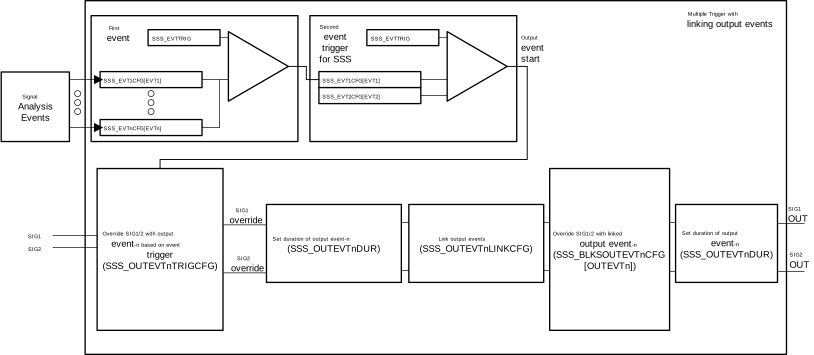 Figure 19-11 Linking Output Events for
Generating Pattern Output Events
Figure 19-11 Linking Output Events for
Generating Pattern Output Events
To generate a cyclic pattern of output events, Figure 19-12, you can do so by linking the output events in a circular fashion. For example if the waveform generation pattern requires a continuous cyclic pattern of high, low, high, low. The output events 1, 2, 3, 4 can be used. Then linking output events 1 → 2 , 2 → 3, 3 → 4, then configure output event 1's link to be output event's 4. This creates the cycle of the pattern generation to continuously output this linking of output events.
 Figure 19-12 Multiple Trigger with Cyclic
Pattern Output Events
Figure 19-12 Multiple Trigger with Cyclic
Pattern Output EventsConfiguration of multiple triggers
In intricate switch topologies, a single event can not reflect the full condition to trigger the SSS. The topology can need two or more states to fully detect the failure condition before starting the safe state sequences. In such cases, the SSS allows linking multiple trigger events together. The register to configure multiple triggers is SSS_TRIGEVT1_4CFG and SSS_TRIGEVT5_8CFG.
| Event Word Select Combination | Words Combination for Sequences | Trigger Numbering | Action for Event Word Compare | |||
|---|---|---|---|---|---|---|
| Event 4 | Event 3 | Event 2 | Event 1 | Trig# (EVT#, next EVT#,...) | ||
| 0 | 0 | 0 | 0 | 0 | NA | None of the event words are used and safe-sequencer is not used. |
| 1 | 1 | 1 | 1 | 1+1+1+1 | T4(EVT4), T3(EVT3), T2(EVT2), T1(EVT1) | Each event trigger is independently configured and has individual sequence. |
| 0 | 1 | 1 | 1 | 1+1+1 | T3(EVT3), T2(EVT2), T1(EVT1) | Three triggers based on event as shown, fourth word is not used. |
| 0 | 0 | 1 | 1 | 1+1 | T2(EVT2), T1(EVT1) | Two triggers based on trigger event as shown. |
| 0 | 0 | 0 | 1 | 1 | T1(EVT1) | One trigger is used based on Event 1. |
| 1 | 1 | 1 | 9 | 1+1+2 | T3(EVT4), T2(EVT3), T1(EVT1, EVT2) | Two of the events are used together and other two triggers are independent triggers. Create up-to 3 possible event triggers. |
| 0 | 1 | 1 | 9 | 1+2 | T2(EVT3), T1(EVT1, EVT2) | Two triggers. One independent trigger and the other on event 1 and event 2 occurring. |
| 0 | 0 | 1 | 9 | 2 | T1(EVT1, EVT2) | Single trigger based on event 1 followed by event 2. |
| 1 | 9 | 1 | 9 | 2+2 | T2(EVT3, EVT4), T1(EVT1, EVT2) | Two pairs of events independently checked as two o/p sequences are correspondingly triggered independently. Event order applicable only between consecutive numbers 1 and 2. |
| 1 | 1 | 9 | 9 | 1+3 | T2(EVT4), T1(EVT1, EVT2, EVT3) | Three trigger events are linked and can be checked in order 1, 2, then 3. The fourth event word is independent. Thus two possible triggers. |
| 0 | 1 | 9 | 9 | 3 | T1(EVT1, EVT2, EVT3) | 3 trigger events |
| 1 | 9 | 9 | 9 | 4 | T1 (EVT1, EVT2, EVT3, EVT4) | All 4 events are indicated in consecutive increasing order. Events are checked in order. |
| Any other combination | Sequence as per configuration | Events linked is 0x9 | In case 0x1, the trigger word can cause the trigger. In case 0x9, the trigger word can relay the event to next event in order. | |||
The SSS does not have to be used, and output can be driven by WADI block instead. However both settings are not to be used simultaneously.