SNLU324 March 2023
2.1 Software Installation Sequence
- Install the TI Latte main installer. Follow all
the instructions within the installer execution process. The installer will
install the following:
- Latte 5.2.3 – Core
- FTDI Driver (CDM21228_Setup.exe)
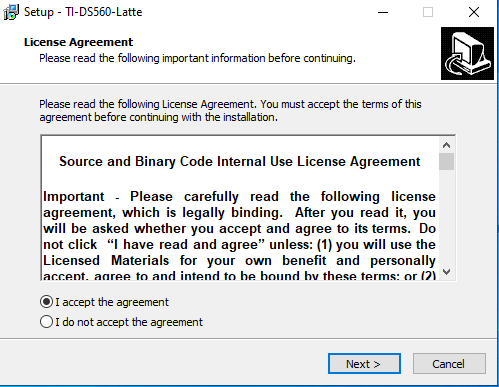 Figure 2-1 Latte Installer Window
to Start Process
Figure 2-1 Latte Installer Window
to Start ProcessSelect the destination location for latte core as “C:\Program Files\Texas Instruments\DS560Latte”.
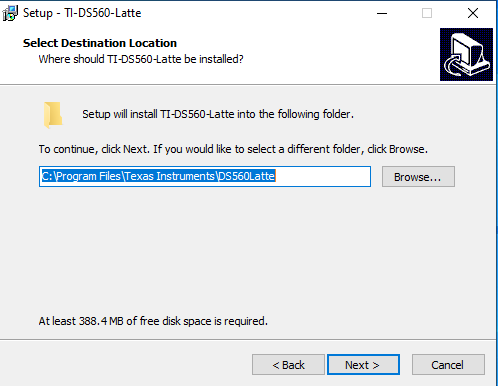 Figure 2-2 Latte Installer Window
to Select the Destination Folder
Figure 2-2 Latte Installer Window
to Select the Destination FolderSelect project directory as “C:\Users\<User ID>\Documents\Texas Instruments\DS560Latte”.
Replace the <User ID> with the proper Windows login ID.
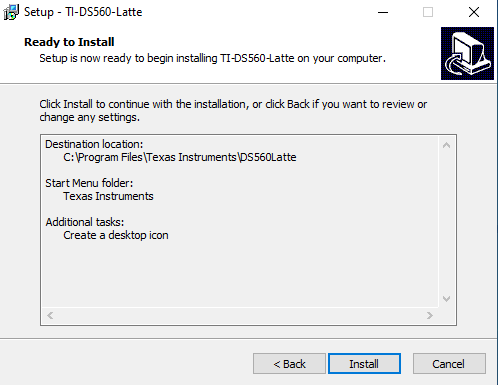 Figure 2-3 Latte Installation
Window Prior to Launch of Install
Figure 2-3 Latte Installation
Window Prior to Launch of InstallContinue the installation setup to complete FTDI Driver installation
- Install the Latte Libraries updater. Follow all
the instructions within the installer execution process. The installer will
install the Latte device library required for configuring DS560DF410EVM
Select project directory as “C:\Users\<User ID>\Documents\Texas Instruments\DS560Latte”.
Replace the <User ID> with the proper Windows login ID.
Note: TI may update both the base Latte software and
the DS560 Latte Library to add features and optimizations.