SLUUCQ5 March 2023 BQ28Z620
-
1BQ28Z620EVM 1- to 2-Series Li-Ion Battery Pack Manager Evaluation Module
- 1.1 Features
- 1.2 BQ28Z620EVM Quick Start Guide
- 1.3 Battery Management Studio
- 1.4 Circuit Module Physical Layouts and Bill of Materials
- 2Revision History
1.3.8 Advanced Comm I2C Screen
Press the Advanced Comm I2C button to select the Advanced Comm I2C window. This tool provides access to parameters using I2C and Manufacturing Access commands. See Figure 1-11. The transaction log screen shows the history of sent commands.
Note:
I2C commands are sent in Little Endian format.
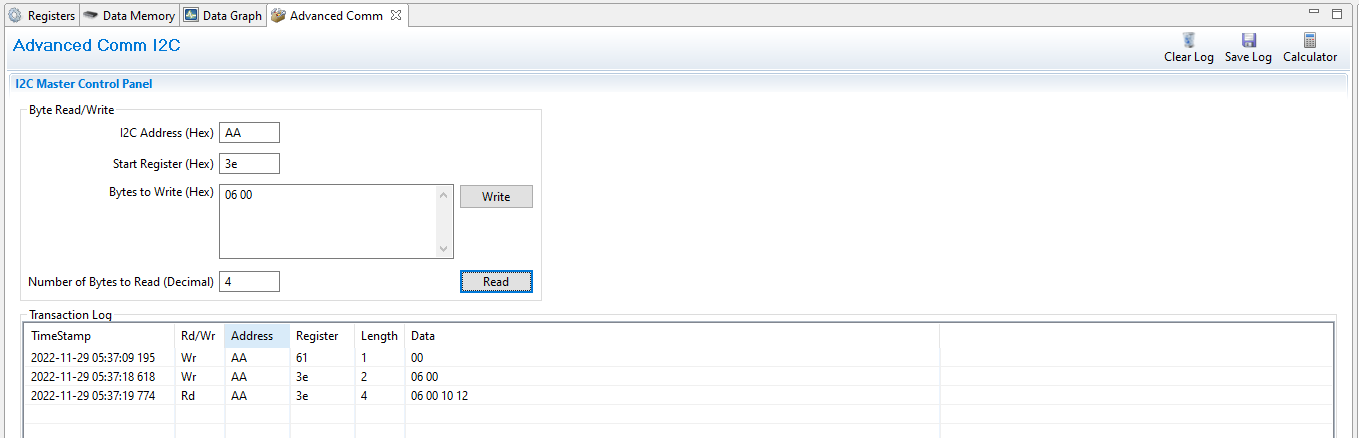 Figure 1-11 Advanced Comm I2C Screen
Examples:
Reading an I2C Command.
- Read chemical ID (0x 0006).
- Make sure the device is unsealed
- Write 0x00 using BlockDataControl() command (0x61) to enable block data flash control. (wr 0x61 0x00)
- Write to mac address 0x3e Command 0x06 0x00 (see Figure 1-11).
- Read 4 bytes.
- The result returned is 0x10 0x12, which is little endian for chem id 1210.
Sending a MAC Gauging() to enable IT via ManufacturerAccess().
- With Impedance Track™ disabled, send Gauging() (0x0021) to ManufacturerAccess().
- Write to mac address 0x3e command 0x21 0x00 (see Figure 1-11).