SLYA093 September 2025 TMAG3001 , TMAG5253
3.1 Simulating Keypress Design
When designing a keyboard switch that uses a Hall-effect sensor, a key consideration is the magnetic sensing range of the sensor. To avoid saturation and be able to sense the full range of the keypress, a sensor that is able encompass the full magnetic range for the key must be chosen. The best way to make sure that the correct device variant is chosen for the application is with a magnetic simulation. Texas Instruments offers a magnetic sense simulator, called Texas Instruments Magnetic Sense Simulator (TIMSS), to help streamline the design process. With this tool, users can specify the type of magnet movement, shown in Figure 3-1, as well as what kind of magnet shape to use which is shown in Figure 3-2.
 Figure 3-1 Magnet Function Selection
 Figure 3-2 Magnet Type Selection
For the purpose of simulating a keyboard keypress design in TIMSS, an axial cylinder magnet moving linearly will be selected. From here, users can select which TI Hall-effect sensor to use in the simulation. Figure 3-3 shows an example of a common keyboard magnetic switch that gets used in keyboard applications. For these magnetic switches, the bottom of the magnet sits about 6.1mm away from the top of the sensor when unpressed. The magnet then moves about 4mm down as this is being pressed and sits 2.1mm away from the top of the sensor when fully pressed. The magnet is an axial cylinder magnet with remanence equal to that of a YX18 samarium cobalt magnet and has a diameter of roughly 2.818mm and a height of about 3.387mm. These magnet inputs are shown in Figure 3-4 along with the sensor inputs which are shown in Figure 3-5. The magnet's position, shown in Figure 3-4, is with regard to the magnet's center from the origin (0,0,0). Hence, make sure that the distance from the bottom of the magnet to the top of the sensor is correct, half of the magnet's height, 1.6935mm, needs to be added to the magnet's origin position, which is 6.1mm when unpressed, and final position, which is 2.1mm when fully pressed. Regarding the sensor's position, shown in Figure 3-5, the sensor is orientated such that the bottom of the sensor is facing the magnet with the bottom center of the package being placed at the origin.
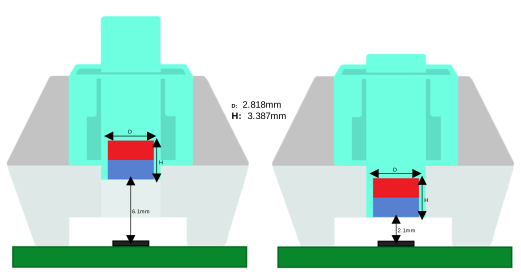 Figure 3-3 Common Keypress Application
 Figure 3-4 Keypress Magnet Input
 Figure 3-5 Keypress Sensor Input
Figure 3-6 shows the results of the TMAG5253BA3 variant which has a magnetic range of ±80mT and a typical sensitivity of 15mV/mT. From Figure 3-6, a steady increase in the magnetic field as this approaches the sensor can be observed.
 Figure 3-6 TMAG5253BA3 Keypress Results
Also, Figure 3-7 shows the results from the TMAG5253BA4 variant which has an increased magnetic range of ±160mT with a lower sensitivity of 7.5mV/mT. Comparing the results from the Device Output plots of Figure 3-6 and Figure 3-7 together, the TMAG5253BA3 provides greater granularity than the TMAG5253BA4 which allows for more precise movement tracking.
 Figure 3-7 TMAG5253BA4 Keypress Results
Figure 3-8 shows the results from the TMAG5253BA2 variant which has a smaller magnetic range of ±40mT and an increased sensitivity of 30mV/mT when compared to the TMAG5253BA3 variant. However, from the Device Output 1 plot shown in Figure 3-8, when the magnet gets pretty close to the sensor, saturation occurs. If the TMAG5253BA2 variant were to be selected, there can be a period of time where no useful magnetic data can be observed due to this saturation.
 Figure 3-8 TMAG5253BA2 Keypress Results
Based on the results observed in Figure 3-6, Figure 3-7, and Figure 3-8, the variant that can allow for the highest sensitivity with no saturation can be the TMAG5253BA3 variant.