SNLU223D August 2017 – February 2023
- DS90UB954-Q1EVM Deserializer User's Guide
- 1 Trademarks
- 2 Introduction
- 3 Quick Start Guide
- 4 DS90UB954-Q1EVM Board Configuration
- 5 Enable and Reset
- 6 Use with DS90UB936-Q1
- 7 Typical Connection and Test Equipment
- 8 Termination Device
- 9 Typical Test Setup
- 10Equipment References
- 11Cable References
- 12Software for DS90UB954Q1-EVM Evaluation - Analog LaunchPAD (ALP) Software Setup
- 13Using ALP and DS90UB954 Profile
- 14Troubleshooting ALP Software
- 15DS90UB954-Q1EVM PCB Schematics, Layout and Bill of Materials - DS90UB954-Q1EVM Schematic
- 16DS90UB954-Q1 EVM PCB Layout
- 17DS90UB954-Q1EVM Bill of Materials
- 18Revision History
14.1 ALP Does Not Detect The EVM
If the following window opens after starting the ALP software, double check the hardware setup.
 Figure 14-1 ALP No Devices Error
It may also be that the USB2ANY driver is not installed. Check the device manager. There should be a “HID-compliant device” under the “Human Interface Devices” as shown in #SNLU2239371.
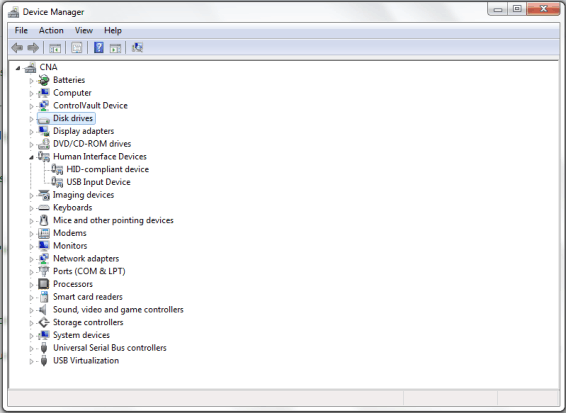 Figure 14-2 Windows 7, ALP USB2ANY Driver
The software should start with only “DS90UB954” in the “Devices” pull down menu. If there are more devices then the software is most likely in demo mode. When the ALP is operating in demo mode there is a “(Demo Mode)” indication in the lower left of the application status bar as shown in #SNLU2237984.
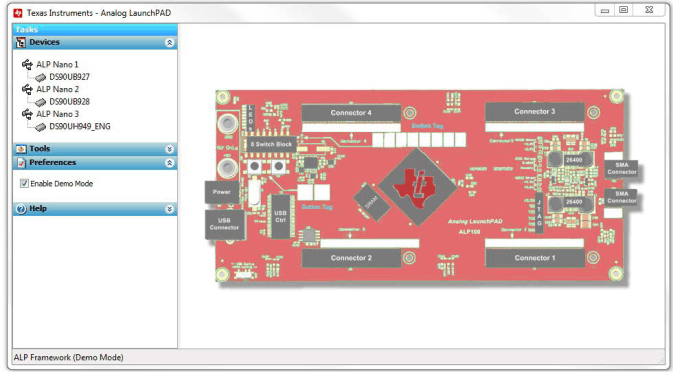 Figure 14-3 ALP in Demo Mode
Disable the demo mode by selecting the “Preferences” pull down menu and un-checking “Enable Demo Mode”.
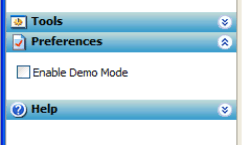 Figure 14-4 ALP Preferences Menu
After demo mode is disabled, the ALP software will poll the ALP hardware. The ALP software will update and have only “DS90UB954” under the “Devices” pull down menu.