SPMA080 April 2021 TM4C1292NCPDT , TM4C1292NCPDT , TM4C1292NCZAD , TM4C1292NCZAD , TM4C1294KCPDT , TM4C1294KCPDT , TM4C1294NCPDT , TM4C1294NCPDT , TM4C1294NCZAD , TM4C1294NCZAD , TM4C1299KCZAD , TM4C1299KCZAD , TM4C1299NCZAD , TM4C1299NCZAD , TM4C129DNCPDT , TM4C129DNCPDT , TM4C129DNCZAD , TM4C129DNCZAD , TM4C129EKCPDT , TM4C129EKCPDT , TM4C129ENCPDT , TM4C129ENCPDT , TM4C129ENCZAD , TM4C129ENCZAD , TM4C129LNCZAD , TM4C129LNCZAD , TM4C129XKCZAD , TM4C129XKCZAD , TM4C129XNCZAD , TM4C129XNCZAD
- Trademarks
- 1 Introduction
- 2 Application Examples
- 3 Application Setup
- 4 Download and Import the Ethernet Examples
- 5 How to Create an Ethernet Application for TI-RTOS NDK
- 6 Enet_tcpecho_server_tirtos Example Overview
- 7 Enet_udpecho_server_tirtos Example Overview
- 8 Enet_httpServer_tirtos Example Overview
- 9 Enet_dns_tirtos Example Overview
- 10Enet_sntp_tirtos Example Overview
- 11Enet_tcpecho_client_tirtos Example Overview
- 12Enet_udpecho_client_tirtos Example Overview
- 13Enet_httpget_tirtos Example Overview
- 14References
8.3 Adding HTTP Server Content
All the html pages for this example are stored in the “fs” directory of the project, see Figure 8-4. These html files form the web pages to be served by the web server.
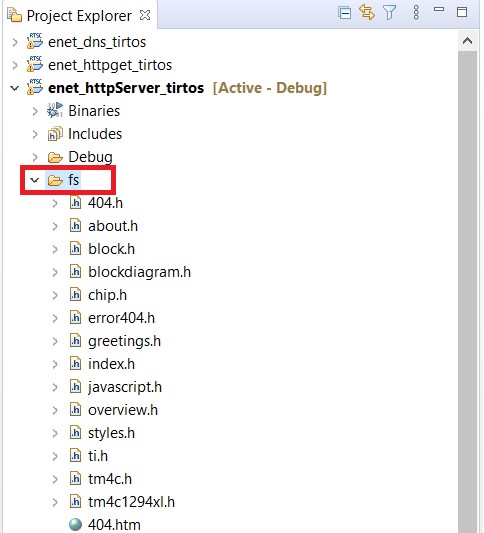 Figure 8-4 File System Directory
 The html web pages must be first converted from their binary HTML files into data arrays declared in C. An MS-DOS utility “binsrc” is supplied in the NDK package to allow conversion of files to a C array. The binsrc utility can be found in <TI-RTOS Installation>\products\ndk_2_25_00_09\packages\ti\ndk\tools\binsrc\binsrc.exe.
The calling format for binsrc is:
>binsrc <input file name> <output file name> <identifier>Parameters:
- Input file name: File to be converted
- Output file name: Name for file containing C data representation of the input file name
- Identifier: C name for data
For example, to convert an HTML file index.html for use by EFS, the following command could be executed from the Windows command window:
>binsrc index.html index.h INDEXThe index.html after conversion to index.h would contain the following as shown in Figure 8-5.
- The index.h file defines the size of the file to be 1932 bytes. Later we will look at Wireshark to confirm that the web server indeed transfers the same number of bytes in its HTTP response to the client.
- The INDEX character array begins with <!DOCTYPE HTML>. Open a text editor to read the first line of index.html and you can confirm that it is the same as what was stored in the INDEX array.
- Look at the content of the next few bytes in the INDEX array and it encodes <!—Copyright © 2013-2021 Texas Instruments Incorporated. All rights…..>. Again, compare it with the index.html and confirm that index.h is a binary representation of the index.html.
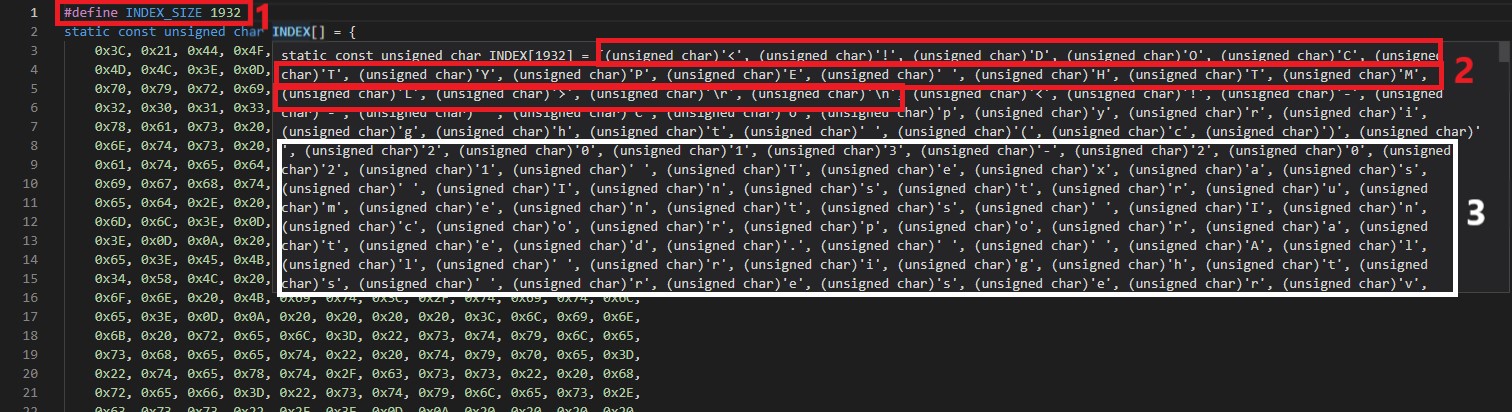 Figure 8-5 Index.html Binary File
Content
Figure 8-5 Index.html Binary File
Content