SWRU271I October 2010 – January 2020 CC2540 , CC2540T , CC2541 , CC2541-Q1 , CC2640R2F
- Preface
- 1Overview
- 2The TI Bluetooth Low Energy Software Development Platform
- 3The Operating System Abstraction Layer (OSAL)
- 4The Application and Profiles
-
5The Bluetooth Low Energy Protocol Stack
- 5.1 Overview
- 5.2 Generic Access Profile (GAP)
- 5.3 GAPRole Task
- 5.4 Gap Bond Manager (GAPBondMgr)
- 5.5
Generic Attribute Profile (GATT)
- 5.5.1 GATT Characteristics and Attributes
- 5.5.2 GATT Services and Profile
- 5.5.3 GATT Client Abstraction
- 5.5.4 GATT Server Abstraction
- 5.6 L2CAP
- 5.7 HCI
- 5.8 Library Files
- 6Drivers
- 7Creating a Custom Bluetooth Low Energy Application
- 8Development and Debugging
-
9General Information
- 9.1 Overview
- 9.2 Porting From BLE-Stack 1.5.0 to 1.5.1
- 9.3 Porting From BLE-Stack 1.4.2 to 1.5.0
- 9.4
Porting From Earlier BLE-Stack Versions
- 9.4.1 Porting BLEv1.4.1 Projects to BLEv1.4.2
- 9.4.2 Porting BLEv1.4.0 Projects to BLEv1.4.1
- 9.4.3 Porting BLEv1.3.2 Projects to BLEv1.4.0
- 9.4.4 Porting BLEv1.2 Projects to BLEv1.3
- 9.4.5 Porting From CC2540 to CC2541 Project
- 9.5 Release Notes History
- 9.6 Document History
- A GAP API
- B GAPRole Peripheral Role API
- C GAPRole Central Role API
- D GATT/ATT API
- E GATTServApp API
- F GAPBondMgr API
- G HCI Extension API
- Revision History
8.3.3 Building and Debugging a Project
To build a project, do the following:
- Right-click on the workspace name, see Figure 8-7.
- Click Make or press F7.
- To download the compiled code onto a CC2540/41 device and debug, connect the keyfob using a hardware debugger (such as the CC Debugger included with the CC2540/41DK-MINI development kit) connected to the PC over USB.
- Find the Debug button on the upper-right side of the IAR window, see Figure 8-8.
- Select a device.
- Click the Go button on the toolbar to execute the program, see Figure 8-10.
- Click the Stop Debugging button to leave debugging mode.
- While the program executes, disconnect the hardware debugger from the CC2540/41.
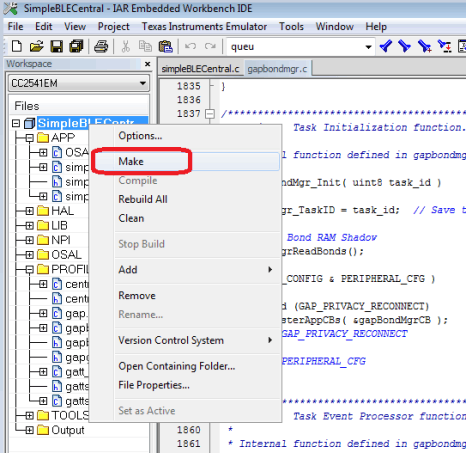 Figure 8-7 Building a Project
 NOTE
This action compiles the source code, links the files, and builds the project. Any compiler errors or warnings appear in the Build window.
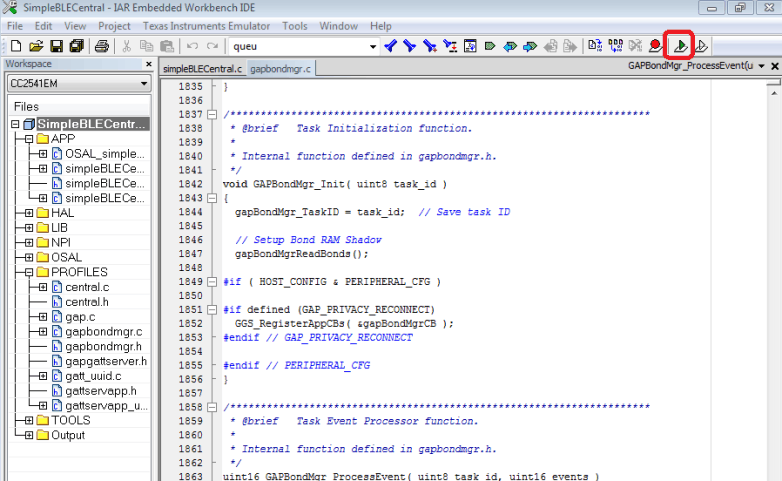 Figure 8-8 Debug Button in IAR
 NOTE
If there are multiple debug devices connected, Figure 8-9 appears to select a device
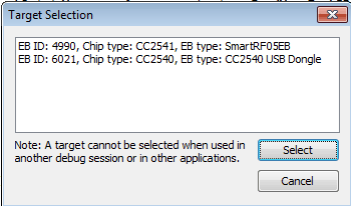 Figure 8-9 Target Selection
 NOTE
After selecting a device, the code downloads. When the code is downloaded, a toolbar with the debug commands appears in the upper-left corner of the screen.
Figure 8-10 shows both of these buttons:
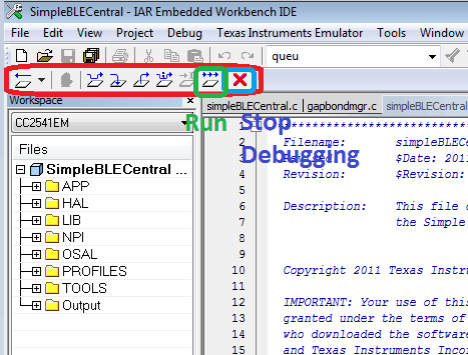 Figure 8-10 IAR Debug Toolbar
 The debugger runs while the device remains powered.