SWRU497B August 2019 – December 2021 CC2564C
5.1 Setting Up the Hardware
To set up the hardware, do as follows:
- Fit the CC256XCQFN-EM on the EM BoosterPack Adapter (BOOST-CCEMADAPTER).
- Stack the BOOST-CCEMADAPTER onto the MSP432 LaunchPad
(MSP-EXP432P401R). Note: The boards must be set to their default settings.
For more information on the jumper positions and default settings for the BOOST-CCEMADAPTER, see the CC256XCQFNEM Quick Start Guide and the Dual-Mode Bluetooth CC2564C QFN EM User's Guide. For jumper positions and configurations for the MSP-EXP432P401R development kit, see the MSP432 LaunchPad Development Kit User's Guide.
Ensure that the connectors of the LaunchPad and the BOOST-CCEMADAPTER are aligned.
- To use the CC3200AUDBOOST device for audio and voice
applications (optional), do as follows:
- Ensure that the directions of the PCM signals are
properly set on the CC256XCQFN-EM to evaluate audio and voice sample
applications. The directions of the PCM signals can be configured so
that the PCM port on the CC2564C device is either PCM master or PCM
slave, depending on the sample application. See Table 5-1 to ensure that the R18, R19, and R11 on the CC256XCQFN-EM are
properly configured for complete evaluation of the audio and voice
sample applications. Table 5-1 CC256XCQFN-EM PCM Direction for Audio and Voice Sample Applications
Demo Name CC256XCQFN-EM
PCM RoleR18(1) R19(1) R11(1) A3DP Demo_SNK Master (Default) DNI 10K Ω 0 Ω or DNI A3DP Demo_SRC,
HFP Demo_AG,
HFP Demo_HF,
and HSP DemoMaster DNI 10K Ω DNI (1) DNI indicates Do not install.Figure 5-1 shows the position of the R18, R19, and R11 resistors on the CC256XCQFN-EM board.
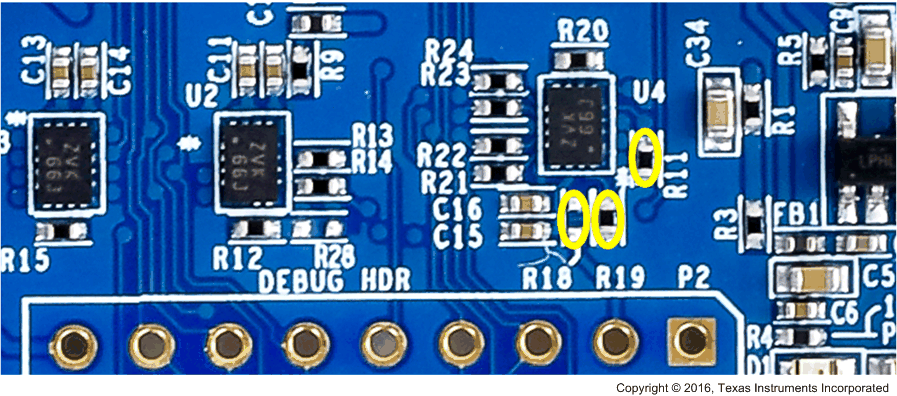 Figure 5-1 CC256XCQFN-EM
PCM Role Selection for Audio and Voice Sample
Applications
Figure 5-1 CC256XCQFN-EM
PCM Role Selection for Audio and Voice Sample
ApplicationsFor more details regarding the PCM role selection on the CC256XCQFN-EM board, refer to CC256xCQFN-EM User's Guide and Dual-Mode Bluetooth® CC2564CQFN-EM Evaluation Board.
- Connect the CC3200AUDBOOST audio codec board to the BOOST-CCEMADAPTER and the MSP-EXP432P401R, as shown in Figure 5-2.
Note:Because the BOOST-CCEMADAPTER and CC3200AUDBOOST BoosterPack pinouts conflict with each other, the CC3200AUDBOOST cannot be stacked on the MSP432 LaunchPad while the BOOST-CCEMADAPTER is being used. Minor prototyping and jumper wire connections are required to connect the CC3200AUDBOOST with the BOOST-CCEMADAPTER and the MSP-EXP432P401R.
- Ensure that the directions of the PCM signals are
properly set on the CC256XCQFN-EM to evaluate audio and voice sample
applications. The directions of the PCM signals can be configured so
that the PCM port on the CC2564C device is either PCM master or PCM
slave, depending on the sample application. See Table 5-1 to ensure that the R18, R19, and R11 on the CC256XCQFN-EM are
properly configured for complete evaluation of the audio and voice
sample applications.
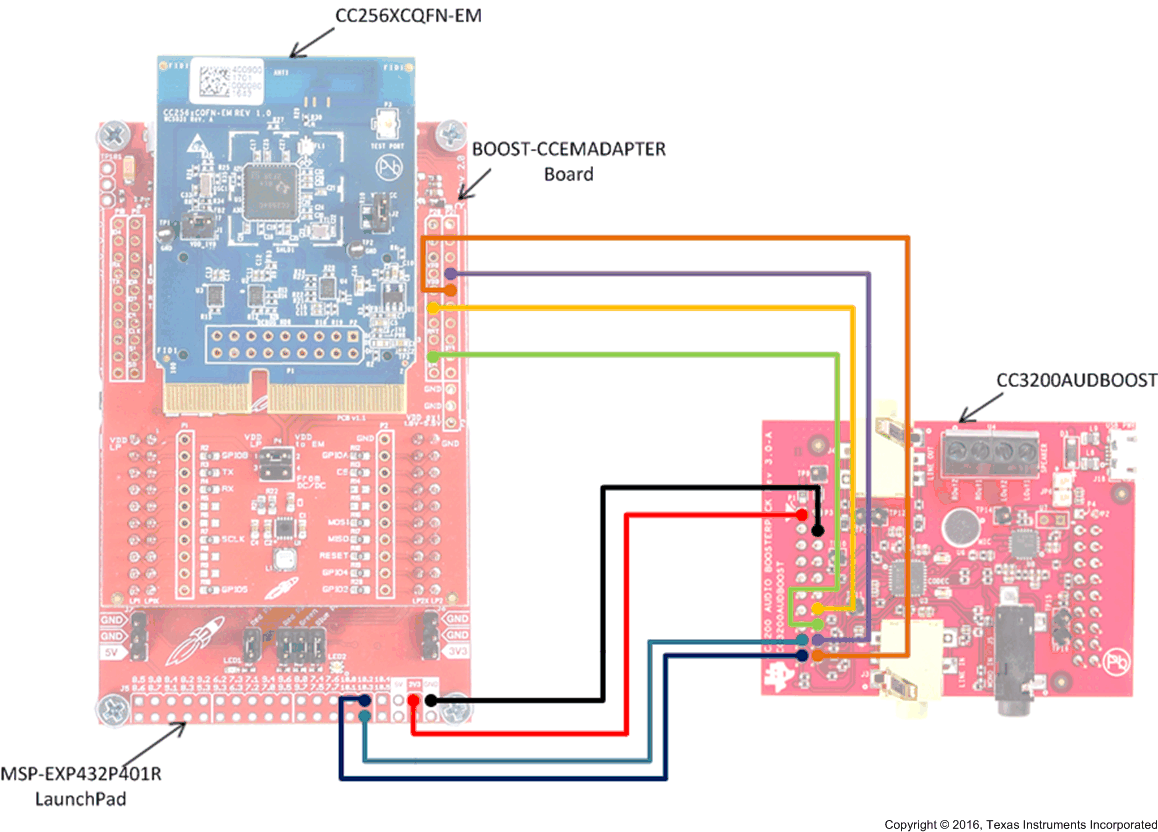
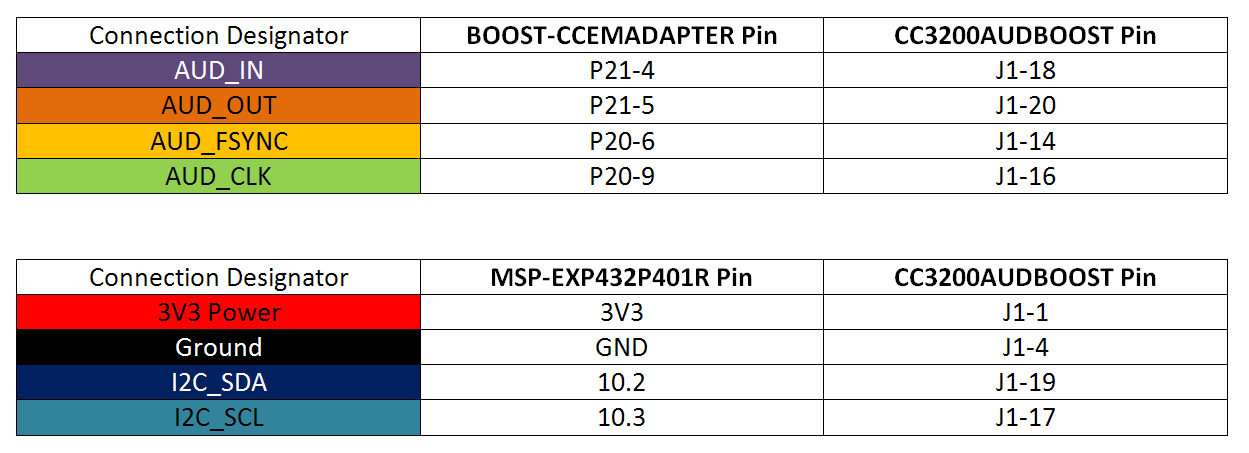 Figure 5-2 CC3200AUDBOOST Connection With
BOOST-CCEMADAPTER and MSP-EXP432P401R
Figure 5-2 CC3200AUDBOOST Connection With
BOOST-CCEMADAPTER and MSP-EXP432P401R| Sample Applications | CC3200AUDBOOST Port |
|---|---|
| A3DP Demo_SRC | LINE_IN (J3) |
| A3DP Demo_SNK | LINE_OUT (J4) |
| HFP Demo_AG | Mic (U6) LINE_OUT (J4) |
| HFP Demo_HF | Mic (U6) LINE_OUT (J4) |
| HSP Demo | Mic (U6) LINE_OUT (J4) |
For more details regarding the PCM role selection on the CC256XCQFN-EM board, see the CC256xCQFN-EM User's Guide and Dual-Mode Bluetooth® CC2564CQFN-EM Evaluation Board.