SLAU857A May 2021 – July 2021 MSP430FR2476 , MSP430FR2512 , MSP430FR2522 , MSP430FR2532 , MSP430FR2533 , MSP430FR2632 , MSP430FR2633 , MSP430FR2672 , MSP430FR2673 , MSP430FR2675 , MSP430FR2676
5.6.1 Program Structure
Figure 5-14 shows the composition of the program. For more related instructions, refer to Starting from Scratch with the Starter Project.
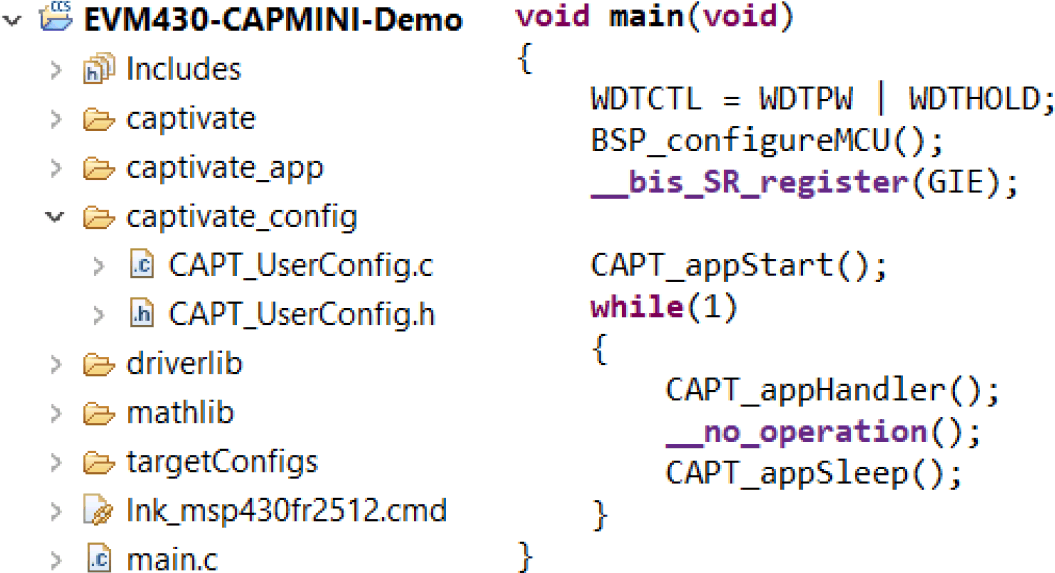 Figure 5-14 Demo Program Folder Structure
The directory structure of the software project is shown on the left side of Figure 5-14. The folders or files involved in this part are shown in Table 5-9. Among them, the most core for users is the CapTIvate_config folder. As shown in Figure 5-15, the corresponding relationship between the GUI and the parameters in CapTIvate_config can be clicked on the corresponding parameter in the GUI and read "Affected Software Parameters" for understanding.
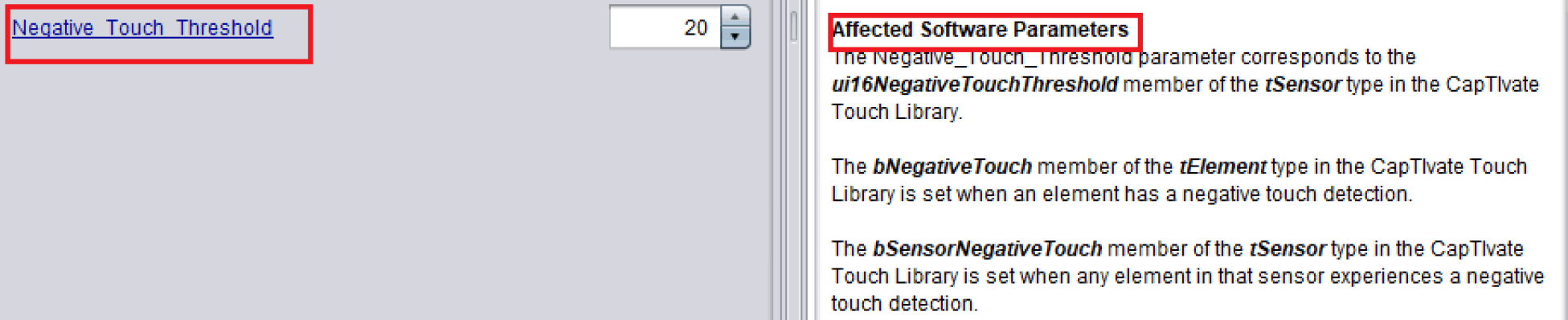 Figure 5-15 Correspondence Between GUI and Code Parameters
| Number | Contents | Comment |
|---|---|---|
| 1 | CapTIvate | Low-level driver library for capacitive touch-related peripherals, including capacitance detection and communication configuration. |
| 2 | CapTIvate_app | The top-level logic code of capacitive touch, including system initialization, scanning and calibration logic. |
| 3 | CapTIvate_config | Configuration parameters generated by the GUI. |
| 4 | driverlib | MSP430 peripheral driver library. |
| 5 | mathlib | Fixed-point calculation library. |
| 6 | targetConfigs | MCU model selection and programming configuration (no need to change). |
| 7 | lnk_msp430fRxxxx.cmd | Linker command file, which gives the settings of program space and data space. |
| 8 | main.c | Main function |
The program structure of the main function is shown on the right side of Figure 5-14, and the function functions involved in this part are shown in Table 5-10. For more function descriptions, refer to the API Guide.
| Number | Contents | Comment |
|---|---|---|
| 1 | WDTCTL = WDTPW | WDTHOLD | Ban watchdog. |
| 2 | BSP_configureMCU() | Configure the communication IO pin, configure the clock. |
| 3 | __bis_SR_register(GIE) | Enable global interrupt. |
| 4 | CAPT_appStart() | Capacitive touch module initialization and calibration, while enabling communication peripherals. |
| 5 | CAPT_appHandler() | Capacitive touch scanning and mode switching. |
| 6 | __no_operation() | CPU waits for one cycle. |
| 7 | CAPT_appSleep() | CPU enters sleep, waiting for periodic interrupt to wake up. |
| 8 | CAPT_initUI() | Capacitive touch module initialization, and enable communication peripherals. |
| 9 | CAPT_calibrateUI() | Capacitive touch module calibration. |
| 10 | CAPT_updateUI() | Update the parameters of all sensors. |
| 11 | I2CSlave_setRequestFlag() | Used to generate high-level pulses when touched to remind the host computer of touch events. |