SBAU380B June 2021 – December 2024 TMAG5170 , TMAG5170 , TMAG5170-Q1 , TMAG5170-Q1 , TMAG5173-Q1 , TMAG5173-Q1 , TMAG5273 , TMAG5273
2 Assembly Guide
The JOYSTICK-MAG-ACC kits ordered from TI.com come pre-assembled, but in cases where the kit is printed locally, follow steps 1-5 described below.
| Item | Description | Quantity |
|---|---|---|
| Thumb Toggle | Joystick_Top.STL | 1 |
| Joystick Base | Joystick_Base.STL | 1 |
| 3/8 in (9.5 mm) Spherical Magnet | NdFeB (N42):available at K&J Magnetics | 1 |
| 8333-20G | Super Glue | 0.02oz |
 Figure 2-1 Joystick Attachment Exploded
View
Figure 2-1 Joystick Attachment Exploded
View- Print the thumb toggle
(Joystick_Top.STL)
This is the printable toggle for the joystick attachment. Notice the raised seat intended for a spherical magnet.
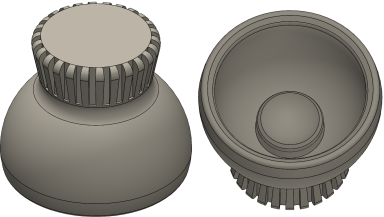 Figure 2-2 Thumb Toggle
 - Orient the spherical magnet
This might be the most easily done using a second magnet with pole markings. For example, if the N pole of a bar magnet is presented near the sphere, this magnet orients itself such that the S pole of the sphere magnet contacts the bar. Take care to ensure the magnets do not strike with significant force. Magnets are often brittle, and striking another object with force may result in damage to one or both magnets.
A 3/8 in. Spherical magnet was used for this design. This could be modified to use other size magnets, but both the thumb toggle and base would require adjustments to match the new magnet sizing. This particular magnet was selected since as it was determined to provide adequately strong field in the z-direction without saturating the input of TMAG5170 and provided a sufficiently large surface area for assembly.
 Figure 2-3 Spherical Magnet
 - Glue the magnet into the thumb
toggle
With the orientation of the magnet known, glue the magnet into the raised seat inside the thumb toggle. Either the N or S pole may be inserted directed downward. If oriented as shown in Magnet Alignment, then the resulting input to the 3D sensor will be positive. The sensor defines a positive field to be directed from the bottom of the package to the top. With the S pole facing the sensor, the field vector will be in this direction.
 Figure 2-4 Magnet Alignment
It can be useful to use a second magnet to secure the magnet in place when setting the magnet and allowing the glue cure until the prescribed dry time is completed.
Completed Thumb Toggle shows how the assembly should appear when the glue fully cures.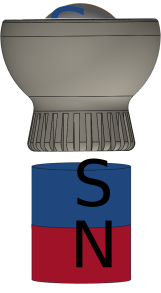 Figure 2-5 Assembly
Suggestion
Figure 2-5 Assembly
Suggestion Figure 2-6 Completed Thumb
Toggle
Figure 2-6 Completed Thumb
Toggle - Print the joystick base
(Joystick_Base.STL)
This is the printable base for the attachment. The magnet seats in the rounded pedestal and the small circular fittings on each tab clip into the match holes in the EVM. The sensor is positioned such that it is directly beneath the magnet pole.
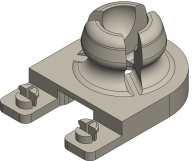 Figure 2-7 Joystick Base
 - Seat the thumb toggle assembly into the base
The thumb toggle should be able to snap into position with a small amount of force, and should similarly be removable if needed.
 Figure 2-8 Seating the
Joystick
Figure 2-8 Seating the
Joystick Figure 2-9 Completed Joystick