SBOS622D July 2018 – May 2025 OPA855
PRODUCTION DATA
- 1
- 1 Features
- 2 Applications
- 3 Description
- 4 Device Comparison Table
- 5 Pin Configuration and Functions
- 6 Specifications
- 7 Parameter Measurement Information
- 8 Detailed Description
- 9 Application and Implementation
- 10Device and Documentation Support
- 11Revision History
- 12Mechanical, Packaging, and Orderable Information
Package Options
Refer to the PDF data sheet for device specific package drawings
Mechanical Data (Package|Pins)
- Y|0
- DSG|8
Thermal pad, mechanical data (Package|Pins)
- DSG|8
Orderable Information
9.4.2 Layout Example
 Figure 9-12 Layout
Recommendation
Figure 9-12 Layout
RecommendationWhen configuring the OPA855 as a transimpedance amplifier, take care to minimize the inductance between the avalanche photodiode (APD) and the amplifier. Always place the photodiode on the same side of the PCB as the amplifier. Placing the amplifier and the APD on opposite sides of the PCB increases the parasitic effects due to via inductance. APD packaging can be quite large, which often requires the APD to be placed further away from the amplifier than ideal. Figure 9-13 shows that the added distance between the two device results in increased inductance between the APD and op amp feedback network. The added inductance is detrimental to a decompensated amplifiers stability because this inductance isolates the APD capacitance from the noise-gain transfer function. The noise gain is given by Equation 3. The added PCB trace inductance between the feedback network increases the denominator in Equation 3 thereby reducing the noise gain and the phase margin. In cases where a leaded APD in a TO-can package is used, further minimize inductance by cutting the leads of the TO-can package as short as possible.
where
- ZF is the total impedance of the feedback network.
- ZIN is the total impedance of the input network.
The layout shown in Figure 9-13 is improved by following some of the guidelines in Figure 9-14. The two key rules to follow are:
- Add an isolation resistor RISO as close as possible to the inverting input of the amplifier. Select the value of RISO to be between 10 Ω and 20 Ω. The resistor dampens the potential resonance caused by the trace inductance and the amplifiers internal capacitance.
- Close the loop between the feedback elements (RF and CF) and RISO as close to the APD pins as possible. This closure provides a more balanced layout and reduces the inductive isolation between the APD and the feedback network.
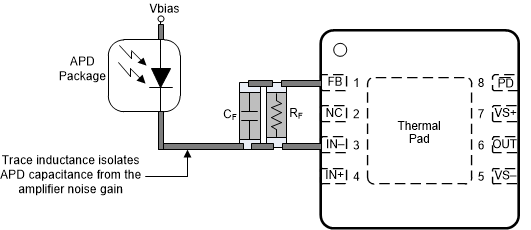 Figure 9-13 Non-Ideal TIA Layout
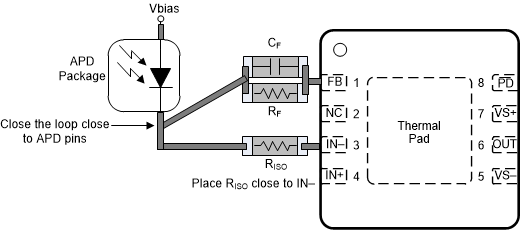 Figure 9-14 Improved TIA Layout