DLPU112 October 2021 DLPC6540
4 User Interface Overview
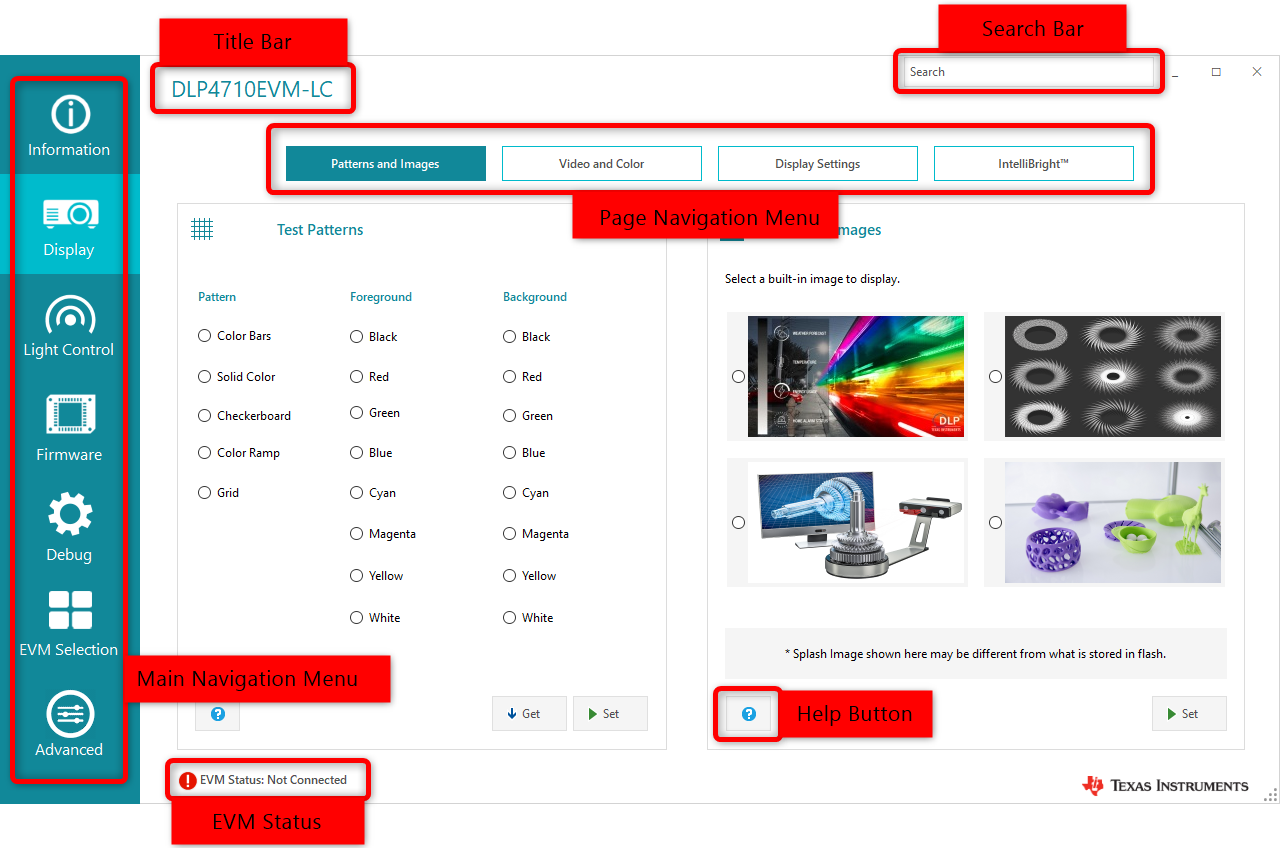 Figure 4-1 EVM GUI Tool
Figure 4-1 shows the layout of the EVM GUI tool
- The title bar displays the current EVM selection of the GUI. To select a different EVM, go to the EVM selection page.
- The search bar allows users to search for EVM GUI pages using page names.
- The main navigation menu lets users navigate to the different sections of the EVM GUI. Each section has one or more pages. Table 2 lists all the sections of the EVM GUI. Not all sections are visible for every EVM.
- The page navigation menu lets users switch between the pages in a section. Table 2 lists all the pages within each section of the EVM GUI.
- The EVM status bar
displays the connection status and the current display mode of the EVM. The
connection status could be one of the following:
- Ready
- Connected, Incompatible EVM
- Connected, Power Off
- Not Connected
- The help buttons in every page shows relevant help content.
Table 4-1 Page Description
| Section | Page | Sub-page | Description |
|---|---|---|---|
| Information | EVM Information | EVM Information | Get the current status of the EVM |
| Display | Patterns and Images | Test Patterns | Set/Get the Test Pattern display |
| Splash Images | Set the Splash Image display | ||
| Video and Color | Video Information | Switch to External Video display and get the current display settings | |
| Color Temperature | Set/Get the current Color Temperature setting | ||
| Display Settings | Display Settings | Set/Get Display Settings | |
| Keystone Correction | Set/Get Keystone Settings | ||
|
IntelliBright™ (DLP2010/3010/4710LC) or DynamicBlack™ (DLP471TP) |
IntelliBright™ | Set/Get IntelliBright™ Settings | |
| LED Current | Set/Get LED Current Settings | ||
| DynamicBlack™ | Set/Get automatic or manual DynamicBlack™ settings | ||
|
Light Control (Available only for light control EVMs: DLPC2010LC, DLPC3010LC, and DLP4710LC) |
External Patterns | Configure and Display External Patterns | |
| Internal Patterns |
Pattern Sets, Patter Set Order, & Pattern Control |
Configure and Display Internal Patterns with the option to save/load pattern data to/from a file | |
| Splash Patterns | Configure and Display Splash Patterns | ||
| Firmware | Backup Firmware | Backup firmware | |
| Update Firmware | Update firmware | ||
| Update Flash Image |
Flash Image, White Point, Splash Image, Startup Option, & Advanced |
Update and create new firmware image | |
| Debug | Connection | Select communication interface and connect/disconnect to the EVM | |
| Event Viewer | View the event(s) that occurred | ||
| Command Log | View the command(s) issued with the option to export the write command(s) to a batch file | ||
| Advanced | Switch to Advanced mode GUI |