SBAU436B January 2024 – February 2025
- 1
- Description
- Get Started
- Features
- Applications
- 6
- 1Evaluation Module Overview
- 2Hardware
- 3Software
- 4Implementation Results
- 5Hardware Design Files
- 6Additional Information
- 7References
- 8Revision History
- 9Revision History
4.4 Frequency Domain Display
The spectral analysis tool shown in Figure 4-4 is intended to evaluate the dynamic performance (SNR, THD, SFDR, SINAD, and ENOB) of the ADS1278 ADC through single-tone sinusoidal signal FFT analysis using the 7-term Blackman-Harris window setting. The FFT tool includes windowing options that are required to mitigate the effects of non-coherent sampling (this discussion is beyond the scope of this document). The 7-Term Blackman-Harris window is the default option and has sufficient dynamic range to resolve the frequency components of up to a 24-bit ADC. The None option corresponds to not using a window (or a rectangular window) and is not recommended.
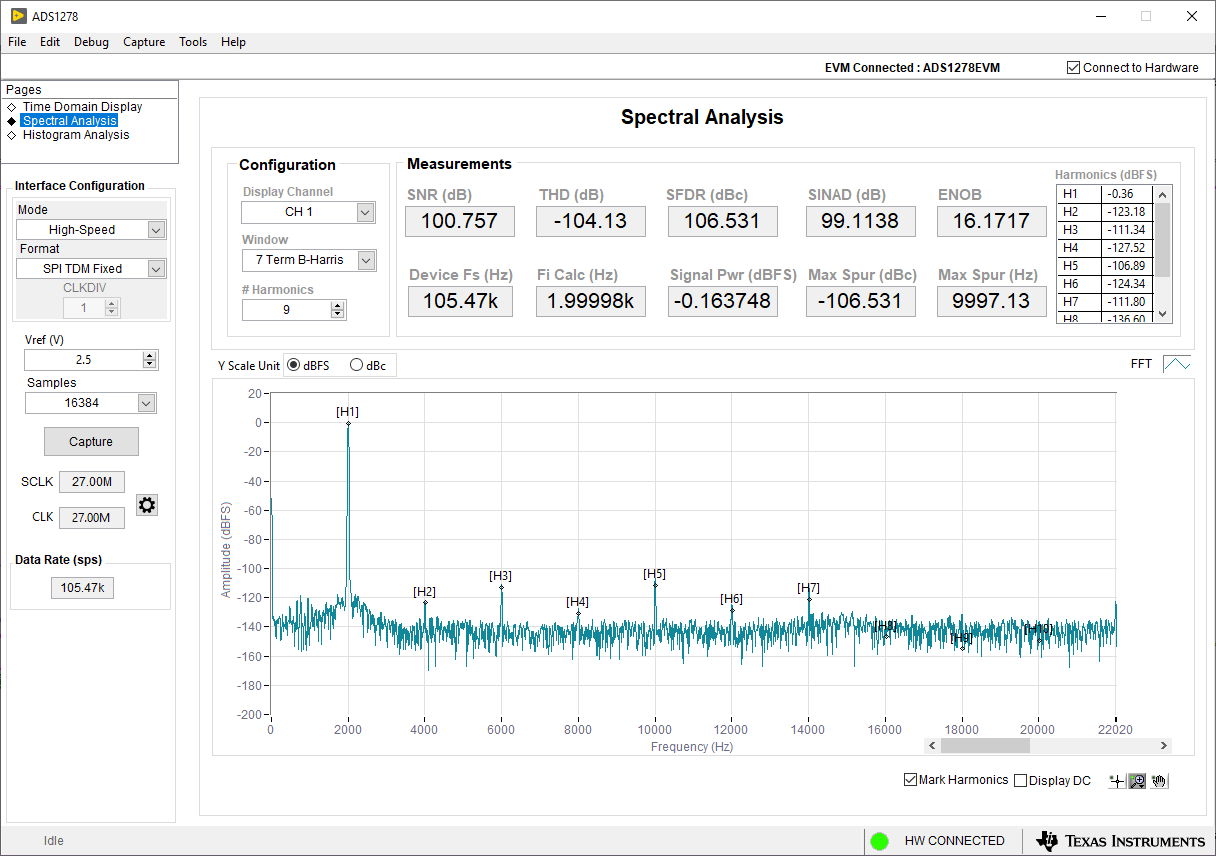 Figure 4-4 Frequency Domain Display