SBAU436B January   2024  – February 2025


  1.   1
  2.   Description
  3.   Get Started
  4.   Features
  5.   Applications
  6.   6
  7. 1Evaluation Module Overview
    1. 1.1 Introduction
    2. 1.2 Kit Contents
    3. 1.3 Specification
    4. 1.4 Device Information
  8. 2Hardware
    1. 2.1 EVM Analog Input Options
      1. 2.1.1 Differential SMA Inputs
      2. 2.1.2 Single-Ended SMA Inputs
      3. 2.1.3 Differential Input Pins
    2. 2.2 Power Supplies
    3. 2.3 ADC Connections and Decoupling
    4. 2.4 ADC Input Amplifiers
    5. 2.5 VCOM Buffer
    6. 2.6 Voltage Reference
    7. 2.7 Clock Tree
    8. 2.8 Digital Interfaces
    9. 2.9 Using the ADS1278EVM With an External Controller
  9. 3Software
    1. 3.1 ADS1278EVM Software Installation
  10. 4Implementation Results
    1. 4.1 Hardware Connections
    2. 4.2 GUI Settings for ADC Control
    3. 4.3 Time Domain Display
    4. 4.4 Frequency Domain Display
    5. 4.5 Histogram Display
  11. 5Hardware Design Files
    1. 5.1 Schematics
    2. 5.2 PCB Layouts
    3. 5.3 Bill of Materials (BOM)
  12. 6Additional Information
    1. 6.1 Trademarks
  13. 7References
  14. 8Revision History
  15. 9Revision History

VCOM Buffer

Figure 2-6 shows the buffer circuit for the ADC VCOM signal. The output of the VCOM buffer connects to the VOCM signal of the input driver amplifiers. The J1 VCOM header pins (depopulated by default) can also be used to provide an alternate source for VCOM by depopulating resistor R5. Jumper J1 can also be used to connect the VCOM signal to an external piece of test equipment to set the common-mode voltage. A common use case is to connect this signal to the Audio Precision SYS-2722 to set the signal generator's common-mode output.
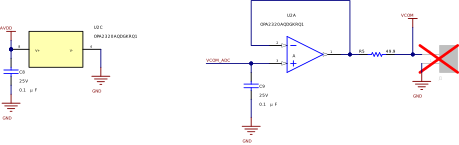
ADS1278V2EVM-PDK VCOM Buffer CircuitFigure 2-6 VCOM Buffer Circuit