SLUUCY7B November 2023 – May 2025
2.5.1 Equipment Set Up

Use the following guidelines to set up the equipment:
- Set power supply 1 for 23V DC, 8A current limit and then turn off the supply.
- Connect the output of power supply 1 in series with a current meter to J1 (VIN and PGND).
- Connect a voltage meter across J1 (VIN) and J1 (PGND).
- Connect load 1 in series with a current meter to J3 (VBAT and PGND).
- Connect a voltage meter across J5 (VBAT and PGND).
- Set 23V at KEPCO load output. Limit KEPCO to 6A. Use load 2 to power EVM from the VOUT output.
- Install the jumpers as indicated in IO and Jumper Descriptions.
- If using Battery Management
Studio, use the following steps:
- Connect J5 to the EV2400. Connect J5 to the I2C PORT 2 on the EV2400
- Turn on the computer and load 2. Open the bqStudio software.
- Select Charger and
click the Next button.

- Select Charger_1_00_BQ25750.bqz on the Select a Target Page.
- Click Field View
after selecting the target device and then click the Read
Register button.
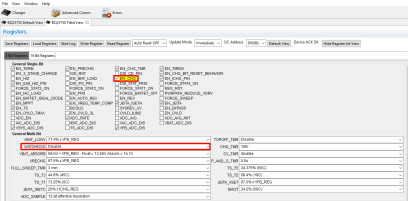
- Set WATCHDOG and EN_CHG to disabled

- If using TI Charger GUI, use the following steps:
- Connect J4 to the USB2ANY. Turn on the computer and load 2.
- Navigate to the TI Charger GUI website and select the
charger you are using:

- You should see at the
top-left, Hardware Connected. After you see the hardware is connected,
select the plug icon on the left panel.

- This is the Charger
Configuration window. Click the Read All Register button at the top,
then set WATCHDOG and EN_CHG to disabled. Set ICHG_REG to 4000mA and
IPRECHG to 1000mA

-
Here is a brief description of what the other icons on the left side panel mean. Select through these icons to configure other operations of the battery charger.

- Turn on power supply 1, measure:
V(J1(VAC)) = 23V ± 0.5V
I(J1(IAC)) = 4.1A ± 0.5A
V(J3(VBAT)) = 23V ± 0.5VI(J3(IBAT)) = 3.9A ± 0.5A
- Set power supply 1 for 40V,
measure:
V(J1(VAC)) = 40V ± 0.5V
I(J1(IAC)) = 2.4A ± 0.5A
V(J3(VBAT)) = 23V ± 0.5VI(J3(IBAT)) = 3.9A ± 0.5A
- Set power supply 1 for 19V,
measure:
V(J1(VAC)) = 19V ± 0.5V
I(J1(IAC)) = 5.0A ± 0.5A
V(J3(VBAT)) = 23V ± 0.5VI(J3(IBAT)) = 3.9A ± 0.5A
Use the following guidelines to test the BQ25750 EVM power path:
- Disconnect the power supply from J1 (VIN and PGND) and disconnect Load 1 from J3 (VOUT and PGND).
- Connect the output of power supply #1 to J3 (VOUT and PGND).
- Set power supply 1 for 20V DC, 8A current limit and then turn off power supply.
- Connect a voltage meter across J2 (VSYS) and J2 (PGND).
- Turn on power supply 1, measure V(J2(VSYS)) = 20V ± 0.5V.