SBAU416C November   2022  – March 2025 ADS9813 , ADS9817


  1.   1
  2.   Description
  3.   Features
  4.   4
  5. 1Evaluation Module Overview
    1. 1.1 Introduction
    2. 1.2 Kit Contents
    3. 1.3 Specification
    4. 1.4 Device Information
  6. 2Hardware
    1. 2.1 Additional Images
    2. 2.2 ADS9813EVM and ADS9817EVM Quick Start Guide
    3. 2.3 Analog Interface
      1. 2.3.1 ADC Input SMA Connections
      2. 2.3.2 Voltage Reference
    4. 2.4 Digital Interface and Clock Inputs
      1. 2.4.1 Digital Interface Connections
      2. 2.4.2 Clock Select
    5. 2.5 Power Supplies
      1. 2.5.1 USB Power and When to Power the Board Externally
  7. 3Software
    1. 3.1 ADS9817EVM and ADS9813EVM Software Installation
      1. 3.1.1 USB Driver Installation
    2. 3.2 ADS9817EVM Software (ADS9817EVM-GUI)
      1. 3.2.1 Using the CONFIG Tab
      2. 3.2.2 Using the Capture Tab
      3. 3.2.3 Using the INL/DNL Tool
      4. 3.2.4 Using the Histogram Tab
    3. 3.3 ADS9813EVM Software (ADS98XXEVM-GUI)
      1. 3.3.1 Using Configuration Tab
      2. 3.3.2 Using the Data Capture Tab
      3. 3.3.3 Using the Linearity Analysis Tab
      4. 3.3.4 Using the Histogram Analysis Tab
  8. 4Hardware Design Files
    1. 4.1 Schematics
      1. 4.1.1 ADS9813EVM Schematics
      2. 4.1.2 ADS9817EVM Schematics
    2. 4.2 Layout
    3. 4.3 Bill of Materials (BOM)
      1. 4.3.1 ADS9813EVM Bill of Materials (BOM)
      2. 4.3.2 ADS9817EVM Bill of Materials (BOM)
  9. 5Additional Information
    1. 5.1 Trademarks
  10. 6Related Documentation
  11. 7Revision History

Using Configuration Tab

After the EVM GUI is started, press the following buttons in the order shown below. After selecting the desired ADC from the drop-down menu, click BOARD STARTUP. After the USB Status, FPGA Power, and FPGA Program lights are green, click INITIALIZE DEVICE.
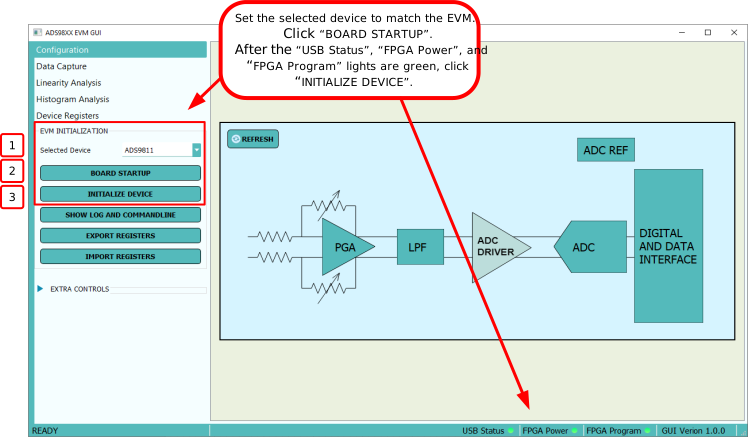
ADS9813EVM, ADS9817EVM FPGA and ADC InitializationFigure 3-9 FPGA and ADC Initialization

The block diagram figures can be used to configure certain settings of the device. The "Device Registers" Tab may be used for more comprehensive device configuration. Press REFRESH on the block diagram to reflect updated device register settings.

ADS9813EVM, ADS9817EVM GUI Block DiagramFigure 3-10 GUI Block Diagram