DLPU124 june 2023
- 1
- Abstract
- Trademarks
- 1 Overview
- 2 If You Need Assistance
-
3 DLP
LightCrafter DLPC910 EVM (DLPLCRC910EVM) Overview
- 3.1 Welcome
- 3.2 DLP LightCrafter DLPC910 Evaluation Module (DLPLCRC910EVM) Hardware
- 3.3 DLPLCRC910EVM Board
- 3.4 Other Items Needed for Operation
- 3.5 DLPLCRC910EVM Connections
- 3.6 DLP LightCrafter DLPC910 LEDs
- 3.7 Apps FPGA Trigger Input
- 3.8 DLPLCRC910EVM HPC FMC Cables
- 3.9 DLPLCRC910EVM and DMD EVM Assembly
- 3.10 Connecting an Apps FPGA Board to the DLPLCRC910EVM
- 4 Quick Start
-
5 Operating the
DLPLCRC910EVM
- 5.1 DLPLCRC910EVM GUI and Apps FPGA Software
- 5.2
PC Software
- 5.2.1 Menu Bar
- 5.2.2 Icon Bar
- 5.2.3 Main Window
- 5.2.4
DLPC910 Registers
- 5.2.4.1 Status/Control Tab
- 5.2.4.2
Register List Tab
- 5.2.4.2.1 DESTOP_INTERRUPT_CLEAR - 0x0000
- 5.2.4.2.2 DESTOP_INTERRUPT_SET - 0x0004
- 5.2.4.2.3 DESTOP_INTERRUPT_ENABLE - 0x0008
- 5.2.4.2.4 MAIN_STATUS (DLPC910) - 0x000C
- 5.2.4.2.5 DESTOP_CAL - 0x0010
- 5.2.4.2.6 DESTOP_DMD_ID_REG - 0x0014
- 5.2.4.2.7 DESTOP_CATBITS_REG - 0x0018
- 5.2.4.2.8 DESTOP_910VERSION_REG - 0x001C
- 5.2.4.2.9 DESTOP_RESET_REG - 0x0020
- 5.2.4.2.10 DESTOP_INFIFO_STATUS - 0x0024
- 5.2.4.2.11 DESTOP_BUS_SWAP - 0x0028
- 5.2.4.2.12 DESTOP_DMDCTRL - 0x002C
- 5.2.4.2.13 DESTOP_BIT_FLIP - 0x0030
- 5.2.4.3 Settings Tab
- 5.2.5
Apps FPGA Registers
- 5.2.5.1 Status/Control Tab
- 5.2.5.2
Apps Registers Tab
- 5.2.5.2.1 APPS_INTERRUPT_CLEAR - 0x0000
- 5.2.5.2.2 APPS_INTERRUPT_SET - 0x0004
- 5.2.5.2.3 APPS_INTERRUPT_ENABLE - 0x0008
- 5.2.5.2.4 MAIN_STATUS (Apps) - 0x000C
- 5.2.5.2.5 APPS_CNTRL - 0x0010
- 5.2.5.2.6 APPSTOP_PATTERNSEL - 0x0014
- 5.2.5.2.7 APPSTOP_TEST_ROWADDR - 0x0018
- 5.2.5.2.8 APPSTOP_LOADER_RESET_TYPE - 0x001C
- 5.2.5.2.9 DMD_TYPEREG - 0x0020
- 5.2.5.2.10 APPS_BUFFER_WSTART - 0x0024
- 5.2.5.2.11 APPS_FIFO_BURST - 0x0028
- 5.2.5.2.12 APPS_ROW_CTRL - 0x002C
- 5.2.5.2.13 APPS_BLK_CTRL - 0x0030
- 5.2.5.2.14 APPS_ROW_LOADER - 0x0034
- 5.2.5.2.15 APPS_LOAD_TRIG_INTERVAL - 0x0038
- 5.2.5.2.16 APPS_EXPOSE_TIME - 0x003C
- 5.2.5.2.17 APPS_LOADER_CTRL - 0x0040
- 5.2.5.2.18 APPS_DMD_PARK - 0x0044
- 5.2.5.2.19 APPS_EXT_RST_EVT - 0x0048
- 5.2.5.2.20 APPS_BUILD_DATE - 0x0080
- 5.2.5.2.21 APPS_VERSION - 0x0084
- 5.2.5.2.22 APPS_FIXED_ID - 0x0088
- 5.2.5.2.23 APPS_GPIF_TEST - 0x008C
- 5.3 JTAG Flash Programming
- 5.4 SPI Flash Programming
- 5.5 AMD Xilinx VC-707 Configuration PROM Programming
- 5.6 USB Firmware Programming
-
6 Connectors
- 6.1 J1 - USB - Micro B USB 2.0 Connector
- 6.2 J2 - DLPC910 I2C Connector
- 6.3 J4 - PMBUS (I2C) Connector
- 6.4 J6 - USB GPIO Connector
- 6.5 J8 - 400 Position FMC Connector (Female)
- 6.6 J14 - Power (Alternate)
- 6.7 J15 - Power
- 6.8 J17 - JTAG Boundary Scan Connector
- 6.9 J18 - SPI Programming Connector
- 6.10 J19, J20, and J21 - Fan Connectors
- 6.11 J500, J501 - FMC Connector (Male)
- 7 DLPLCRC910EVM Power Supply Requirements
- 8 Related Documentation from Texas Instruments
- 9 Abbreviations and Acronyms
- 10Safety
5.2.3.1.1 Load Tab
Load Image Commands
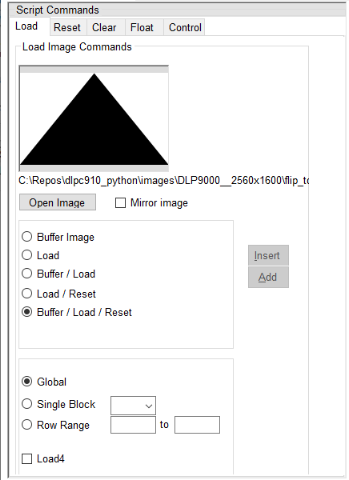 Figure 5-8 Load
Tab
Figure 5-8 Load
Tab- Open Image button -
opens a dialogue box to select an image to use for loading the Apps FPGA user
pattern buffer.Note: Images the size of the native DMD resolution are required. Images larger than the DMD resolution are truncated to the native resolution of the attached DMD.
- Mirror Image check box - when checked the image data is reversed left to right when buffering to the Apps FPGA user buffer resulting in a mirror image.
The Apps FPGA contains a user image buffer which is populated independent of:
- sending the pixel data to the attached DMD via the DLPC910 controller.
- requesting a DMD mirror reset [mirror clocking pulse (MCP)] to update the pixel data sent to the mirror array.
There are three commands:
- Buffer - loads pixel data into a user pattern buffer inside the Apps FPGA.
- Load - sends the data currently in the Apps FPGA buffer via the DLPC910 controller to the attached DMD.
- Reset - requests a DMD MCP of the specified blocks on the DMD (Global, Single, Dual, or Quad block reset).
Buffer, Load, and Reset commands are able to be entered separately (Reset only commands are entered from the Reset Tab or grouped together in a single script entry:
- Buffer Image - sends the image data from the selected image to the Apps FPGA user buffer. The selection of Global, Single Block, or Row Range determines the data buffered.
- Load - sends the image data in the Apps FPGA user buffer to the attached DMD via the DLPC910 controller. The selection of Global, Single Block, or Row Range determines the data sent.
- Buffer / Load - sends the image data from the selected image to the Apps FPGA user buffer based on the selection of Global, Single Block, or Row Range and sends the selected image data in the Apps FPGA user buffer to the attached DMD via the DLPC910 controller.
- Load / Reset -
sends image data stored in the Apps FPGA user buffer to the attached DMD via the
DLPC910 controller and resets the DMD mirrors based on the selection of Global,
Single Block, or Row Range.Note: For a row range the required blocks are reset to display the rows loaded.
- Buffer / Load /
Reset - sends the image data from the selected image to the Apps
FPGA user buffer, then sends the selected image data in the Apps FPGA user
buffer to the attached DMD via the DLPC910 controller and resets the DMD based
on the selection of Global, Single Block, or Row Range.Note: For a row range the required blocks are reset to display the rows loaded.
- Global - directs the Load command to load all of the data from the Apps FPGA user buffer and directs the Reset command to reset all DMD blocks at the same time.
- Single Block - directs the Load command to load the data from the Apps FPGA user buffer to the specified block and directs the Reset command to reset the specified DMD block.
- Row Range - directs the Load command to load the data from the Apps FPGA user buffer to the specified row range and directs the Reset command to reset the DMD blocks that encompass the specified rows.
- Load4 check box -
is intended for Global mode only and directs the Load command to
load only the first ¼ of the Apps FPGA user buffer to the attached DMD via the
DLPC910 controller.Note: Using Load4 with other modes besides Global resets results in unpredictable behavior.
Once an image is selected, the desired operation (Buffer - Load - Reset) or combination is selected, and the Load - Reset mode is selected press one of the following options:
- Insert button -
inserts the command between the highlighted command and the prior command in the
Script sub-window. If there are no commands in the
Script
sub-window, then no entry is made. Note: Take care that the command is valid in the position inserted.
- Add button - adds the command as the last line in the Script sub-window.