SBAU388D September   2021  – June 2025 TMAG5170 , TMAG5170-Q1


  1.   1
  2.   Description
  3.   Features
  4.   Applications
  5.   5
  6. 1Evaluation Module Overview
    1. 1.1 Introduction
    2. 1.2 Kit Contents
  7. 2Hardware
    1. 2.1 EVM Operation
    2. 2.2 Quick Start Setup
  8. 3Software
    1. 3.1 Setup
      1. 3.1.1 Driver Installation
      2. 3.1.2 Firmware
        1. 3.1.2.1 Firmware Debug
      3. 3.1.3 GUI Setup and Usage
        1. 3.1.3.1 Initial Setup
        2. 3.1.3.2 GUI Operation
    2. 3.2 Rotate and Push Demo
    3. 3.3 Direct EVM Serial Communication
  9. 4Schematics, PCB Layout, and Bill of Materials
    1. 4.1 Schematics
    2. 4.2 PCB Layout
    3. 4.3 Bill of Materials
  10. 5Reference
    1. 5.1 Trademarks
  11. 6Related Documentation
  12. 7Revision History

PCB Layout

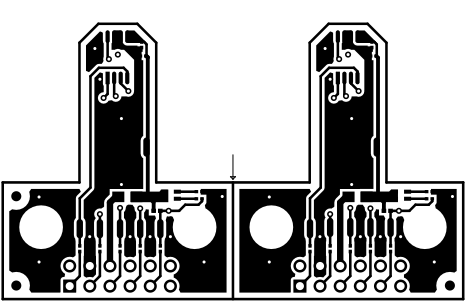
Figure 4-3 through Figure 4-6 show the PCB layers of the EVM.

TMAG5170-Q1 Top ViewFigure 4-3 Top View
TMAG5170-Q1 Top LayerFigure 4-4 Top Layer
TMAG5170-Q1 Bottom ViewFigure 4-5 Bottom View
TMAG5170-Q1 Bottom LayerFigure 4-6 Bottom Layer