SNVU940 January 2025 LP5810 , LP5811 , LP5812 , LP5813
PRODUCTION DATA
2.2 MSPM0-SDK Installation
The MSPM0-SDK provides the ultimate collection of software, tools, and documentation to accelerate the development of applications for the MSPM0 MCU platform, providing a consistent and cohesive experience with a wide variety of drivers, libraries, and examples under a single software package. This section details steps to install MSPM0-SDK. After installation, the default SDK directory path is: C:\ti\mspm0_sdk_x_xx_xx_xx.
- Before downloading, a myTI account is required. Register for a myTI account here.
- Download the latest MSPM0-SDK
from the product page. Click Download
options, select the operating system, and click the file name to start
downloading.
 Figure 2-4 MSPM0-SDK
Download
Figure 2-4 MSPM0-SDK
Download - After downloading, follow the
steps in Figure 3-4 to finish installation.
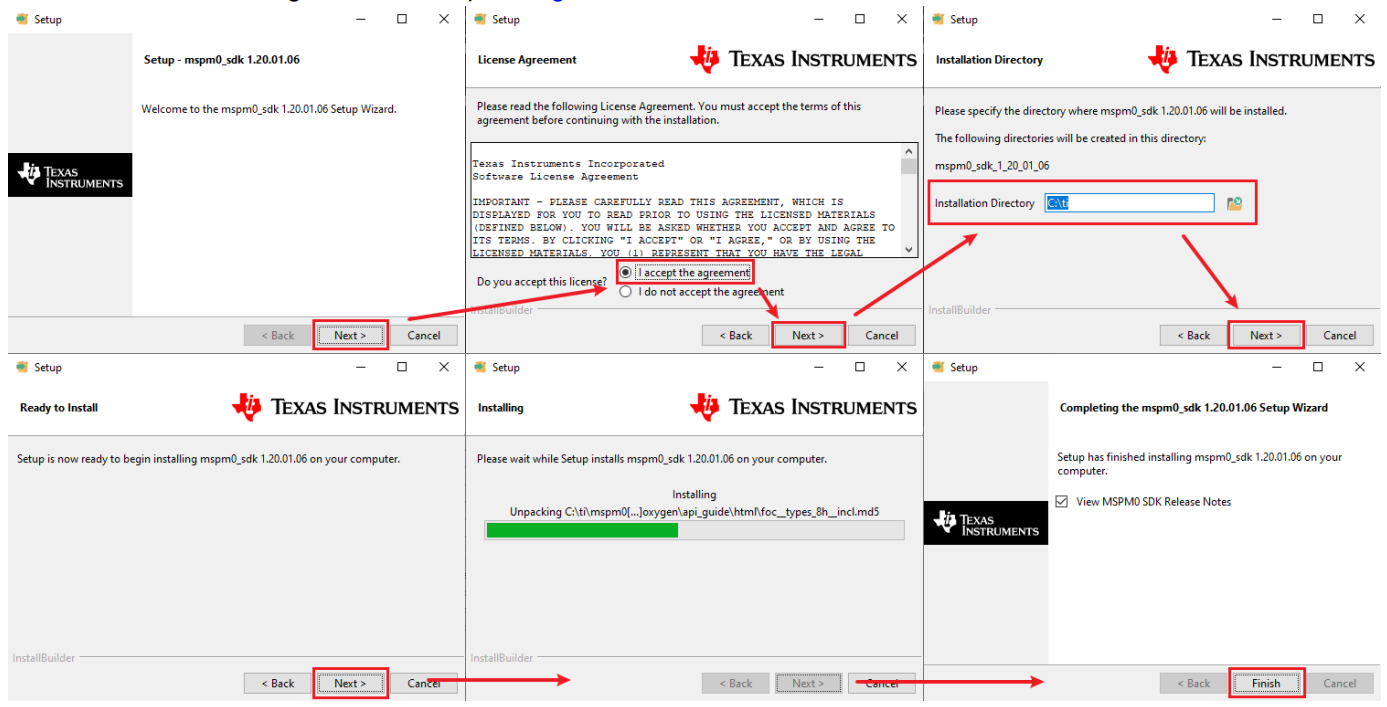 Figure 2-5 MSPM0-SDK Install
Step-by-Step
Figure 2-5 MSPM0-SDK Install
Step-by-Step