SPRADD1A August 2023 – September 2024 AM620-Q1 , AM623 , AM625 , AM625-Q1 , AM625SIP , AM62A1-Q1 , AM62A3 , AM62A3-Q1 , AM62A7 , AM62A7-Q1 , AM62P , AM62P-Q1
4.1 Introduction to Devicetrees
A devicetree contains nodes that represent peripherals. Each node contains properties that hold data that is used by U-Boot and Linux kernel device drivers to initialize peripherals. Without a devicetree, the hardware configuration and parameters would need to be hardcoded into the device drivers. Keeping the hardware configuration separate from the board initialization code allows for a simpler development and maintenance process.
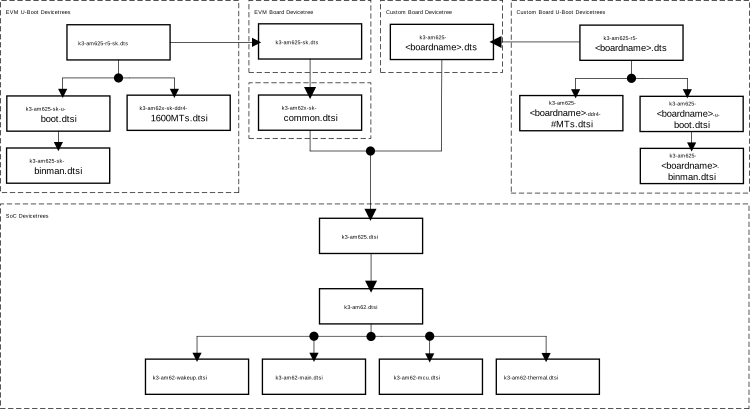 Figure 4-1 AM62x Devicetree Structure
It is important to understand the AM62x devicetree structure and the layers of the structure you will create. Files with names containing <boardname> are files that become the custom board's devicetrees.
The base of the tree is formed by devicetree include (DTSI) files. These are used to define SoC specific hardware that is generally the same across all board variations of the same SoC, including custom boards. Directly editing these files risks corrupting other devicetrees that include these files. For this reason, these should not be directly modified. Rather, devicetree nodes in SoC devicetree files are modified by referencing the node in the board devicetree.
The file k3-am62x-sk-common.dtsi contains hardware descriptions that are common between board variants of the AM62x SoC. This DTSI is included by k3-am625-sk.dts and k3-am62-lp-sk.dts. The files k3-am625-sk.dts and k3-am62x-sk-common.dtsi are applied on top of the SoC DTSI files. The k3-am62x-sk-common.dtsi is not used with a custom board devicetree.
At the top of the tree, there are devicetree source (DTS) files. These are used to describe board specific hardware and to modify DTSI nodes without altering them directly. This is what will be created for the custom board. Additionally, you will create other U-Boot specific devicetrees that are needed to build the bootloader binaries. This process is covered in Section 4.3.