SPRADK2A November 2024 – October 2025 F29H850DM , F29H850TU , F29H859TU-Q1 , F29P329SM-Q1 , F29P589DM-Q1 , F29P589DU-Q1
- 1
- Abstract
- Trademarks
- 1 Introduction
- 2 Supplemental Online Information
- 3 SSU Overview
- 4 Key Concept Definitions
- 5 Safety and Security Goals
- 6 System Design
- 7 Configuring the SSU
- 8 Debug Authorization
- 9 Debugging the SSU
- 10SSU Frequently Asked Questions (FAQ)
- 11Summary
- 12References
- 13Revision History
6 System Design
The first step in configuring the SSU for an application is to determine the required system partitioning. The SSU provides three levels of hierarchy for partitioning the application subsystem:
- ZONEs: Each ZONE determines debug access for all C29 CPUs on
the chip. ZONEs are designed to enable multiple code owners or entities to
develop and maintain different partitions of an application residing on the same
chip. For instance, if a certain aspect of the embedded application is owned and
maintained by a third-party vendor, then the system can be divided into two
ZONEs:
- ZONE1: Primary user ZONE, owned by the primary system developer;
- ZONE2: Secondary user ZONE, owned by the third-party developer.
This partitioning enables the third-party developer to develop, debug and maintain an application function on the same chip without requiring access to the primary user’s code and data assets. Furthermore, each user ZONE provides two levels of debug authorization:
- Partial debug – CPU debug commands such as halt, step, and breakpoints allowed, but no memory access
- Full debug – Access to memory locations is provided as permitted for all LINKs contained within the ZONE.
As an example, a secondary user such as a third-party developer can debug an application module in ZONE2, and also be given partial debug access to ZONE1, so that the secondary user can effectively debug the application in context without having access to the primary user’s assets.
Each device has 3 user ZONEs available: ZONE1, ZONE2, and ZONE3. ZONE1 is the primary user ZONE; ZONE2 and ZONE3 are secondary user ZONEs.
- Sandboxes (STACKs): Sandboxes provide security and safety isolation
within a CPU. Each Sandbox is associated with a STACK in the SSU. Each sandbox
has a dedicated physical stack pointer in the CPU that is inaccessible by other
sandboxes, and a dedicated stack memory AP region with read/write permissions
restricted to only code belonging to that sandbox.
Special C29 CPU gate instructions are required when crossing from one STACK to another. These instructions must be inserted by the compiler at the entry and exit of each function, and at function calls or branches. These mechanisms provide security protection against malware attacks that attempt to redirect code execution or manipulate the stack.
A Sandbox consists of an SSU STACK and everything associated with the STACK, including the stack memory AP region. Each STACK belongs to one ZONE, but a ZONE can contain multiple STACKs
Table 6-1 Predefined STACKs per CPUSTACK # Description STACK0 This STACK is reserved for TI internal use and cannot be configured by the user. STACK1 This STACK is primarily used for bootloaders, but can optionally be associated with other user application code. STACK1 is always associated with ZONE1, and contains only one LINK (LINK1). STACK2 This is the primary user STACK. STACK2 is always associated with ZONE1. STACK2 always contains LINK2, but can also contain other LINKs. - Application Modules (LINKs): An application module is a basic partition of a
system application. Each module consists of a single SSU LINK, one or more code
memory AP regions containing the code of the LINKs, all data memory AP regions
associated with the LINK, and all peripherals and interrupts associated with the
Module.
Typically, the code AP regions contain .text and other linker output sections containing code, and the data AP regions contain
.bss,.const, and other linker output sections containing data and variables.Each LINK enables SSU memory protections, providing safety protection from other LINKs in the CPU. Every AP region defines access permissions for each LINK. These permissions are enforced in real time for every instruction that performs a memory access, depending on the LINK ID instruction. Functions that require safety isolation from each other can be placed in separate Modules. If security isolation is required, then these Modules are placed in separate sandboxes; if not, the Modules can be placed in the same sandbox.
| LINK # | Description |
|---|---|
| LINK0 | This LINK is reserved for TI internal use and cannot be configured by the user. |
| LINK1 | This LINK is primarily used for bootloaders, but can optionally
be associated with other user application code.
CPU1.LINK1 has some special fixed permissions
that enable access to certain system configuration registers, in
addition to AP-defined protections. |
| LINK2 | This is the primary user LINK. CPU1.LINK2 is the
system security root LINK (SROOT), and has special fixed permissions
that enable access to system configuration registers and override
controls. This LINK typically executes privileged host functions at
the RTOS level. |
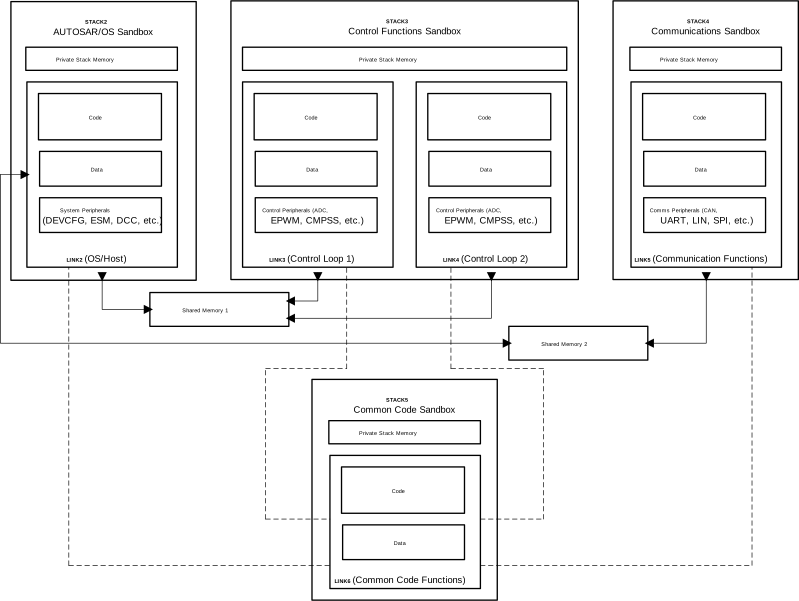 Figure 6-1 Example of Software
Partitioning With SSU
Figure 6-1 Example of Software
Partitioning With SSUFigure 6-1 shows an example of SSU system partitioning on a single-CPU, single-ZONE system and Table 6-3 explains the details behind this configuration.
| STACK | LINK | Details |
|---|---|---|
| STACK 2 | LINK2 | The RTOS runs in STACK2.LINK2, and is responsible for initializing system configuration, setting up peripherals and interrupts, and starting the main execution lop. While various tasks and respective task stacks can be placed in other links, all of the RTOS tasks/stacks need to be within SSU STACK2. If RTINTs are used then the code and data related to the RTINT should be placed in a sepeare SSU STACK other than SSU STACK2. |
| STACK 3 | LINK3 and LINK 4 | There are two control functions, Control Loop1 and Control Loop 2. Each of these control functions is placed in a separate Application Module (LINK), and both Application Modules are placed in the same Sandbox. In this system, safety isolation is required between the two control functions, but security isolation is not required between the two. |
| STACK 4 | LINK 5 | LINK5 contains the host communication code, such as UART or CAN-FD code. Because data coming from an external interface can potentially pose a security threat to other functions in the system, this Module is placed in a separate Sandbox. |
| STACK 5 | LINK 6 | Contains common code functions which are shared between all the other Modules in the system. LINK 6 is defined as the Access Protection Inheritance LINK (APILINK) for other LINKs. The Common Code Module is also placed in a separate sandbox to maintain security isolation from the rest of the system (while maintaining inherited permissions). It is recommended that the common code LINK be placed in its own STACK. |
SysConfig includes full support for multicore applications. The built-in memory allocator tool automatically manages memory regions associated with application modules across multiple CPUs, and also manages the allocation of peripherals across the entire device. The SysConfig tool also includes a Shared Memory feature that enables the definition of memory regions that can be shared between modules on the same CPU or multiple CPUs.