SWRU629A September 2024 – February 2025
2.1.1 SWD Interface
The LP-EM-CC35X1 supports Serial Wire Debug (SWD) interface to an external XDS110 or other JTAG-based debuggers. The SWD interface to the CC35xxE device is used for flashing the device and basic debugging. The SWD lines are part of the VIO1 IO ring, the voltage of which can be controlled by shunt J10, see Section 2.2.1.
The default SWD connection is to the LP-XDS110 20-pin header on the bottom of the LP-EM-CC35X1 (J7).
 Figure 2-2 SWD Interfaces
| Pin | Signal Name | Description |
|---|---|---|
| J7.6 | SWCLK | Serial wire clock |
| J7.8 | SWDIO | Serial wire data in/out |
| J7.10 | XDS_RESET | nRESET (enable line to the CC3551E) |
| J7.12 | UART1_TX_XDS | The CC3551E UART TX (from CC3551E) (can be disconnected with jumpers; see Section 2.1.3) |
| J7.14 | UART1_RX_XDS | The CC3551E UART RX (to CC3551E) (can be disconnected with jumpers; see Section 2.1.3) |
| J7.16 | VIO1 | VIO1 supply reference voltage to connector |
| J7.18 | VCC_BRD_5V | 5V supply to LP-EM-CC35X1 from LP-XDS110 |
| J7.1, J7.7, J7.13, J7.19, J7.20 | GND | Board ground |
 Figure 2-3 20-Pin LP-XDS110 Connector (J7)
There is also the option to use the ARM Cortex-M 10-pin (CM10) connector for the SWD interface. This connector is not assembled by default but a CM10 header can be soldered on the J22 footprint on the LP-EM-CC35X1. For J22 footprint location, see Figure 2-2.
The pinout of the CM10 connector when assembled is shown in Figure 2-4 and Table 2-2.
| Pin | Signal Name | Description |
|---|---|---|
| J22.1 | VIO1 | VIO1 supply reference voltage to connector |
| J22.2 | SWDIO | Serial wire data in/out (See note) |
| J22.4 | SWCLK | Serial wire clock (See note) |
| J22.10 | XDS_RESET | nRESET (enable line to the CC3551E) |
| J22.3, J22.5, J22.7, J22.9 | GND | Board Ground |
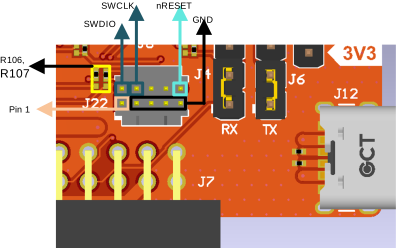 Figure 2-4 CM10 Connector (J22)