SWRU629A September 2024 – February 2025
2.2.1 VIO Selection
The CC35xxE device features three Voltage IO rings (VIOs) for choosing the reference voltage of the various IOs. These three VIOs are VIO1, VIO2, and VDDSF. Each one of the IO rings can be set to 1.8V or 3.3V independently of each other.
The LP-EM-CC35X1 features 2 jumpers (J10, J11) for easy voltage configuration for VIO1 and VIO2, either to 1.8V or 3.3V. By default both are set to 3.3V; see Figure 2-18.
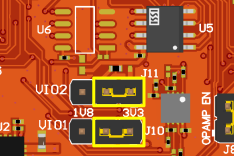 Figure 2-18 VIO Jumpers
To set either VIO to 1.8V instead of 3.3V, place the jumper on the left two header pins. For example, VIO1 is set to 1.8V and VIO2 is set to 3.3V as shown in Figure 2-19.
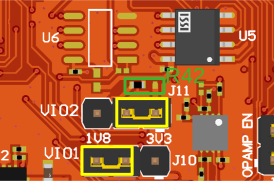 Figure 2-19 VIO Selection Example
VDDSF IO ring controls the reference voltage of the xSPI signals to the external flash. For more information on VDDSF, see Section 2.1.5.
For the VIO selection of each GPIO, see Table 2-8.
| LaunchPad Header Pin # | Default Setting on LP-EM-CC35X1 | CC35xx GPIO # | IO Ring |
|---|---|---|---|
| 1 | 3.3V | N/A | N/A |
| 2 | SLOW_CLK_IN | GPIO0 | VIO1 |
| 3 | UART0 RX | GPIO18 | VIO1 |
| 4 | UART0 TX | GPIO17 | VIO1 |
| 5 | I2C1 Data | GPIO10 | VIO1 |
| 6 | I2C1 CLK | GPIO11 | VIO1 |
| 7 | SPI0 CLK | GPIO27 | VIO2 |
| 8 | SPI1 CLK | GPIO14 | VIO1 |
| 9 | I2C0 CLK, PDM Data0 | GPIO33 | VIO2 |
| 10 | I2C0 Data, PDM BCLK | GPIO32 | VIO2 |
| 11 | SPI1 POCI | GPIO15 | VIO1 |
| 12 | SPI1 CS | GPIO12 | VIO1 |
| 13 | SPI1 PICO | GPIO13 | VIO1 |
| 14 | SPI0 POCI | GPIO28 | VIO2 |
| 15 | SPI0 PICO | GPIO29 | VIO2 |
| 16 | Reset | N/A | N/A |
| 17 | GPT1_1 | GPIO30 | VIO2 |
| 18 | SPI0 CS | GPIO26 | VIO2 |
| 19 | GPT1_3 | GPIO2 | VIO1 |
| 20 | GND | N/A | N/A |
| 21 | 5V | N/A | N/A |
| 22 | GND | N/A | N/A |
| 23 | ADC2 | GPIO6 | VIO1 |
| 24 | ADC3 | GPIO5 | VIO1 |
| 25 | ADC4 | GPIO4 | VIO1 |
| 26 | ADC5 | GPIO3 | VIO1 |
| 27 | I2S WCLK | GPIO26 | VIO2 |
| 28 | I2S MCLK/BCLK | GPIO29 | VIO2 |
| 29 | I2S Data0 | GPIO30 | VIO2 |
| 30 | I2S Data1 | GPIO31, GPIO35 | VIO2 |
| 31 | DCAN RX | GPIO34 | VIO2 |
| 32 | DCAN TX | GPIO30 | VIO2 |
| 33 | GPT0_1 | GPIO35 | VIO2 |
| 34 | Logger | N/A | N/A |
| 35 | UART1 RX | GPIO6 | VIO1 |
| 36 | UART1 TX | GPIO5 | VIO1 |
| 37 | UART0 RTS | GPIO16 | VIO1 |
| 38 | UART0 CTS | GPIO19 | VIO1 |
| 39 | GPIO | GPIO4 | VIO1 |
| 40 | N/A | GPIO36 | VIO1 |