SLOU590 January 2025 TAS5802 , TAS5815
3.5 3-Band DRC
The Dynamic Range Control (DRC) is a feed-forward mechanism that can be used to automatically control the audio signal amplitude or the dynamic range within specified limits. The dynamic range control is done by sensing the audio signal level using an estimate of the alpha filter energy then adjusting the gain based on the region and slope parameters that are defined. The 3-Band DRC is shown in Figure 2-1.
 Figure 3-10 3-Band DRC
The DRC works to reduce the peak of energy if it goes beyond the programmable threshold level. DRC starts an attack event (reduces gain) if energy goes above the threshold. Similarly, it starts a release event if the level goes below the threshold (increases gain back to the original value). Attack and release events occur only when level remains above or below the threshold continuously during the time-constant time. And the constant time is controlled by the attack/release rate. If the attack/release rate is short, DRC operates frequently. Attack time defines how fast to cut the signal to bring it under the threshold. Similarly, release time defines how fast to release the cut back to normal.
The 3-band DRC is comprised of three DRCs that can be spilt into three bands using the BQ at the input of each band. The DRC in each band is equipped with individual energy, attack, and decay time constants as shown in Figure 3-11.
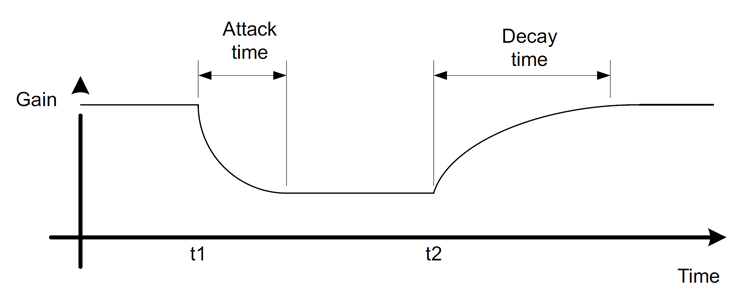 Figure 3-11 DRC Attack and Decay
This DRC can be used for power limiting and signal compression. Therefore, it must be tested with maximum signal levels for the desired application. Use a resistive load for initial testing. However, the speaker used in the end application must be used for final testing and tweaking.
 Figure 3-12 3-Band DRC Tuning Window
The 3-Band DRC Tuning Window as shown in Figure 3-12 consists of three identical windows for low, mid and high bands. Each has a DRC curve that offers 3 regions of compression. The points on the DRC curve can be dragged and dropped.
Below each DRC plot, parameters such as threshold, offset and ratio can be manually typed in for each of the 3 regions. By typing a value and pressing Enter on the keyboard, the DRC curve automatically adjusts to the entered parameter.