SBAU491 May   2025 ADS9326 , ADS9327


  1.   1
  2.   Description
  3.   Get Started
  4.   Features
  5.   Applications
  6.   6
  7. 1Evaluation Module Overview
    1. 1.1 Introduction
    2. 1.2 Kit Contents
    3. 1.3 Specification
    4. 1.4 Device Information
  8. 2Hardware
    1. 2.1 ADS9327EVM Quick Start Guide
    2. 2.2 Analog Interface
      1. 2.2.1 Fully-Differential Circuit: THS4552
      2. 2.2.2 Voltage Reference
    3. 2.3 Power Supplies
      1. 2.3.1 USB Power and When to Power the Board Externally
  9. 3Software
    1. 3.1 Digital Interface and Clock Inputs
      1. 3.1.1 Digital Interface Connections
      2. 3.1.2 Clock Select
    2. 3.2 ADS9327EVM Software Reference
      1. 3.2.1 ADS9327EVM-GUI Software Installation
      2. 3.2.2 Using the CONFIG Tab
      3. 3.2.3 Using the Capture Tab
      4. 3.2.4 Using the INL/DNL Tool
  10. 4Hardware Design Files
    1. 4.1 Schematics
    2. 4.2 PCB Layout
    3. 4.3 Bill of Materials (BOM)
  11. 5Additional Information
    1. 5.1 Trademarks
  12. 6Related Documentation

Using the CONFIG Tab

After the EVM GUI starts, press the following buttons in the order shown in Figure 3-5 below. Monitor the Status message to confirm that each step is completed before proceeding to the next step. For the Power Up and Program FPGA buttons, some status LEDs on the hardware illuminate. After all four buttons are pressed, the power on the ADS9327EVM is on and the ADS9327 device registers are configured.
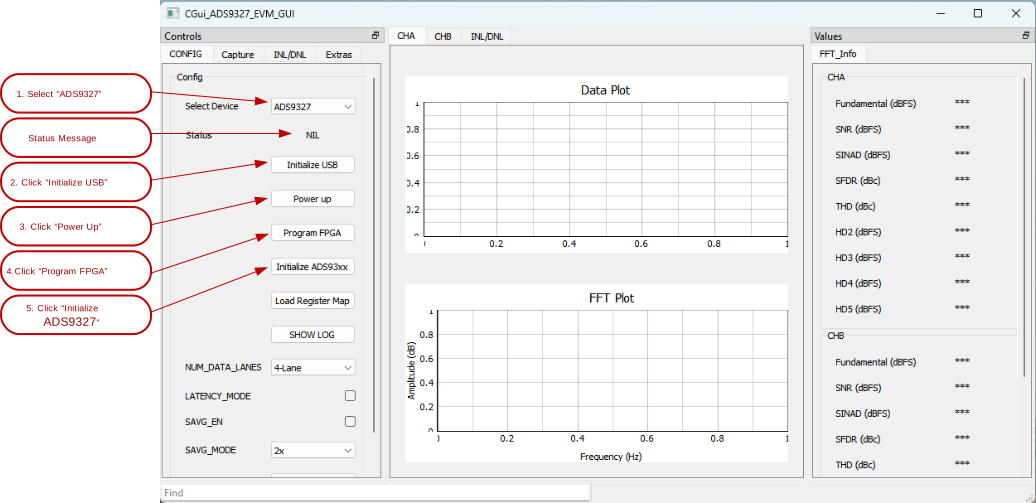
ADS9327EVM Initial Required Setup on the Config TabFigure 3-5 Initial Required Setup on the Config Tab