SLAAEN4 March 2025 MSPM0G1106 , MSPM0G1107 , MSPM0G1506 , MSPM0G1507 , MSPM0G1518 , MSPM0G1519 , MSPM0G3106 , MSPM0G3106-Q1 , MSPM0G3107 , MSPM0G3107-Q1 , MSPM0G3506 , MSPM0G3506-Q1 , MSPM0G3507 , MSPM0G3507-Q1 , MSPM0G3518 , MSPM0G3518-Q1 , MSPM0G3519 , MSPM0G3519-Q1
4 Hardware
By using the XDS110 on the launchpad, users can use the PC to send and receive messages on the UART side. As a demonstration, two LaunchPads can be used as two CAN-UART bridges to form a loop. When the PC sends UART messages through one of the LaunchPads, the PC receives UART messages from the other LaunchPad™. Figure 4-1 shows the basic structure. Note that CAN transceivers are required to construct a CAN bus.
The accompanying demo uses two LaunchPads: a TCAN1046EVM and a PC. A TCAN1046EVM is a high-speed dual channel CAN transceiver evaluation module. Figure 4-2 shows the connection of the demo. For LaunchPad, a PA12 is used for CAN transmit and a PA13 is used for CAN receive. PA12 and PA13 should be connected to the TX pin and the RX pin of TCAN1046EVM. PA20 is used for UART transmit, and PA21 is used for UART receive. Note that back-channel UART interface on eZ-FET of the LaunchPad can be used on UART communication with PC.
For TCAN1046EVM, VCC must be connected to 5V and VIO must be connected to 3.3V since TCAN1046 supports level shifting. To build up a CAN bus, CANH1 and CANL1 must be connected to CANH2 and CANL2. Besides, the termination on the CAN bus (CANH and CANL) must be configured with the J2 (or J3) and J6 (or J8) jumpers. Each jumper adds 120Ω termination to the respective bus. For more information, see related documentation.
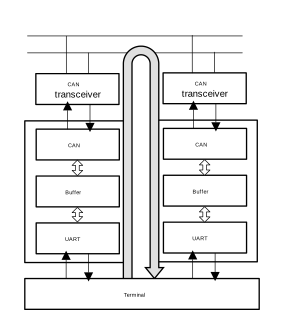 Figure 4-1 Basic Structure of
Accompanying Demo
Figure 4-1 Basic Structure of
Accompanying Demo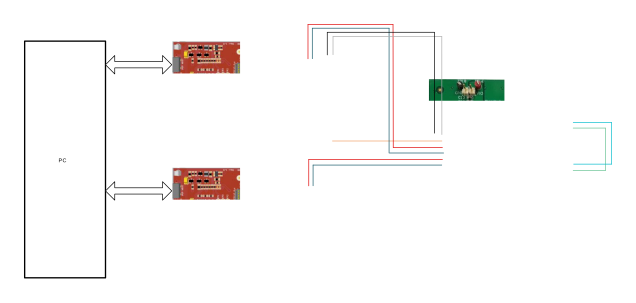 Figure 4-2 Hardware Connection of the
Demo
Figure 4-2 Hardware Connection of the
Demo