SLVUCP9B November 2023 – October 2025
- 1
- Description
- Get Started
- Features
- Applications
- 6
- 1Evaluation Module Overview
- 2Hardware
- 3Software
-
4Application Specific Use Case
- 4.1 Application Specific General Overview
- 4.2 TPS4S201 Short-to-Vbus Protection
- 4.3 TPS25751EVM and BQ257xxEVM Setup
- 4.4 Liquid Detection and Corrosion Mitigation Overview
- 5Hardware Design Files
- 6Additional Information
- 7Revision History
4.4.1 Liquid Detection and Corrosion Mitigation Hardware Setup
Out of the box, the hardware on TPS25751EVM is set up for Liquid Detection and Corrosion Mitigation. R44 and R45 are populated to connect J3 Type-C SBU pins to TPS25751 GPIO4 and GPIO5 for liquid detection, R41 and R42 are not populated. TPD4S201 (U12) is in between TPS25751 and J3 Type-C port for protection in case of a short to VBUS. See also Figure 4-12 and Figure 4-13 for location details.
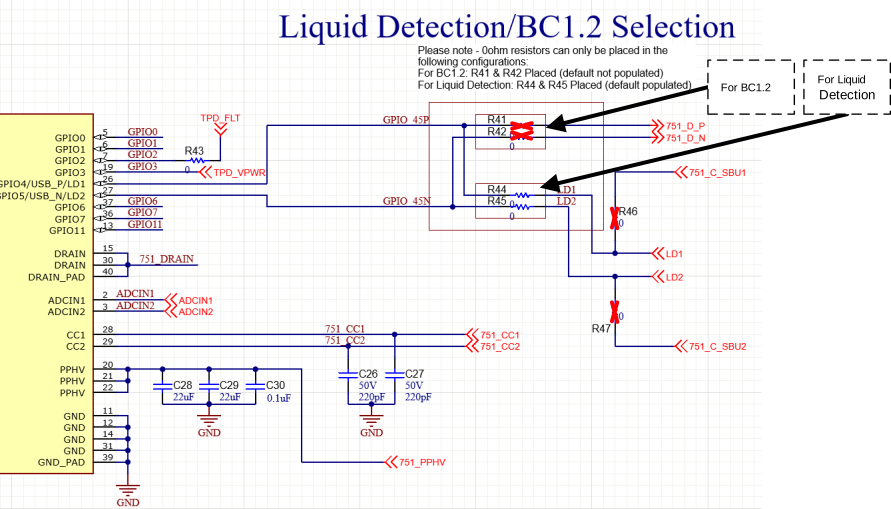 Figure 4-12 Liquid Detection Resistor
Selection
Figure 4-12 Liquid Detection Resistor
Selection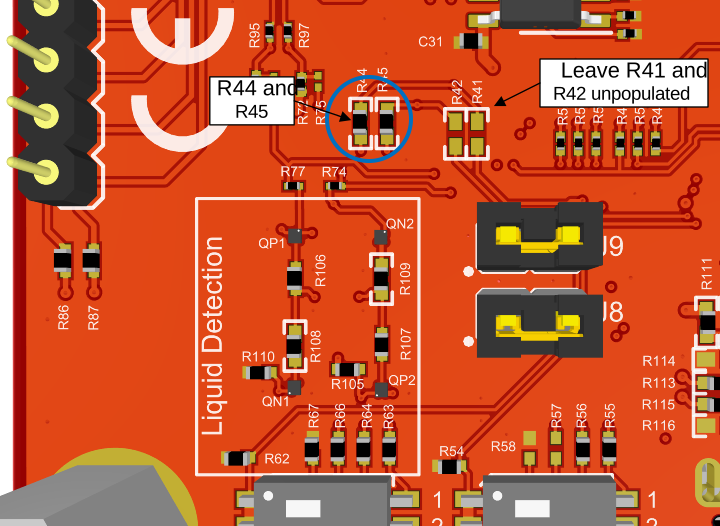 Figure 4-13 Liquid Detection Resistor
Location
Figure 4-13 Liquid Detection Resistor
LocationOn the TPS25751EVM the hardware is set to use specific GPIOs for MOSFET control and Liquid Detection feature. For user applications, some GPIOs can be configured differently while some are required for all designs, see Table 4-5 for details on specific test point and the configurability for custom designs. See also Section 4.4.2.
| Test Point on EVM | Description | Configurability |
|---|---|---|
| GPIO4 | SBU1 measurement line between TPS25751 (LD1) and TPD4S201 (SBU1). This test point is protected from overvoltage and short conditions at the USB-C port. | Not configurable for custom designs |
| GPIO5 | SBU2 measurement line between TPS25751 (LD2) and TPD4S201 (SBU2). This test point is protected from overvoltage and short conditions at the USB-C port. | Not configurable for custom designs |
| SBU1 | SBU1 measurement line between TPD4S201 (C_SBU1) and the USB-C port (SBU1 pin). This test point is subjected to overvoltage and short conditions at the USB-C port. | Not configurable for custom designs |
| SBU2 | SBU2 measurement line between TPD4S201 (C_SBU2) and the USB-C port (SBU2 pin). This test point is subjected to overvoltage and short conditions at the USB-C port. | Not configurable for custom designs |
| GPIO6 | Connected to the gate pin of NFETs (QN1 and QN2) to enable pulldown. When enabled, PD is detecting short to VBUS/CC. | Configurable for custom designs |
| GPIO7 | Connected to the gate pin of P-Channel Field Effect Transistors (PFETs) (QP1 and QP2) to enable pullup. When enabled, PD is detecting short to GND. | Configurable for custom designs |
| GPIO1 | Connected to D9 LED to indicate if liquid is detected at J3 Type-C port. | Configurable for custom designs |
| GPIO2 | Act as an input pin for TPS25751 and connected to the FLT (pin 9) of TPD4S201. When OVP condition occurs at TPD4S201, TPS25751 enters Type-C error recovery, sets CCx pins to Hi-Z state and removes VBUS. | Configurable for custom designs |