SBAU489 June 2025
3.1.3 Full Signal Chain Evaluation Procedure
Note: Verify that the outputs of the connected supplies are disabled before connecting or disconnecting equipment. These are general instructions for EVM evaluation. For more information on getting started with the Code Composer Studio, visit Code Composer Studio Academy for additional resources and training modules.
- Set the first 5V (±10%) source and limit the current to 50mA, as noted in Section 3.1.1. Connect the EVM voltage source to one of the DVDD connections, referenced to DGND. Turn on the power source and make sure there is no more current limit drawn than what is specified in the device data sheets. See Section 2.4.2 for more information. Leave unpowered for now.
- Set the second 2.5V−5V (±10%) source and limit the current to 50mA, as noted in Section 3.1.1. Connect the EVM voltage source to one of the AVDD connections, referenced to AGND. Turn on the power source and make sure there is no more current limit drawn than what is specified in the device data sheets. See Section 2.4.1 for more information. Leave unpowered for now.
- Connect a C2000 control card, such as the TMDSCNCD280039C, to connector J1.
- Install Code Composer Studio (CCS). Open or create the project by selecting the connected control card in the board settings. Configure the following settings in ProjectName.syscfg:
- Enable EPWM for CLKIN with the following settings:
- Name: Mod_Clk
- Use Hardware: EPWM1
- Time Base Clock Divider: Divide clock by 1
- Time Base Period: 5
- Counter Mode: Up - count mode
- Enable SDFM for data collection with the following settings:
- Name: SDFM_1
- Use Filter Channel 1: ■
- Chanel 1 SDCLK source: SD1 channel clock
- SD Modulator Frequency (MHz): 20
- Differential clipping voltage (V): 0.064
- DC input to SD-modulator (V): 0
- To evaluate the current-sensing performance of the EVM, capture the SDFM output for each current value by averaging as many samples as memory allows. Roughly 300 samples per current value works well for evaluation. A time delay of 5 seconds between collected samples with 15 second input current increments is a good starting point. Follow the main pseudo code example (Figure 3-3) for getting started:
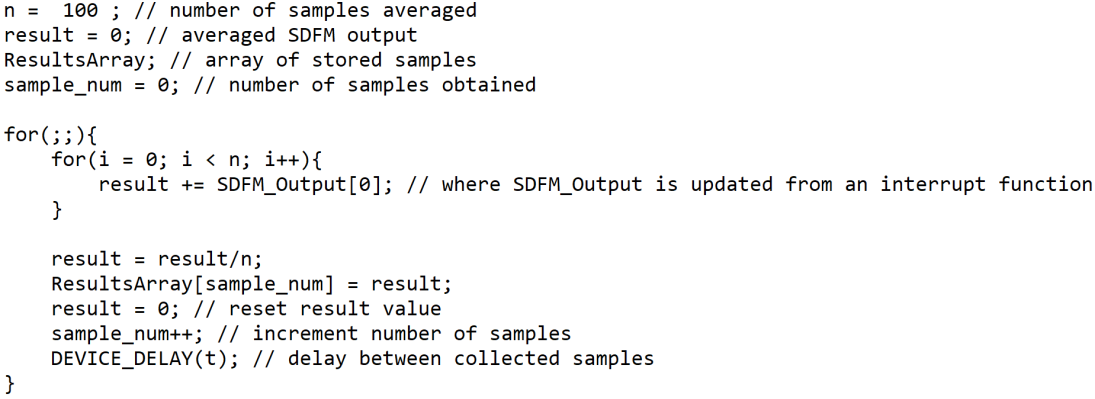 Figure 3-3 Main Pseudo Code Example
- Enable EPWM for CLKIN with the following settings:
- Connect the high current carrying cables to the positive and negative lugs, J2 (IN+) and J5 (IN−). For high-side measurement of the positive current, IN– sources to the electronic load; for the negative current, IN+ sources to the load. Set current bounds if supplies allow. Turn on all connected supplies.
- Turn on the power sources and begin the CCS program to begin data collection.
- Apply the appropriate full-scale linear input sweep ±50A range (or ±70A). Incrementing 1A every 15 seconds for data collection works well for evaluation. Record input current, input voltage at INP referenced to INN, and optionally voltage across a control shunt.
Visit the C2000 E2E Microcontrollers Forum for additional support on data collection.
- Convert SDFM output to millivolts (mV) using the following formula:Equation 3.
- Calculate the total error results across the entire current sweep:
- Default Values:Equation 4.Equation 5.
- Error Equations:
Equation 6.Equation 7.Equation 8. - Default Values:
- Plot the calculated results against input current, IIN. Figure 3-4 shows an example results plot.
 Figure 3-4 AMC-MOD-50A-EVM Total Error %FS Results
 - To evaluate the overcurrent detection performance, configure the C2000 settings in the Code Composer Studio.
- Repeat these steps at hot and cold temperatures if desired. Calibrate if necessary.