SLAAE88D December 2022 – September 2025 MSPM0C1105 , MSPM0C1106 , MSPM0G1105 , MSPM0G1106 , MSPM0G1107 , MSPM0G1505 , MSPM0G1506 , MSPM0G1507 , MSPM0G3105 , MSPM0G3106 , MSPM0G3107 , MSPM0G3505 , MSPM0G3506 , MSPM0G3507 , MSPM0H3216 , MSPM0L1105 , MSPM0L1106 , MSPM0L1227 , MSPM0L1227-Q1 , MSPM0L1228 , MSPM0L1228-Q1 , MSPM0L1303 , MSPM0L1304 , MSPM0L1304-Q1 , MSPM0L1305 , MSPM0L1305-Q1 , MSPM0L1306 , MSPM0L1306-Q1 , MSPM0L1343 , MSPM0L1344 , MSPM0L1345 , MSPM0L1346 , MSPM0L2227 , MSPM0L2227-Q1 , MSPM0L2228 , MSPM0L2228-Q1
4.1.3 Step-by-Step Using the Demo
The following steps describe how to program an MSPM0 MCU using a LP-MSPM0G3507 as the host. A MSPM0G3507 is used as target device, hardware BSL invoke and UART communication are used in this demo. A similar process can be used to program other MSPM0 devices through either UART, I2C or SPI by using the proper hardware connections (see Table 4-10).
- Connect the hardware signals as shown
in Figure 4-3. This example uses UART, so the I2C signals do not need to be connected.
 Figure 4-3 Hardware Signal
Connections
Figure 4-3 Hardware Signal
Connections - Connect the jumpers as shown in Table 4-5. Table 4-5 Jumper Connections
Board Mode Jumpers to Connect Jumpers to Disconnect LP-MSPM0G3507 Host J101(Power and debug), J4,J7(LED) None LP-MSPM0G3507 Target J7,(LED) J21, J22 (UART to J101 XDS110) All in J101 Note: If use LP-MSPM0L1306 as target board, jumper on J6 must be removed. - Import the
BSL host with UART demo that available in the folder <
…\mspm0_sdk_xxxx\examples\nortos\LP_MSPM0G3507\bsl\bsl_host_mcu_to_mspm0g1x0x_g3x0x_target_uart>
into CCS.
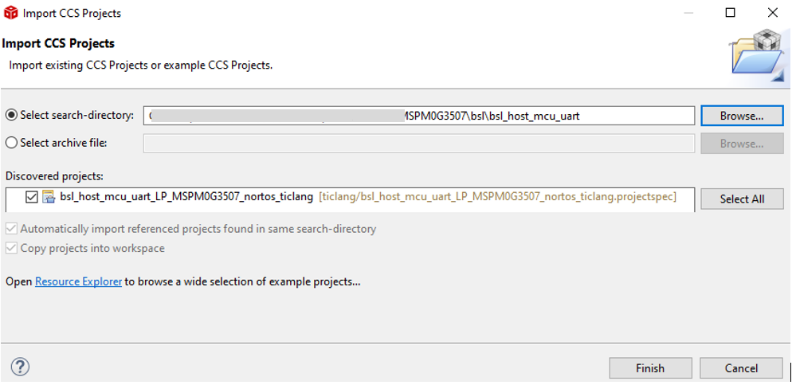 Figure 4-4 Import Host Project Into
CCS
Figure 4-4 Import Host Project Into
CCS - Modify the password in the bsl_password array in main.c, if needed. The default password are all 0xFF with 32 bytes. The target BSL password is defined in the NON-MAIN memory. For more information, see the technical reference manual [1] or [2] or the bootloader user's guide [3].
-
If just want to run the demo and no need to make any change of the application code, the BSL host demo include default firmware file application_image_uart.h that generate from demo named bsl_software_invoke_app_demo_uart) and the step 6 to 8 can be skip.
- Import the application code( here can
use the demo bsl_software_invoke_app_demo_uart) into CCS and generate the target
device firmware in TI-TXT hex format (see Figure 4-5).
 Figure 4-5 Generate TI-TXT Hex File
in CCS
Figure 4-5 Generate TI-TXT Hex File
in CCS - Run the GUI MSPM0_BSL_GUI.exe to convert the target device firmware .txt format to a header file. For more details, see Section 4.1.2.
- Copy the contents of the output file xxx.h file by the GUI into the host project file application_image.h.
- Build the host project and download to LP-MSPM0G3507.
- Push button S2 on the host board to initiate the firmware update. If there is an error, LED1 turns on.