SLUUD32A June 2024 – April 2025
- 1
- Description
- Features
- 4
- 1Evaluation Module Overview
- 2BQ41Z50EVM Quick Start Guide
- 3Hardware
- 4Software
- 5IT-DZT Guide To Gauging
- 6Hardware Design Files
- 7Additional Information
- 8Related Documentation
- 9Revision History
2.3.1.5 GPIO Connector
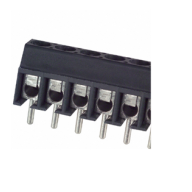
Figure 2-7 ED555/6DS (Reference Image Only)
 Figure 2-8 Evaluation Board GPIO Connector (J8)
Table 2-6 Connector Information
| Designator | Manufacturer | Part Number |
|---|---|---|
| J8 | On-Shore Technology | ED555/6DS |
Table 2-7 describes the pinouts for the six available GPIOs.
Table 2-7 Pin Description
| Pin | Name | Comment |
|---|---|---|
| 1 | GPIO1 | Multifunction push-pull pin, general-purpose digital input or general-purpose digital output. |
| 2 | PLSR_GPIO2 | Multifunction push-pull pin, general-purpose digital input or general-purpose digital output. |
| 3 | GPIO3 | Multifunction open drain pin, general-purpose digital input or general-purpose digital output. |
| 4 | GPIO4 | LED display segment that drives the external LEDs via an internal current sink depending on the firmware configuration. Alternatively, this pin is push-pull and can be configured as a general-purpose digital input or general-purpose digital output pin. |
| 5 | GPIO5 | LED display segment that drives the external LEDs via an internal current sink depending on the firmware configuration. Alternatively, this pin is push-pull and can be configured as a general-purpose digital input or general-purpose digital output pin. |
| 6 | GPIO6 | LED display segment that drives the external LEDs via an internal current sink depending on the firmware configuration. Alternatively, this pin is push-pull and can be configured as a general-purpose digital input or general-purpose digital output pin. |