SLVUCP8A September   2024  – June 2025 TPS26750


  1.   1
  2.   Description
  3.   Get Started
  4.   Features
  5.   Applications
  6.   6
  7. 1Evaluation Module Overview
    1. 1.1 Introduction
    2. 1.2 Kit Contents
    3. 1.3 Specification
    4. 1.4 Device Information
  8. 2Hardware
    1. 2.1 Power Requirements
    2. 2.2 Setup
      1. 2.2.1 Flashing Firmware Configuration to the TPS26750EVM
      2. 2.2.2 Stand Alone Testing
      3. 2.2.3 Dead Battery Safe Mode
      4. 2.2.4 Dead Battery Always Enable Sink
      5. 2.2.5 TPS26750 and BQ25756
    3. 2.3 Header Information
    4. 2.4 Jumper Information
    5. 2.5 Push Buttons
    6. 2.6 Interfaces
    7. 2.7 Debug Information
    8. 2.8 Test Points and LEDS
  9. 3Software
    1. 3.1 Software Description
    2. 3.2 Software Installation
      1. 3.2.1 Web Browser
      2. 3.2.2 Native Application
    3. 3.3 Software Development
    4. 3.4 Using the Application Customization Tool
      1. 3.4.1 Default View
      2. 3.4.2 Selecting a Configuration
      3. 3.4.3 Filling Out the Questionnaire
      4. 3.4.4 Advanced Configuration Mode
      5. 3.4.5 Flashing Configuration to TPS26750
      6. 3.4.6 Additional Settings
        1. 3.4.6.1 Generating a New Configuration
        2. 3.4.6.2 Exporting and Importing Settings
        3. 3.4.6.3 Generating the Binary
        4. 3.4.6.4 Generating the VIF File
  10. 4Application Specific Use Cases
    1. 4.1 Use With the BQ25756EVM
      1. 4.1.1 Hardware Setup with BQ25756EVM
      2. 4.1.2 Software Setup with the BQ25756EVM
  11. 5Hardware Design Files
    1. 5.1 Schematics
    2. 5.2 PCB Layouts
    3. 5.3 Bill of Materials (BOM)
  12. 6Additional Information
    1. 6.1 Trademarks
    2. 6.2 Electrostatic Discharge Caution
    3. 6.3 Terminology
    4. 6.4 Device Support
      1. 6.4.1 Third-Party Products Disclaimer
      2. 6.4.2 Supplemental Content
    5. 6.5 Documentation Support
    6. 6.6 Receiving Notification of Documentation Updates
    7. 6.7 Support Resources
  13. 7Revision History

Schematics

TPS26750EVM Block Diagram (Top
                    Level) Figure 5-1 Block Diagram (Top Level)
TPS26750EVM TPS26750Figure 5-2 TPS26750
TPS26750EVM Liquid Detection Figure 5-3 Liquid Detection
TPS26750EVM Bidirectional Power
                    Path Figure 5-4 Bidirectional Power Path
TPS26750EVM System Power Figure 5-5 System Power
TPS26750EVM System Power SuppliesFigure 5-6 System Power Supplies
TPS26750EVM Type-C Power InputFigure 5-7 Type-C Power Input
TPS26750EVM Support Circuits Top LevelFigure 5-8 Support Circuits Top Level
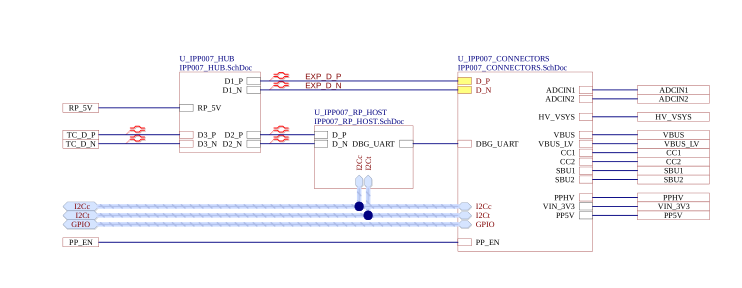
TPS26750EVM Connectors Figure 5-9 Connectors
TPS26750EVM TIVA MCUFigure 5-10 TIVA MCU
TPS26750EVM HUBFigure 5-11 HUB