SLVUD44A March   2025  – October 2025 TPS1689


  1.   1
  2.   Description
  3.   Features
  4.   Applications
  5.   5
  6. 1Evaluation Module Overview
    1. 1.1 Introduction
    2. 1.2 Kit Contents
    3. 1.3 Specification
    4. 1.4 Device Information
  7. 2Hardware
    1. 2.1 General Configurations
      1. 2.1.1 Physical Access
      2. 2.1.2 Test Equipment and Setup
        1. 2.1.2.1 Power supplies
        2. 2.1.2.2 Meters
        3. 2.1.2.3 Oscilloscope
        4. 2.1.2.4 USB-to-GPIO Interface Adapter
        5. 2.1.2.5 Loads
  8. 3Implementation Results
    1. 3.1 Test Setup and Procedures
      1. 3.1.1 Hot Plug
      2. 3.1.2 Start-up With Enable
      3. 3.1.3 Power Up Into Short
      4. 3.1.4 Undervoltage Lockout
      5. 3.1.5 Overvoltage Lockout
      6. 3.1.6 Overcurrent Event
      7. 3.1.7 Output Hot Short
      8. 3.1.8 Thermal Performance of TPS1685EVM
  9. 4Using the TPS1689EVM-GUI
    1. 4.1 Access the TPS1689EVM-GUI
    2. 4.2 Introduction to the TPS1689EVM-GUI
    3. 4.3 Establishing Communication Between the EVM and GUI
    4. 4.4 Quick Info
    5. 4.5 Configuration
    6. 4.6 Telemetry
    7. 4.7 Register Map Page
  10. 5Hardware Design Files
    1. 5.1 Schematic
    2. 5.2 PCB Drawings
    3. 5.3 Bill OfmAterials (BOM)
  11.   Trademarks
  12. 6Revision History

Access the TPS1689EVM-GUI

After accessing the TPS1689EVM-GUI for the first time in a web browser (preferably Google Chrome™ browser), the following pop-up appears as shown in Figure 4-1. Make sure to complete Step 1 and Step 2 and then click on the FINISH icon.
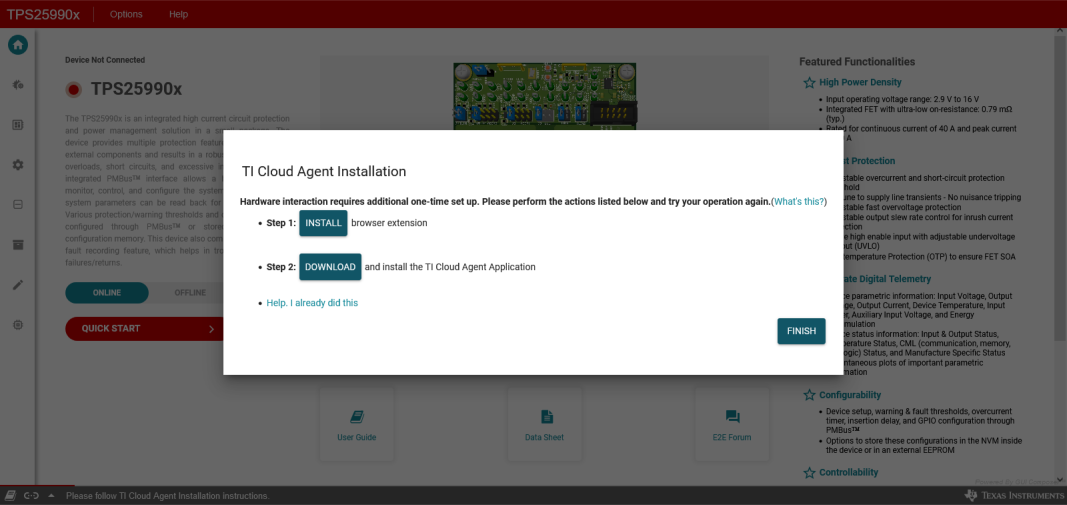
TPS1689EVM Prerequisite to Establish Communication Between the EVM and GUIFigure 4-1 Prerequisite to Establish Communication Between the EVM and GUI