SLVUD74A April 2025 – June 2025 LM72880-Q1
2.1.4.1.1 Quick Overview
To start, connect the USB2ANY adapter to the computer using USB mini-B connector, connect the USB2ANY adapter to EVM using 10-pin ribbon cable, connect power supply and load to the EVM, power on the EVM, and then launch the configuration GUI.
The GUI automatically connects with the EVM, but if not, in the status bar at the bottom of the GUI, click the Reconnect button to connect to the EVM.
 Figure 2-2 Get
Started
Figure 2-2 Get
StartedFinish the I2C interface configuration in step 1 before programming the device. Select LM72880 as the GPN and 8mΩ as the sense resistor value. The device supports standard, fast, and fast-plus modes, but the GUI supports only standard and fast modes. Please select the standard mode as a starting point. Enable the pullup resistors inside the USB2ANY adapter and then click the CONFIGURE USB2ANY button. Select 0x6A as the I2C target address, and then click the CONNECT TO EVM button.
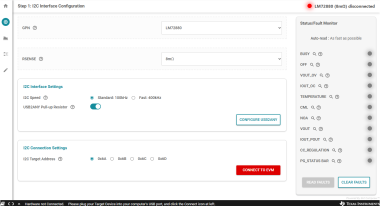 Figure 2-3 Step 1:
I2C Interface Configuration
Figure 2-3 Step 1:
I2C Interface ConfigurationIn step 2, program the VOUT regulation target to 20V as a starting point, and program the cable compensation gain if required.
 Figure 2-4 Step 2:
VOUT Programming and CDC
Figure 2-4 Step 2:
VOUT Programming and CDCProgram the rest of the parameters in step 3, including switching frequency, spread spectrum, CC mode regulation target, OVP, PGOOD, DVS, and VOUT discharge. Program the CC mode regulation target to 5A and the switching frequency to 400kHz as a starting point. After finishing the device programming, the converter can be enabled by toggling on the Enable Converter toggle button when required.
 Figure 2-5 Step 3:
Evaluation
Figure 2-5 Step 3:
EvaluationEach I2C registers and bits can be monitored or programed in the register map. Please program the I2C register map directly if familiar with the device operation and the I2C interface.
 Figure 2-6 Register
Map
Figure 2-6 Register
Map