SLVUDG9 September   2025


  1.   1
  2.   Description
  3.   Get Started
  4.   Features
  5.   Applications
  6.   6
  7. 1Evaluation Module Overview
    1. 1.1 Introduction
    2. 1.2 Kit Contents
    3. 1.3 Specifications
    4. 1.4 Device Information
  8. 2Single-Wire_MEM_EVM_GUI Software
    1. 2.1 Hardware Requirements
    2. 2.2 Software Installation
    3. 2.3 GUI Software Operation
      1. 2.3.1 Launching GUI
      2. 2.3.2 Menu Bar
      3. 2.3.3 Main Controls
        1. 2.3.3.1 Search Devices
        2. 2.3.3.2 Select 64 bit Device ID
        3. 2.3.3.3 Speed Selection
      4. 2.3.4 Memory Table
        1. 2.3.4.1 Memory Table Auto Corrections
        2. 2.3.4.2 Memory Table Controls
          1. 2.3.4.2.1 Read from Memory
          2. 2.3.4.2.2 Write to Memory
          3. 2.3.4.2.3 Load from File
            1. 2.3.4.2.3.1 Load From File Auto Corrections
            2. 2.3.4.2.3.2 Tips for Creating a .CSV File
          4. 2.3.4.2.4 Save File
      5. 2.3.5 Status Registers
        1. 2.3.5.1 Status Registers Auto Corrections
        2. 2.3.5.2 Status Registers Controls
          1. 2.3.5.2.1 Read from Status Memory
          2. 2.3.5.2.2 Write to Status Memory
  9. 3TMF00XXEVM Hardware Overview
    1. 3.1 SDQ Pullup Selection Jumper
    2. 3.2 Test Points
  10. 4Updating Firmware
  11. 5Hardware Design Files
    1. 5.1 Schematics
    2. 5.2 PCB Layouts
      1. 5.2.1 Assembly Files
    3. 5.3 Bill of Materials (BOM)
  12. 6Additional Information
    1. 6.1 Trademarks
  13. 7Related Documentation from Texas Instruments
Read from Status Memory

The Read from Status Memory button, shown in Figure 2-17, is used to read from the status memory of the selected device and automatically populates that memory data into the table.
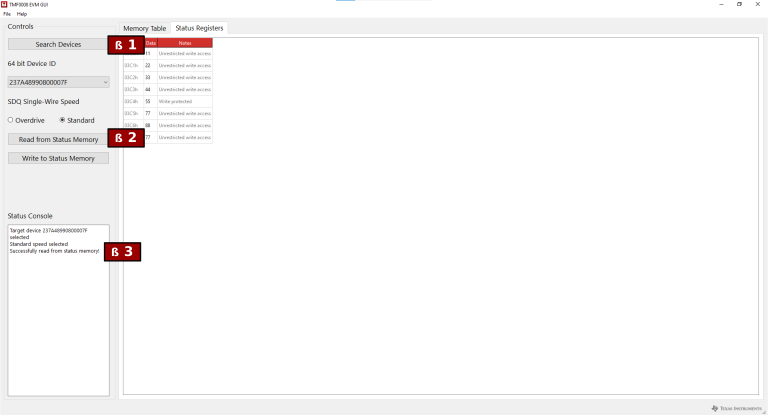
TMF0020EVM, TMF0064EVM Read from Status MemoryFigure 2-17 Read from Status Memory