SBAU427 July 2025 ADS131E08
4.1 Hardware Connections
Connect the EVM as shown in Figure 4-1 after installing the software:
- Physically connect P2 of the PHI to J2 of the ADS131E08 EVM.
- Install the screws to provide a robust connection. Connect the USB on the PHI to the computer.
- LED D5 on the PHI lights up, indicating that the PHI is powered up.
- LEDs D1 and D2 on the PHI start blinking to indicate that the PHI is booted up and communicating with the PC.
- Start the software GUI by selecting from the start menu or associated shortcut as shown in Figure 4-2. Notice that the LEDs on the PHI blink slowly when the FPGA firmware is loaded on the PHI. Loading takes a few seconds.
- Connect the signal generator. The ADS131E08 analog inputs are fully differential. The differential input voltage (VINxP – VINxN) can span from –VREF / gain to VREF / gain. Use the ADS131E08 in a differential configuration to maximize the dynamic range of the data converter. For best performance, set the common-mode voltage at the midpoint of the analog supplies [(AVDD + AVSS) / 2].
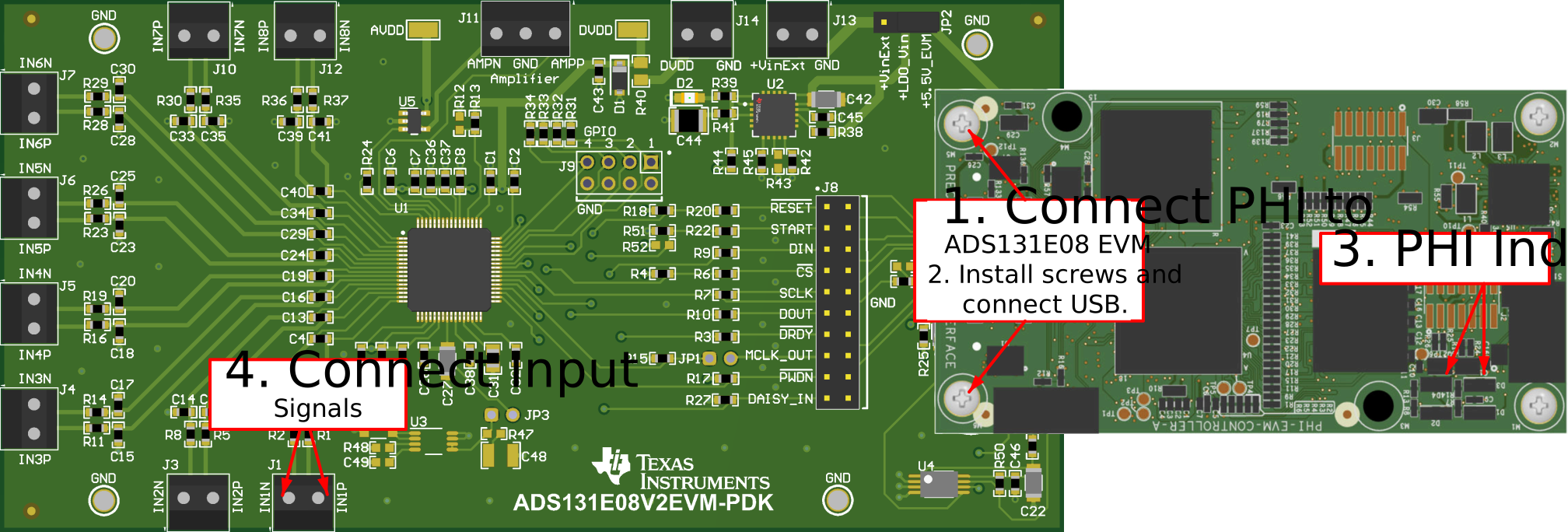 Figure 4-1 Hardware Connections
 Figure 4-2 Launch the ADS131E08EVM GUI Software