SBAU427 July   2025 ADS131E08


  1.   1
  2.   Description
  3.   Get Started
  4.   Features
  5.   Applications
  6.   6
  7. 1Evaluation Module Overview
    1. 1.1 Introduction
    2. 1.2 Kit Contents
    3. 1.3 Device Information
    4. 1.4 Specification
  8. 2Hardware
    1. 2.1 EVM Analog Inputs
    2. 2.2 Power Supplies
    3. 2.3 ADC Connections and Decoupling
    4. 2.4 Voltage Reference
    5. 2.5 Op Amp Common-Mode Bias
    6. 2.6 Digital Interface
    7. 2.7 EEPROM
  9. 3Software
    1. 3.1 Software Description
    2. 3.2 Software Installation
  10. 4Implementation Results
    1. 4.1 Hardware Connections
    2. 4.2 Optional EVM Configuration
    3. 4.3 GUI Software Operation
      1. 4.3.1 EVM Register Settings
      2. 4.3.2 GUI Settings for ADC Control
      3. 4.3.3 Time Domain Display
      4. 4.3.4 Frequency Domain Display
      5. 4.3.5 Histogram Display
  11. 5Hardware Design Files
    1. 5.1 Schematics
    2. 5.2 PCB Layouts
    3. 5.3 Bill of Materials (BOM)
  12. 6Additional Information
    1. 6.1 Trademarks

ADC Connections and Decoupling

Figure 2-3 shows all connections to the ADS131E08 (U1). Each analog power supply connection has a 1µF decoupling capacitor. Place these capacitors physically close to the device and make sure the capacitors have a good connection to the GND plane. Also, each digital input has a 10Ω series resistor. These resistors smooth the edges of the digital signals so that the signals have minimal overshoot and ringing. Although not strictly required, these components can be included in final designs to improve digital signal integrity.

The EVM uses the ADS131E08 internal clock by default. Alternatively, use an external clock by installing the JP1 header and then applying a clock signal to the CLK pin of JP1.
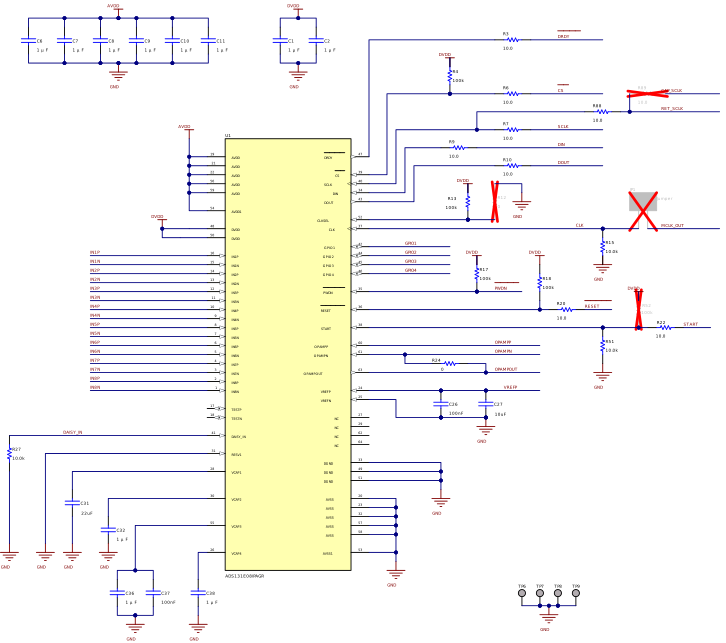
ADS131E08EVM-PDK ADS131E08 Connections and DecouplingFigure 2-3 ADS131E08 Connections and Decoupling