SBAU358A November   2020  – June 2025 AFE10004


  1.   1
  2.   Description
  3.   Get Started
  4.   Features
  5.   Applications
  6.   6
  7. 1Evaluation Module Overview
    1. 1.1 Introduction
    2. 1.2 Kit Contents
    3. 1.3 Specification
    4. 1.4 Device Information
  8. 2Hardware
    1. 2.1 Power Requirements
      1. 2.1.1 Configuring the EVM for a Positive Output Range
      2. 2.1.2 Configuring the EVM for a Negative Output Range
    2. 2.2 Header Information
    3. 2.3 Jumper Information
    4. 2.4 Interfaces
      1. 2.4.1 SPI Configuration
      2. 2.4.2 I2C Configuration
    5. 2.5 Test Points
  9. 3Software
    1. 3.1 Software Installation
    2. 3.2 Software Description
      1. 3.2.1 Launching the Software
      2. 3.2.2 Low Level Configuration Page
      3. 3.2.3 Block Diagram Page
      4. 3.2.4 Look Up Table Page
        1. 3.2.4.1 Loading and Saving LUT Files
  10. 4Hardware Design Files
    1. 4.1 Schematics
    2. 4.2 PCB Layouts
    3. 4.3 Bill of Materials (BOM)
  11. 5Additional Information
    1. 5.1 Electrostatic Discharge Caution
    2. 5.2 Trademarks
  12. 6Related Documentation
  13. 7Revision History

Introduction

This user's guide describes the characteristics, operation, and recommended use cases of the AFE10004EVM. This document provides examples and instructions on how to use the AFE10004EVM board and included software. Throughout this document, the terms evaluation board, evaluation module, and EVM are synonymous with the AFE10004EVM. This document also includes a schematic, reference printed circuit board (PCB) layouts, and a complete bill of materials (BOM).

The AFE10004EVM is connected to a personal computer (PC) using the USB cable that is supplied with the EVM. The EVM board features connectors and test points for all communication lines, DAC outputs, digital pins, and supplies. Figure 1-1 shows a block diagram of the AFE10004EVM.
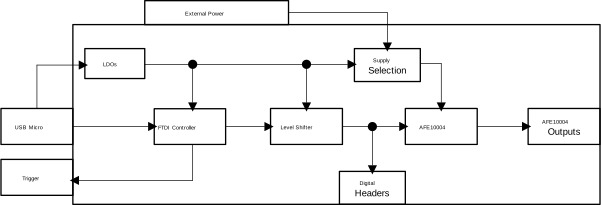
AFE10004EVM Theory of Operation Block
          Diagram Figure 1-1 Theory of Operation Block Diagram