SPRADL4 January 2025 F29H850TU , F29H859TU-Q1
- 1
- Abstract
- Trademarks
- 1 Introduction
- 2 Differences Between EEPROM and On-Chip Flash
- 3 Overview
- 4 Software Description
- 5 Single-Unit Emulation
- 6 Ping-Pong Emulation
- 7 Application Integration
- 8 Flash API
- 9 Source File Listing
- 10Troubleshooting
- 11Conclusion
- 12References
6.2.2.1 EEPROM_GetValidBank
The EEPROM_GetValidBank() function provides functionality for finding the current EEPROM bank and page. This function is called by both the EEPROM_Write_Page() and EEPROM_Read() functions. GetValidBank Flow shows the overall flow required to search for current EEPROM bank and page.
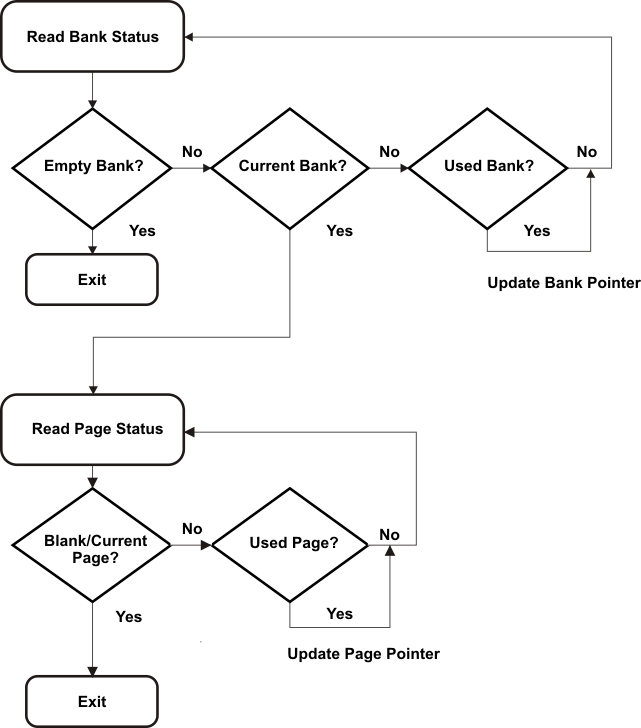 Figure 6-1 GetValidBank Flow
When entering this function, the EEPROM bank and page pointers are set to the beginning of the first sector specified in FIRST_AND_LAST_SECTOR:
RESET_BANK_POINTER;
RESET_PAGE_POINTER;
The addresses for these pointers are defined the EEPROM_Config.h file for the specific device and EEPROM configuration being used.
Next, the current EEPROM bank is found. As GetValidBank Flow shows, there are three different states that an EEPROM bank can have: Empty, Current, and Used.
An Empty EEPROM Bank is signified by the 128 status bits all being 1s (0xFFFFFFFFFFFFFFFFFFFFFFFFFFFFFFFF). A Current EEPROM Bank is signified by the most significant 64 bits being set to 0x5A5A5A5A5A5A5A5A, with the remaining 64 bits set to 1 (0x5A5A5A5A5A5A5A5AFFFFFFFFFFFFFFFF. A Used EERPOM Bank is signified by all 128 bits being set to 0x5A5A5A5A5A5A5A5A5A5A5A5A5A5A5A5A. These values can be changed if desired.
First, the program checks for an Empty EEPROM bank. If this status is encountered, the EEPROM bank has not been used and no further search is needed.
if (Bank_in_Use == EMPTY_BANK)
{
    Bank_Counter = i;
    return;
}
If an Empty EEPROM Bank is not encountered, the Current status is checked for next. If present, the EEPROM bank counter is updated accordingly and the page pointer is set to the first page of the EEPROM bank to enable testing for the current page. The loop is then exited as no further search is needed.
if (Bank_in_Use == CURRENT_BANK && Bank_Full != CURRENT_BANK)
{
    Bank_Counter = i;
    Page_Pointer = Bank_Pointer + WRITE_SIZE_BYTES*2;
    break;
}
Lastly, a check for the Used status is made. In this case, the EEPROM bank has been used and the EEPROM bank pointer is updated to the next EEPROM bank to test its status.
if (Bank_in_Use == CURRENT_BANK && Bank_Full == CURRENT_BANK)
{
    Bank_Pointer += Bank_Size;
}
After the current EEPROM bank has been found, the current page needs to be found. there are three different states that a page can have: Empty, Current, and Used.
An Empty Page is signified by the 128 status bits all being 1s (0xFFFFFFFFFFFFFFFFFFFFFFFFFFFFFFFF). A Current Page is signified by the most significant 64 bits being set to 0xA5A5A5A5A5A5A5A5, with the remaining 64 bits set to 1 ( 0xA5A5A5A5A5A5A5A5FFFFFFFFFFFFFFFFF). A Used Page is signified by all 128 bits being set to 0xA5A5A5A5A5A5A5A5A5A5A5A5A5A5A5A5. These values can be changed if desired.
The Blank and Current statuses are looked for first. If either of these are the current state of the page, the correct page is found and the loop is exited as further searching is not needed.
if (Page_in_Use == BLANK_PAGE)
{
    Page_Counter = i;
    break;
}

if (Page_in_Use == CURRENT_PAGE && Page_Full != CURRENT_PAGE)
{
    Page_Counter = i + 1;
    break;
}
If the page status is neither of these, the only other possibility is a Used Page. In this case, the page pointer is updated to the next page to test its status.
Page_Pointer += WRITE_SIZE_BYTES*2 + EEPROM_PAGE_DATA_SIZE;At this point, the current EEPROM bank and page is found and the calling function can continue. As a final step, this function will check if all EEPROM banks and pages have been used. In this case, the sector needs to be erased. The last bank and page in the full unit are marked as used for completeness, active units are switched, Write/Erase Protection masks are reconfigured, and the Erase_Inactive_Unit flag is set.
if (!ReadFlag && Bank_Counter == NUM_EEPROM_BANKS - 1 && Page_Counter == NUM_EEPROM_PAGES)
{
    EEPROM_UpdatePageStatus();
    EEPROM_UpdateBankStatus();

    EEPROM_ACTIVE_UNIT ^= 1;
    Set_Protection_Masks();
    Erase_Inactive_Unit = 1;

   RESET_BANK_POINTER;
   RESET_PAGE_POINTER;
}
This check is performed by testing the EEPROM bank and page counters. The number of EEPROM banks and pages indicating a full EEPROM depends on the application. These counters are set when testing for the current EEPROM banks and pages as shown in the code snippets above. However, this check is not made when the Read_Flag is set. This is to prevent premature erasure of the inactive EEPROM unit when reading from a full EEPROM unit.